G–02Guide
Claude for Architects: What It Does Well, Where It Fails
On this page
- What is Claude good at in an architecture practice?
- Brief and RFP analysis: the strongest use case
- Design statements and planning narratives
- Can Claude check building codes and zoning?
- Client communication: letters, minutes, explanations
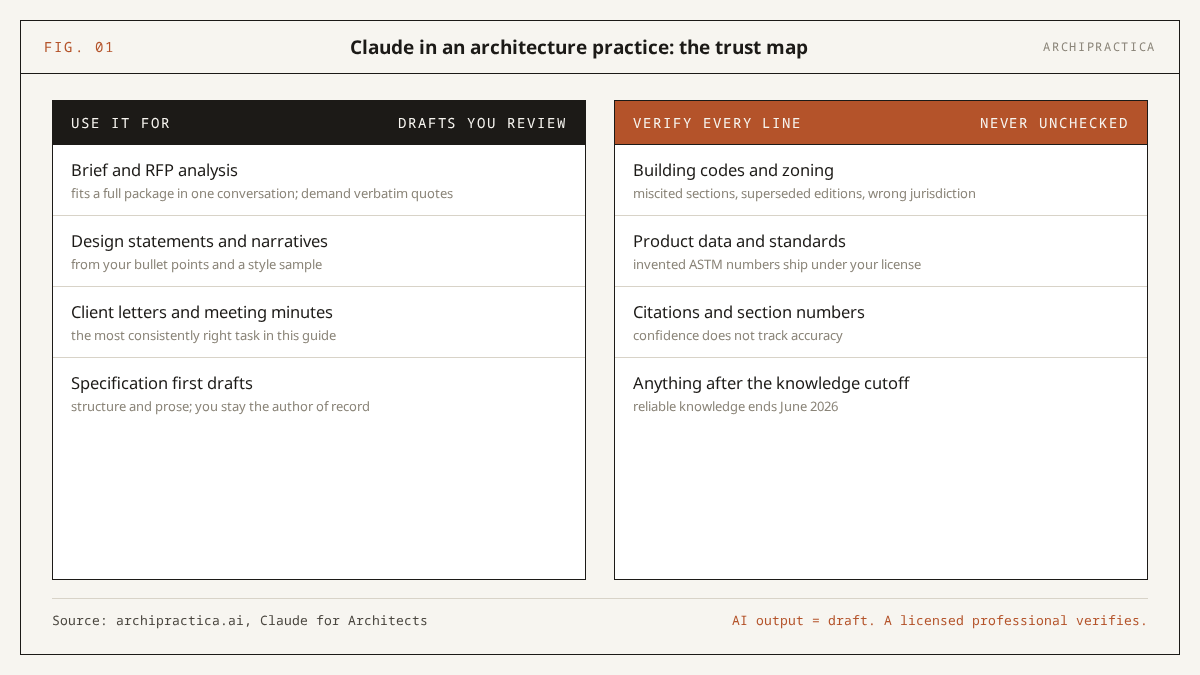
- Specification first drafts, with the line drawn
- Which Claude plan and model do you need?
- How do you keep client data private in Claude?
- Where does Claude fail an architect?
- FAQ
- Sources
Claude earns its place in an architecture practice as a document assistant: it reads a 200-page brief, RFP or spec package in one pass and drafts your project text - design statements, client letters, outline specs, meeting minutes. The honest case for Claude for architects stops at anything jurisdiction- or date-sensitive: codes, zoning, product data and contract language come out as unverified drafts for a licensed professional to check against current local sources.
This guide covers chat-based workflows for real practice: brief analysis, design statements, code and zoning research, client communication and specification first drafts, each with copyable prompts. It does not cover rendering, Revit integration or plugins - those need their own guides. Plan details and model names below were checked on 16 October 2026 and change often, so treat the prices as a snapshot.
What is Claude good at in an architecture practice?
Claude is good at the written half of your week: briefs, narratives, correspondence, specifications, summaries. Made by Anthropic, it is a large language model you talk to in a chat window - it reads and writes text and tables, interprets images and PDFs, and holds very long documents in a single conversation. Drawings, models and renders are outside its reach.
The adoption data backs that framing of Claude for architects. According to the RIBA AI Report 2026 (July 2026), 74% of UK practices now use AI on most projects, up from 59% a year earlier, and 75% report a productivity improvement. The same survey found only 17% of respondents agree their designs are better because of AI. Read those two numbers together: the gain is in document and admin work, where the hours actually leak away.
The US picture is thinner and more skeptical. The AIA’s Journey to Specification study, reported by Dezeen (March 2025), found just 6% of American architects using AI regularly, with 90% voicing concerns - inaccuracy first among them. A separate AIA 2025 study (September 2025) put firm-level integration at 8%, with another 20% mid-rollout. That skepticism is earned, and this guide takes it seriously.
Brief and RFP analysis: the strongest use case
If you adopt Claude for one task, make it this one. Current Claude models accept up to 1 million tokens of context - roughly 750,000 words, an approximation that varies with the text - per Anthropic’s model documentation (checked October 2026). A full client brief, an owner’s requirements document or a public RFP fits in one conversation, and you can ask questions about it instead of skimming it at midnight.
My working pattern: paste or upload the document, get a structured overview, then examine the weak spots. Two prompts I keep reusing:
I am an architect reviewing a client brief for a new project. I will paste the full brief below. After reading it, give me: 1) the stated space program with areas, as a table; 2) every quantitative requirement (areas, budgets, dates, performance targets) with the page or section it came from; 3) requirements that conflict with each other; 4) decisions the brief leaves open that the client will need to make before schematic design. Quote the brief verbatim for anything you flag, so I can check it in the source.I am deciding whether my firm should respond to an RFP. I will paste the full RFP below. Summarize: 1) scope of services; 2) evaluation criteria with any stated weights; 3) minimum qualifications and required team roles; 4) submission requirements, page limits and deadlines; 5) anything unusual for this project type that I should price or clarify before committing. Keep it to one page and cite the RFP section for each point.Demand verbatim quotes and section references in every document prompt, as above. That one habit converts Claude’s output from “sounds right” to “checkable in minutes”, and it exposes misreadings before they cost you anything. When the brief is solid and you want to move from analysis to a presentable concept, the next step is covered in how to turn a client brief into a concept narrative with Claude - a 20-minute workflow with its own prompts.
Design statements and planning narratives
Claude drafts design and access statements, basis-of-design narratives and award submissions well, with one condition: it needs your material to work from. Given bullet points, site notes and a sample of your past writing, it produces a competent first draft in your usual writing style. Given nothing, it produces generic prose that any planning officer will recognize as machine-written filler.
Draft a design statement for a planning submission. I will give you three inputs below: 1) bullet-point facts about the site, context and proposal; 2) the local authority's list of what the statement must address; 3) one design statement my firm wrote previously, as a style reference - match its tone and sentence rhythm, never copy its content. Only use facts from input 1. Where a required topic from input 2 has no matching fact, write the heading and the note [NEEDS INPUT] instead of inventing anything.Rewrite the draft text I paste below so it reads like a practicing architect wrote it for a client presentation. Keep every fact, number, dimension and caveat exactly as given. Remove marketing language, repeated ideas and filler phrases. Shorter is better. Flag any sentence whose meaning you were unsure about rather than guessing.Language models fill gaps with plausible inventions by default; telling Claude to mark gaps with [NEEDS INPUT] instead is the cheapest reliability upgrade available in any writing workflow.
Can Claude check building codes and zoning?
As a research assistant on code questions, Claude is genuinely useful; as a compliance checker, it is a professional liability. Resolved, an IT consultancy working with AEC firms, tested Claude on six real AEC tasks (March 2026), and their published verdict line for the code-compliance task reads:
“research accelerator, not a sign-off | every output needs professional verification”
- Reid McConkey and Chris Briggs, Resolved, “We Tested Claude AI on Six Real AEC Tasks”
Community threads in r/Architects and r/architecture report the same failure pattern since 2025: answers that are broadly right while wrong in the details. A miscited section, a superseded edition, a US default quietly applied to a non-US project - and those details are precisely where code work lives.
The workable method is to supply the code text yourself and restrict Claude to it:
I will paste excerpts from the building code that applies to my project, including the edition year and jurisdiction. Answer my questions using ONLY the text I provide. For every answer, quote the exact clause and its number. If the pasted text does not cover my question, say "not covered in the provided text" - do not answer from general knowledge. First question: list every requirement in these excerpts that applies to [describe the element], as a checklist with clause references.I will paste the text of a zoning ordinance section and the basic parameters of a site and proposed building (use, lot area, frontage, height, setbacks, parking). Build a two-column table: each zoning requirement from the pasted text with its clause number, next to my proposed value, marked "appears to meet", "appears short" or "unclear from provided text". This is a first-pass screen to organize my own review. Do not state that anything complies.Liability. Codes and zoning are jurisdiction-specific, date-specific and legally the responsibility of a licensed professional. Claude’s training data ends at a cutoff (June 2026 for current models) and it can invent section numbers, cite superseded editions or default to the wrong country’s code with full confidence. Use its output to find the relevant clauses faster; verify every one of them against the current adopted edition in your jurisdiction before anything reaches a drawing set or a client.
Client communication: letters, minutes, explanations
Of everything in this guide, this is the task Claude gets right most consistently. Sensitive project emails - a delay, a fee conversation, a scope dispute - take experienced architects a long time because client relationships are at stake. Claude drafts them fast and reads the room surprisingly well.
In Resolved’s March 2026 test, Claude’s draft response to a contractor RFI needed refinements rather than rewrites, cutting a 30-to-45-minute drafting job to under five by their account. Their raw meeting notes came back as structured minutes with an accurate action-item table, saving 30 to 60 minutes per meeting in their assessment.
Draft an email to my client. Situation: a design milestone will slip by [number] weeks because [reason]. Requirements: open with the revised plan rather than the problem; explain the cause in two sentences without blaming anyone; propose what we will progress in parallel so the end date is protected as far as possible; close with a specific next step and date. Professional, direct, no apologetic filler. Under 250 words. I will review and personalize before sending.Turn my raw meeting notes, pasted below, into minutes with: attendees; decisions made; open questions; and an action table with columns for item, owner, deadline. Where the notes imply an owner or deadline without stating one, mark it [confirm] rather than guessing. Keep the wording factual - no interpretation of anyone's intent.Nothing client-facing should leave your office unread. The tone is usually right; the facts are yours to own, and a wrong date in a polished email is still a wrong date.
Specification first drafts, with the line drawn
Claude can set up specification work: turning a product schedule into outline spec sections, summarizing a reference package, flagging gaps against a project scope. In Resolved’s test it summarized a Division 07 92 00 joint sealants section and caught a non-standard 10-year warranty term that a junior reviewer might have skimmed past. That is the right role - a fast, tireless first reader and first drafter on documents where you remain the author of record.
I will paste a product and materials schedule for a project. Draft outline specification sections organized by CSI MasterFormat division. For each section include: section number and title, a short description, the products from my schedule that belong there, and a [VERIFY] list of what must be confirmed with manufacturers or consultants before the section is developed. Do not invent product names, standards or performance values that are not in my schedule.I will paste a specification package from a previous project that we are using as a reference. For a project of this scope - [describe project type and scope in one sentence] - list: 1) which MasterFormat divisions are covered; 2) divisions this project will likely need that are missing; 3) sections whose requirements look unusual or contradictory, with the clause quoted. Review only - do not rewrite anything.Liability. Specifications are contract documents. An invented ASTM number or a hallucinated performance value in a published spec is your error, carried under your license and your insurance - the tool carries nothing. Claude drafts structure and prose; product data, standards references and performance requirements get verified at the source, every time.
Which Claude plan and model do you need?
Start free, upgrade when the usage ceiling interrupts real work. The Free tier includes the Sonnet model, file creation, web search and up to 5 Projects - enough to evaluate Claude on one live brief for a couple of weeks. Pro is the working plan for most sole practitioners and small studios. Max exists for people running Claude most of the day.
| Criterion | Free | Pro | Max |
|---|---|---|---|
| Price | $0 | $17/month billed annually ($200 up front) or $20 billed monthly | $100/month (5x Pro usage) or $200/month (20x) |
| Models | Sonnet 5.5, Haiku 5.5 | Adds Opus 5.5; Fable 5.1 via usage credits | Adds Fable 5.1 at 50% of weekly limits |
| Usage | Rolling 5-hour window, lowest allocation | At least 5x Free per session, plus weekly caps | 5x or 20x Pro, higher output limits, priority at peak times |
| Projects (persistent document workspaces) | Up to 5 | Included | Included |
| Extras relevant to practice | Web search, file creation, Artifacts (shareable mini-documents and tools Claude builds in the chat) | Claude Code (a terminal coding assistant most architects can ignore), Microsoft 365 integration, Research mode | $100-200/month in credits for Anthropic’s developer platform |
| Who it fits | Evaluating on one project | The default working plan | All-day document volume across many projects |
Feature comparison compiled from Anthropic’s pricing page and model documentation, checked 2026-10-16. This is vendor-documented data; our own benchmark test of the plans is still to come. Prices exclude tax and change at Anthropic’s discretion.
On models: Sonnet 5.5 handles most architectural document work and is the fastest of the capable tier. Opus 5.5 is worth selecting for the hardest jobs - reconciling several long documents, or reasoning across a full spec package. All current models share the 1M-token context window, so document size alone no longer forces the expensive model. For firms, Team (from $20 per seat per month, billed annually, per the same pricing page) and Enterprise ($20 per seat plus usage at API rates) add single sign-on and central administration; audit logs and custom data retention are Enterprise-only.
How do you keep client data private in Claude?
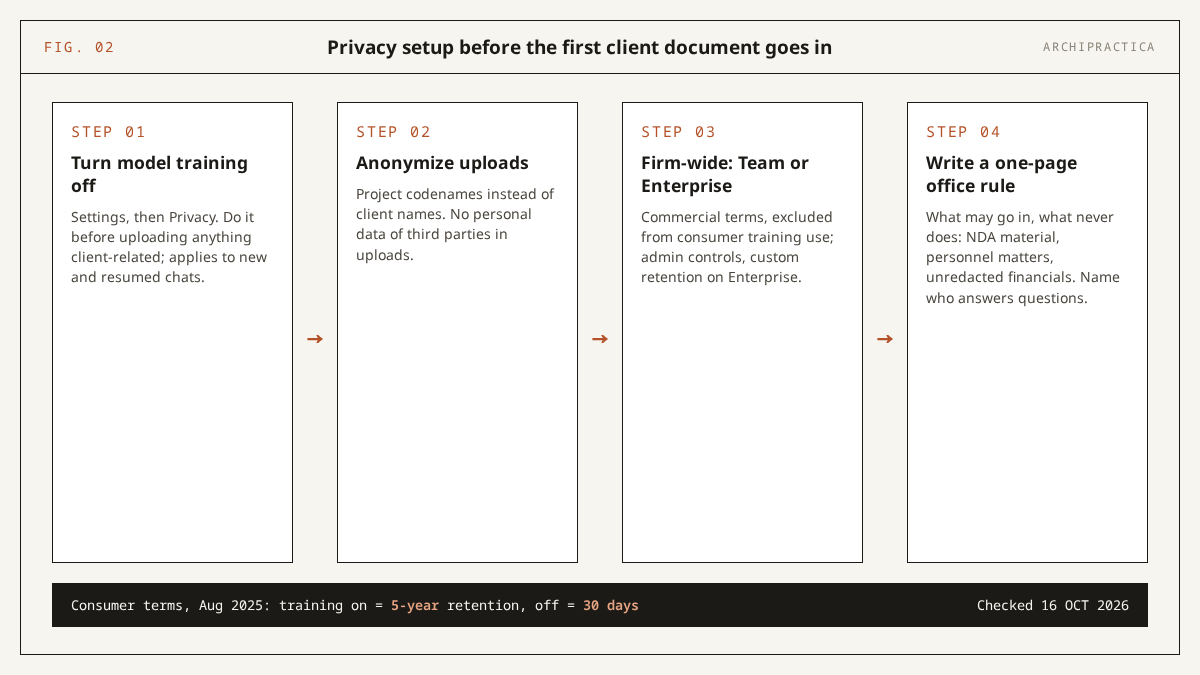
Turn model training off in Privacy settings, anonymize what you upload, and put the firm on commercial terms - five minutes of setup before the first client document goes in. Under Anthropic’s consumer terms update (August 2025, still in force), chats on Free, Pro and Max accounts are used for model training unless you opt out. Retention is five years if you allow training, 30 days if you do not.
- Open Settings, then Privacy, and turn model training off. Do this before uploading anything client-related; the setting applies to new and resumed chats.
- Anonymize what you reasonably can: project codenames instead of client names, no personal data of third parties in uploads.
- Moving the firm onto Team or Enterprise changes the legal basis: those run under commercial terms and are excluded from consumer training use, with admin controls and custom retention on Enterprise.
- Write a one-page internal rule for staff: what may go into Claude, what never does (anything under NDA, personnel matters, unredacted financials), and who answers questions. The AIA finding that 90% of US architects voice concerns about AI (Dezeen, March 2025) lists privacy among the top three worries, and a written rule beats individual judgment calls made at 6 pm on a deadline.
Where does Claude fail an architect?
The three failure modes that cost architects real money: invented citations in regulatory work, a knowledge cutoff that silently ages code and product data, and confident wording that reads identically whether the answer is right or wrong. A tool this fluent invites overtrust, so here is the full list in plain terms:
- No drawings, no models. It will never produce a detail, a Revit family or an energy model. Text, tables, images in; text and tables out.
- Knowledge cutoff. Current models reliably know the world up to June 2026 (per Anthropic’s model docs, checked October 2026). Codes, products and prices move after that date; web search helps when enabled, with results you still verify.
- Invented citations. Section numbers, standards, court-case-style confidence in things that do not exist. Worst in exactly the regulatory work architects most want automated.
- Confidence does not track accuracy. A wrong answer reads as smoothly as a right one. Your review effort goes to the claims that would hurt most if false.
- Long documents dilute attention. A 1M-token window fits the whole package, yet attention still thins across 200 pages. Ask for quoted evidence, and spot-check it against the source.
- It agrees with you too easily. Frame a leading question and it will lean your way. For anything contested, ask for the strongest case against your position too.
- Usage limits land mid-task. Sessions run on rolling 5-hour windows with weekly caps on paid plans. Plan heavy document reviews so a limit reset does not split your context.
FAQ
Can Claude check building code compliance?
No. Treat it as a research assistant and keep the checking for yourself. It finds relevant clauses quickly when you paste the code text and demand quoted references, which can save hours of lookup. Its unguided answers can miscite sections, use superseded editions or assume the wrong jurisdiction. Every code conclusion must be verified by a licensed professional against the current adopted edition where the project is located.
Is Claude safe for confidential client documents?
Only after configuration. On Free, Pro and Max accounts, chats train Anthropic’s models unless you opt out in Privacy settings (Anthropic consumer terms, August 2025). Retention is five years with training allowed, 30 days with it off. Team, Enterprise and API use fall under commercial terms and are excluded. Opt out first, anonymize where possible, and establish a written firm policy.
How is Claude different from ChatGPT for architects?
The practical difference is document depth versus breadth of extras. Claude’s long context and document-following discipline suit full brief, RFP and spec-package work; ChatGPT offers a wider range of integrations and image tools. Many practices run both for different jobs. We are publishing a 12-task working comparison between the two - watch the guides section or the newsletter for it.
Can Claude create drawings or work with Revit?
Claude itself draws nothing and does not open Revit models. It works with text, data, images and PDFs in a chat. Connecting it to BIM workflows is possible through third-party plugins and MCP integrations (a standard for wiring AI models into other software), which carry their own setup and reliability questions; that guide is on this site’s publishing plan. For pure drawing production, Claude is the wrong tool category.
Which Claude plan should an architect get?
Start on Free with the Sonnet model and one live project; it is enough to learn the prompting habits that matter. Move to Pro (17 to 20 dollars per month, checked October 2026) once usage limits interrupt real work - for most architects that is where Claude stops being an experiment. Max only pays off at all-day usage. Firms wanting admin control and training exclusion by contract should look at Team or Enterprise.
Will AI like Claude replace architects?
The current data says tasks are moving to the tool while the role stays put. In the RIBA AI Report 2026 (RIBA, July 2026), 74% of UK practices use AI on most projects, yet only 17% say their designs improved, and 77% agree AI can never replace human creativity. Staff-reduction fears are real (59% expect them). For now the shift is in who drafts the paperwork; judgment, liability and authorship have not moved.
Sources
- Anthropic - Plans and pricing (checked 16 October 2026)
- Anthropic - Models overview, Claude Platform Docs (checked 16 October 2026)
- Anthropic - Updates to Consumer Terms and Privacy Policy (28 August 2025)
- RIBA - AI adoption reaches tipping point across UK architecture (22 July 2026)
- Dezeen - Only six per cent of architects regularly using AI says AIA study (14 March 2025)
- AIA - Amplification, not automation: What AI really means for architects, Evelyn Lee (4 September 2025)
- Resolved - We Tested Claude AI on Six Real AEC Tasks (17 March 2026)
More guides in this series are collected under guides.
If one of these prompts saved you an hour this week, the newsletter brings a workflow like it every week - one workflow, one tool, no hype. Subscribe.