G–07Guide
AI Site Analysis for Architects: Tools, Workflow, Limits
On this page
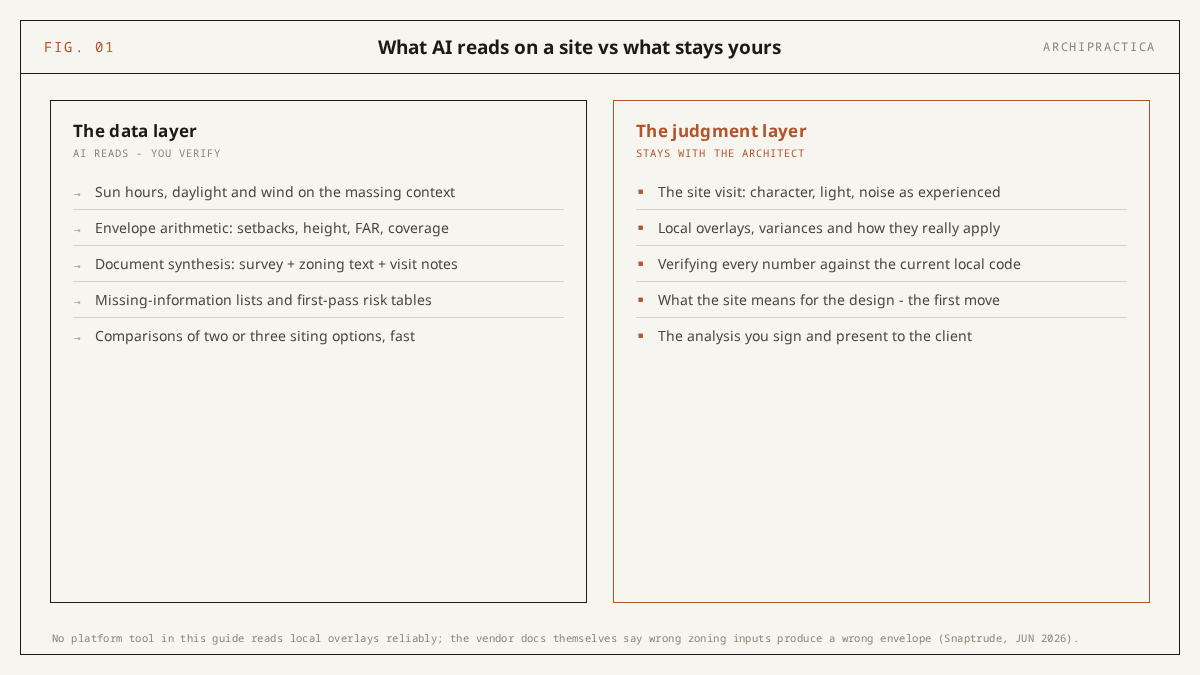
AI site analysis for architects now covers the data-assembly layer - platform tools like Autodesk Forma, Snaptrude and TestFit simulate sun, wind and zoning envelopes in minutes, and chat assistants like Claude and ChatGPT synthesize your surveys and zoning text into structured briefs. The judgment layer - the site visit, the local overlays, and the verification of every regulatory number against the current local code - stays with the architect.
Site analysis has an assembly problem before it has a design problem. The zoning PDF, the survey DWG, the climate file and the planning portal that times out all have to be collected by hand before anyone can ask a single design question. The current AI tools are most useful to architects during that assembly work, so this guide starts there.
The adoption figures describe a profession that is trying this and staying cautious at the same time. In the Chaos + Architizer survey of nearly 800 architects and designers, 60% of them from practices of up to 19 people, 43% named concept and pre-design as the area where AI has the greatest impact, and 48% named inconsistent output quality as the biggest challenge (blog.chaos.com, page updated 23 March 2026). Site analysis sits at that intersection: early enough to benefit from AI, and consequential enough that a wrong number costs you.
Our own data on how architects actually use AI points the same way. This guide is written for the architect who fears an AI-invented setback becoming their liability.
What does AI actually do in site analysis?
Two kinds of software share the label AI site analysis. Platform tools such as Autodesk Forma, Snaptrude and TestFit read geometry, climate data and zoning parameters and return simulations, envelopes and yield studies. Chat assistants such as Claude and ChatGPT read the documents you paste and return structured synthesis. Much of the first kind is deterministic simulation on top of GIS data; machine learning covers a narrow slice of it.
Take Forma Site Design as the clearest example, because Autodesk lists its analyses on one page. The overview describes area, sun hours, daylight potential, wind, microclimate, noise and total carbon analyses (autodesk.com, read 22 October 2026), and the wind entry says which part is machine learning. Autodesk says wind runs with both “rapid (real-time machine learning predictions) and detailed (simulation)” analyses, so the rapid mode is the machine-learned part. The detailed mode is simulation of the kind engineers ran long before anyone put AI on the box.
Snaptrude packages the same territory as two agents. According to Snaptrude’s guide, Analyze Site reads sun path and solar exposure across the year, prevailing wind direction, topography where elevation data is available, access points and visible constraints. Buildable Envelope takes setbacks, height limits, FAR and overlay zones and generates the maximum legal volume (snaptrude.com, updated 22 June 2026).
The word “agent” means the tool runs a sequence for you. You still enter the setbacks, heights and FAR yourself, from your reading of the code.
The chat assistants work differently. Claude and ChatGPT have no geometry engine and no GIS feed. They read your survey notes, your verified zoning extract and your own observations, then return a table, a risk list and a checklist of what is missing. That is document synthesis, the layer where the day-to-day value is easiest to see, as Claude for architects shows across other tasks.
The AIA’s research with Deltek and ConstructConnect found that only 8% of firms had implemented AI solutions, with a further 20% working on it (aia.org, 11 March 2025), where the unit is the firm and the bar is an implemented solution. The Deltek Clarity study of 896 A&E firms in the US and Canada, a mix of engineering and architecture firms, reported adoption rising from 53% to 70% year-over-year while only 38% saw measurable positive business impact (prnewswire.com, 12 May 2026). In site analysis the assembly hours are easy to count.
Which AI site analysis tools cover which layer?
No single tool covers a whole site analysis. Reading the vendors’ pages, Forma Site Design is strongest in environmental simulation, TestFit in yield and parking, and Snaptrude in the buildable envelope plus BIM handoff. Prices run from a Snaptrude free tier up to TestFit’s Site Solver at $15,000 a year and up (testfit.io, read 22 October 2026), so the practical choice is the layer your practice is missing and the budget you have.
| Criterion | Autodesk Forma Site Design | Snaptrude | TestFit |
|---|---|---|---|
| What it reads | Site geometry and local weather for area, sun hours, daylight potential, wind, microclimate, noise and total carbon analyses (autodesk.com, read 22 October 2026) | Analyze Site: sun path and solar exposure, prevailing wind, topography where elevation data exists, access points, visible constraints. Buildable Envelope: setbacks, height limits, FAR, overlay zones (snaptrude.com, updated 22 June 2026) | Site and parking parameters for yield; product line on the pricing page is Parking Solver, Site Solver, Site Solver Portfolio, with Site Intelligence and Pro Forma add-ons (testfit.io, read 22 October 2026) |
| Core outputs | Sun-hour and daylight maps, rapid machine-learning and detailed wind simulation, perceived outdoor temperature, noise, carbon totals | Annual solar and wind read of the site; maximum legal volume from the zoning parameters you enter | Parking and site yield studies, with site intelligence and pro forma as add-ons |
| Pricing | Starting at $59/month (autodesk.com, read 22 October 2026) | From $50/month billed yearly; $100/seat/month tier with 2,500 AI credits per seat per month (snaptrude.com, read 22 October 2026) | Parking Solver $195/month; Site Solver from $15,000/year; Site Solver Portfolio from $20,000/year; Site Intelligence +$150/month and Pro Forma +$170/month as add-ons (testfit.io, read 22 October 2026) |
| Free entry point | Free trial; no free tier on the overview page | Free tier, 1 project | None listed on the pricing page |
| Who it fits | Studios that want an environmental read on early massing | Small studios that want envelope plus BIM in one model | Feasibility and yield work at developer scale |
Feature comparison compiled from the vendors’ pages on 22 October 2026. We have not tested the three tools ourselves.
The table shows a cost cliff. TestFit prices its Site Solver tiers for feasibility work at developer scale, while Forma Site Design and Snaptrude start in the range a small practice already pays for any subscription.
None of the three claims to read local overlay or variance nuance reliably. That gap stays with your reading of the code, the same gap covered for a developed design in AI for building code and zoning checks.
A 6-step AI site analysis workflow
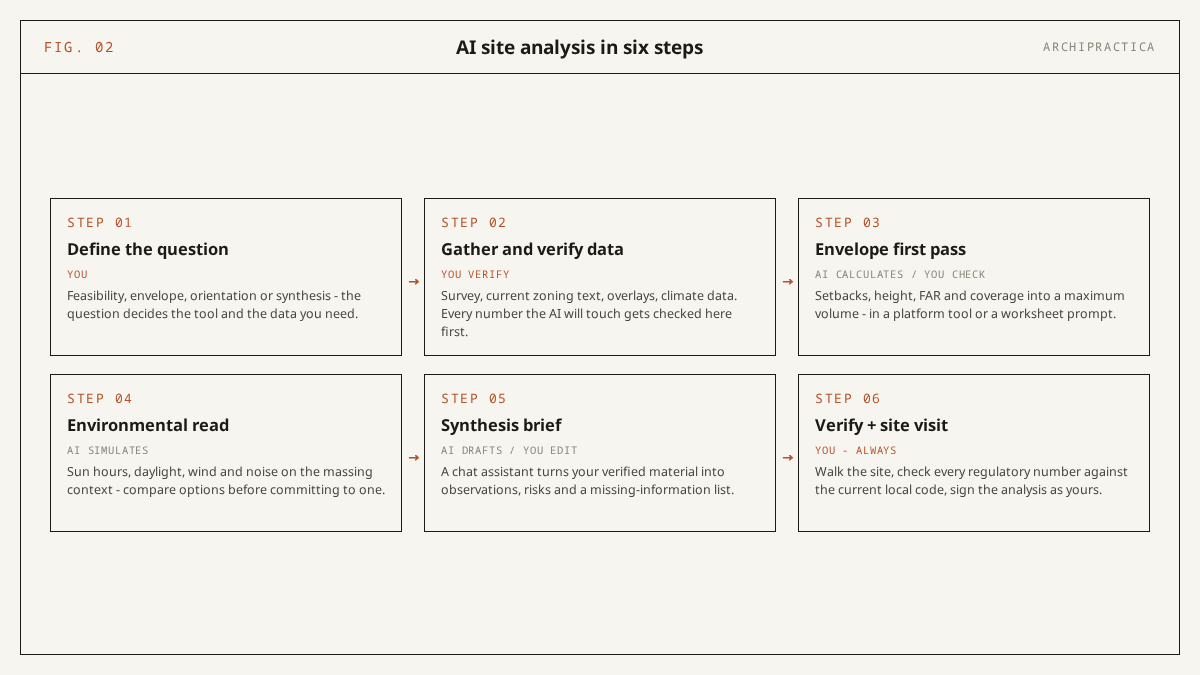
The workflow puts the AI between two human steps. Define the question first and verify the input data yourself. Then let the tools do the envelope arithmetic and the environmental simulation and let a chat assistant synthesize the documents. Finally, verify every number and walk the site.
- Define the question. AI tools answer the question you give them. A vague question returns a polished generic report. Write down the project type, the two or three decisions this site analysis must inform, and what a wrong answer would cost. That page later opens P1.
- Gather and verify data. The survey, the zoning extract from the current code edition, the parcel layer from the municipal GIS, climate normals and your own photographs. Check the zoning text against the municipality’s current edition before any tool sees it, because every subsequent calculation depends on how current that text is. This step stays manual.
- Envelope first pass. P2 in a chat assistant, or Snaptrude’s Buildable Envelope agent. Paste the verified clauses and the lot dimensions and you get a worksheet with each clause quoted, the footprint arithmetic shown and an “unclear from provided text” list. Treat that output as a worksheet with your signature still to be added.
- Environmental read. Forma Site Design for sun hours, daylight potential, wind and microclimate on a first massing, or Snaptrude’s Analyze Site for sun path and prevailing wind. Run it before the massing is settled, because an analysis run afterwards only validates what is already drawn. We have not run either tool ourselves; these descriptions come from the vendors’ pages.
- Synthesis brief. P1 in a chat assistant. Paste the survey notes, the verified zoning extract, the climate notes and your site visit observations. You get back a table of observations with their sources, opportunities and risks tied to specific observations, and a missing-information checklist.
- Verify and site visit. Every regulatory number from steps 3 and 5 is checked against the current local code edition and the overlay map. The missing-information list becomes the agenda for the site visit. This is the step where the architect’s license is on the line.
Snaptrude’s number for its agent sequence is a half-day of preparation work compressed to under an hour. That is a vendor claim on its own blog (snaptrude.com, updated 22 June 2026) that I have not verified and would not put in front of a client as fact. The two prompt runs in this guide point the same way. The assembly work is what shrinks; steps 2 and 6 are the same verification work they always were.
Two prompts, each tested once
Both prompts force the model to use only the pasted material and to list gaps instead of guessing. I ran each prompt once on 22 October 2026, programmatically from a command-line client, on fully fictional synthetic fixtures - a corner lot and a bylaw written for the test. P1 ran against Claude Sonnet 5 and P2 against GPT-6 Astra. Single runs, so read the results as illustration and nothing more.
P1 - Site analysis synthesis
Use when: you have the raw material in hand (survey notes, a zoning extract you have already verified, climate notes, your own site visit observations) and you want a first synthesis that cites every line and lists what is still missing.
I am an architect starting site analysis for a [project type] on the site described
below. I will paste my raw material: survey notes, the zoning extract I have
verified, climate notes, and my own site visit observations.

Build a site analysis synthesis with three parts:
1. A table of observations: each site condition, its source in my material
   (quote the line), and the design question it raises.
2. Opportunities and risks: two plain lists, each item tied to a specific
   observation - no generic entries that could apply to any site.
3. Missing information: what an architect would still need to verify before
   schematic design, as a checklist.

Use only the material I paste. If something is not in my material, put it in
the missing-information list instead of guessing. Do not propose a design.

My material: [paste]
In my single run on 22 October 2026, Claude Sonnet 5 returned 11 observations, each with a verbatim quote from the fixture and a design question. Its 17-item missing-information checklist surfaced items absent from the fixture such as geotechnical data, a tree protection bylaw, parking counts and permitted use.
The model connected the south-west ponding observation to the 1.8 m grade fall as a combined risk. It also kept the oak’s root-zone implications in the missing list without guessing a radius. On a real project I would verify every quoted line against the source document and every “missing” item against what the municipality actually requires, because a clean fixture is kinder than a scanned survey with handwritten notes.
P2 - Buildable envelope worksheet
Use when: you have the actual zoning text for the site and the lot dimensions, and you want a clause-by-clause worksheet with the arithmetic shown before you do the envelope by hand.
Here is the zoning text that applies to my site, and my lot dimensions. Using
ONLY the text I paste, build a buildable envelope worksheet:

- One row per parameter (setbacks by edge, maximum height, FAR, lot coverage,
  parking minimum, any other limit in the text), with the clause number and a
  verbatim quote of the controlling sentence.
- A derived-envelope section: from those parameters and my lot dimensions,
  calculate the maximum footprint and buildable volume, showing the arithmetic.
- An "unclear from provided text" list for anything the text references but
  does not define (overlays, variances, definitions in other sections).

Do not fill gaps from general knowledge of zoning codes. This is a first-pass
worksheet; a licensed professional verifies it against the current local code.

Zoning text: [paste]
Lot dimensions: [paste]
In the second run, GPT-6 Astra listed all 10 clauses of the fictional bylaw in a table with verbatim quotes. The arithmetic checks by hand: the setback rectangle came to 34.5 x 17.0 m = 586.5 m2, the model treated the 40% coverage cap of 512.4 m2 as the governing footprint because it is the smaller figure, and the FAR allowance came to 1,537.2 m2.
It flagged the height definition, the parking section, the easement geometry and the overlay as unclear from the provided text. It declined to call the result a verified buildable envelope without the height definition from another section. On a real bylaw with cross-references I would expect a longer unclear list. I would also re-run the arithmetic myself before any of it reached a drawing.
Both prompts sit in the pre-design group of our 50 Claude prompts organized by project stage.
Can AI read zoning for a site?
Yes, from text you paste, and only from that. A chat assistant given the bylaw extract and your lot dimensions can list each clause in a table and compute a first-pass footprint; Snaptrude’s Buildable Envelope agent does the equivalent from the setbacks, heights and FAR you enter. Models asked without the text answer from memory, which is where invented setbacks come from. Pasting the text turns the answer into a worksheet you can check.
A poster on r/Architects in August 2025 described zoning and code lookups, compliance checklists, specifications and client slides as the non-design tasks that consume so much time, and wanted to know whether AI could speed them up without adding hassle (reddit.com, 23 August 2025). My answer for the zoning part is a qualified yes. The speed comes from the model reading your document faster than you do. The model knows nothing about your municipality.
Important. Zoning, setbacks and buildable envelopes are jurisdiction-specific and date-specific. Any AI output on them is a starting point that a licensed professional verifies against the current edition of the local code before it informs a design. A model asked without the pasted text answers from memory and invents plausible setback and FAR values, or applies another jurisdiction’s typical values; local overlays and variances go unread; public GIS layers lag reality. Nothing in this guide changes who signs the drawing.
Snaptrude puts the same warning on its envelope agent. “If you give the agent outdated setback rules or miss a height overlay, the envelope it generates will be wrong,” Snaptrude writes (snaptrude.com, updated 22 June 2026). That sentence applies word for word to a chat assistant fed a stale PDF, which is why P2 demands an “unclear from provided text” list for every overlay and cross-referenced definition the paste leaves out.
What the AI will not tell you
The AI will not tell you what the site feels like at eight in the morning, which neighbor will object, or that the parcel layer is two years behind the recorded plat. Snaptrude says as much in its documentation. Simulation outputs are credible for early decisions. The character of the place, the currency of the data and the design meaning of each reading are the architect’s to supply.
“Analyze Site does not replace a site visit,” Snaptrude states in its agent guide (snaptrude.com, updated 22 June 2026). The site visit is where the data layer gets tested against the ground, where the missing-information list from P1 turns into questions for the neighbor and the surveyor, and where the wind simulation meets the gap between two buildings that the model never saw.
Every platform tool reads what its data provider published, every chat assistant reads what you pasted, and neither knows about the rezoning that passed last month. A generated report hides that gap better than a hand-built one does, so I read generated reports with more suspicion than my own notes.
The survey data suggests most practices have not yet asked AI to read a site at all. The RIBA AI Report 2026, a UK-weighted survey with more than 1,100 respondents, run in March and April 2026, found that 74% of practices use AI on at least some projects, and the most common use is early-stage design visualisation at around 56% of AI users (riba.org, August 2026). Site analysis does not appear as its own category in that chart, so most practices still have those failure modes ahead of them.
What you can do for free
You can run a credible first synthesis of site analysis for free. Snaptrude’s free tier covers 1 project (snaptrude.com, read 22 October 2026), Forma Site Design offers only a free trial (autodesk.com, read 22 October 2026), and TestFit lists no free tier on its pricing page (testfit.io, read 22 October 2026). The free manual stack is public municipal maps and GIS plus a chat assistant working on documents you pasted.
P1 and P2 are that stack. Reach for it where no platform subscription is justified. It is enough for a first synthesis of your material, for an envelope worksheet from verified zoning text, and for a missing-information checklist that shapes the site visit. Each of those outputs cites the source line, which is what makes the free stack checkable.
The free stack falls short in three places. It cannot run wind or microclimate simulation, because a chat assistant has no geometry engine and the public maps carry no climate model. It cannot run yield studies of the kind TestFit sells to developers either.
Nothing it produces goes to a client or an authority as verified analysis until you have checked it and put your stamp on it. On your next project, paste the verified zoning extract into P2 before you draw the envelope by hand, and compare the two.
FAQ
Can AI do a complete site analysis?
No. AI covers the data layer of site analysis: platform tools simulate sun, wind and microclimate and compute envelopes, and chat assistants synthesize your documents into briefs and checklists. The judgment layer stays with the architect. Snaptrude’s guide states that its Analyze Site agent does not replace a site visit. Verifying every regulatory number against the current local code remains your professional task.
What is the best AI tool for site analysis in architecture?
It depends on the layer you are missing. On the vendors’ pages, Forma Site Design is strongest in environmental simulation, TestFit in yield and parking, and Snaptrude in the buildable envelope with BIM handoff. Chat assistants such as Claude and ChatGPT are the best choice for synthesizing your own survey, zoning and climate documents. No single tool covers all four layers, so most practices combine one platform tool with a chat assistant.
Is AI site analysis accurate?
Simulation outputs for sun hours, daylight and wind are credible for early decisions, because they are largely geometry-driven calculations on published climate data. Zoning accuracy depends entirely on the currency of the input. Snaptrude’s documentation warns that outdated setback rules or a missed height overlay produce a wrong envelope. A model asked without the pasted code answers from memory. Verification against the current local code is the architect’s job.
How much do AI site analysis tools cost?
On the vendors’ pages read on 22 October 2026, Forma Site Design starts at $59 per month with a free trial, Snaptrude has a free tier for 1 project and paid plans from $50 per month billed yearly, and TestFit prices its Parking Solver at $195 per month and its Site Solver from $15,000 per year. The free alternative is public GIS and municipal maps plus a chat assistant working on documents you paste.
Can ChatGPT or Claude do site analysis?
Yes for document synthesis and envelope worksheets on verified text you paste. In two single runs on 22 October 2026, Claude Sonnet 5 produced a cited observation table and a 17-item missing-information list from a synthetic fixture, and GPT-6 Astra produced a clause-by-clause envelope worksheet with correct arithmetic. Neither assistant can run sun, wind or microclimate simulation. Neither should be asked about zoning from memory.
Sources
- Autodesk Forma Site Design overview - autodesk.com, read 22 October 2026. Analyses list, wind sentence, starting price of $59/month, free trial.
- TestFit pricing - testfit.io, read 22 October 2026. Parking Solver, Site Solver and Portfolio tiers, add-ons.
- What Are AI Site Analysis Agents? A Guide for Architects - snaptrude.com, published 5 May 2026, updated 22 June 2026. Analyze Site and Buildable Envelope agents, site visit and wrong-envelope warnings, vendor time claim.
- Snaptrude pricing - snaptrude.com, read 22 October 2026. Free tier, paid tiers, AI credits.
- The State of AI in Architecture survey - Chaos + Architizer, blog.chaos.com, page updated 23 March 2026. Nearly 800 architects and designers, 60% from practices of up to 19 people.
- New research explores perceptions and opportunities of artificial intelligence - AIA with Deltek and ConstructConnect, aia.org, 11 March 2025. 8% implemented, 20% working on it; firms as the unit.
- Deltek Clarity industry studies release - Deltek, prnewswire.com, 12 May 2026. 47th A&E study, 896 firms US and Canada, 53% to 70% adoption, 38% measurable impact.
- RIBA AI Report 2026 - riba.org, August 2026. Survey March to April 2026, more than 1,100 respondents, UK-weighted; 74% use AI, around 56% early-stage visualisation.
- Is anyone using AI to speed up zoning/spec admin work? - r/Architects, reddit.com, 23 August 2025. Community thread, paraphrased only.
Every tested prompt on this site has a dated transcript on file, and the ones that failed get written up too. Subscribe