P–01Prompts
50 Claude Prompts for Architects, Organized by Project Stage
On this page
- How do you adapt these prompts to your project?
- Pre-design and brief prompts (1-9)
- Concept and schematic design prompts (10-17)
- Design development prompts (18-25)
- Documentation and specification prompts (26-33)
- Construction administration prompts (34-41)
- Practice management prompts (42-50)
- Which Claude model and plan fits which stage?
- Where does this whole library break?
- FAQ
- Sources
Here are 50 Claude prompts for architects, organized by project stage: pre-design and brief, concept and schematic design, design development, documentation and specifications, construction administration, and practice management. Every prompt is copyable as written - swap the [bracketed] placeholders for your project’s facts, paste your source material where the prompt asks for it, and treat anything touching codes, products or contract language as a draft that a licensed professional verifies.
This page is a working library. Ten of these prompts were run on Claude Sonnet 5.5 while writing our Claude guide (16 October 2026); the rest follow the same structure, checked against Anthropic’s prompting guidance and the current model lineup on 17 October 2026, not benchmarked on live projects. The 50 prompts on this page and the sitewide prompt library (which is what the downloadable Prompt Pack PDF bundles) overlap but are not identical - the library only admits prompts after they pass our test protocol. If you want the background first - what Claude handles well, plan pricing, privacy setup - the guide covers it; this page is for the day you open a blank chat with real work due.
How do you adapt these prompts to your project?
Each prompt here needs two edits: replace every [bracketed placeholder] with your project’s specifics, and paste the material the prompt asks for where it asks. That is the one way Claude prompts for architects differ from generic AI prompt lists - they only work when supplied with project material. The brackets mark decisions only you can make: jurisdiction, building type, the paragraph of code text. A prompt run without its source material returns generic filler.
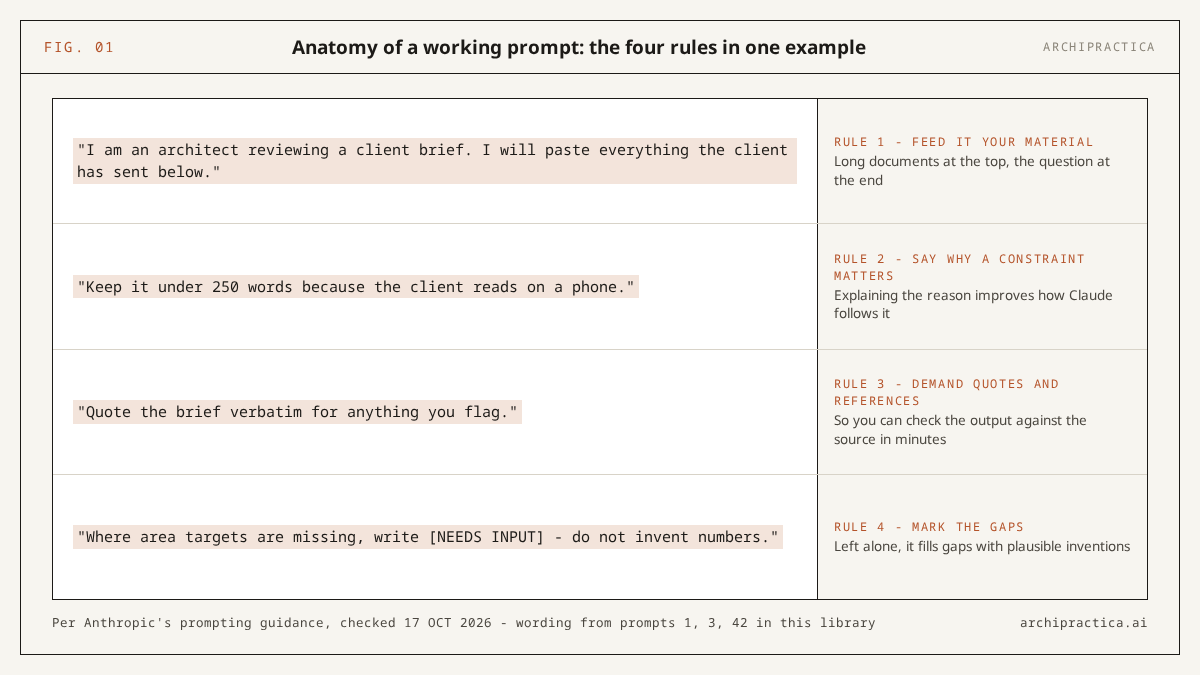
Four rules guide the whole library:
- Feed it your material. Claude writes from what you give it. Anthropic’s own prompting guidance (checked 17 October 2026) says to put long documents at the top of the prompt and the question at the end - the paste-then-ask order in these prompts follows that.
- Say why a constraint matters. Per the same guidance, explaining the reason behind an instruction improves how Claude follows it. “Keep it under 250 words because the client reads on a phone” beats “be brief”.
- Demand quotes and references. Any prompt that reads a document should require verbatim quotes with section numbers, so you can check the output against the source in minutes.
- Mark the gaps. Instructing Claude to write [NEEDS INPUT] wherever it lacks a fact is the simplest reliability upgrade in this library. Left alone, it fills the gap with a plausible invention.
Anthropic’s prompting guidance offers a test for any prompt: “Show your prompt to a colleague with minimal context on the task and ask them to follow it. If they’d be confused, Claude will be too.”
Pre-design and brief prompts (1-9)
Pre-design work is document-heavy and suited to a long-context model: briefs, RFPs, survey notes, zoning text. These nine prompts extract, structure and question that material. The zoning and code prompts are screens that organize your own review - you, or whoever stamps the drawing, still verify every regulatory conclusion against the current adopted edition in your jurisdiction.
The stages on this page track the five phases of basic services in the AIA’s B101 framework and map just as well onto the RIBA Plan of Work, with practice management added because the admin never stops.
1. Structured brief review. Use when a new brief lands as a pile of emails and attachments.
I am an architect reviewing a client brief. I will paste everything the client has sent below. Give me: 1) the space program with areas, as a table; 2) every quantitative requirement (areas, budget, dates, performance targets) with where it appears; 3) requirements that conflict; 4) decisions still open. Quote the brief verbatim for anything you flag.2. RFP go/no-go summary. Use when you have one evening to decide whether to pursue.
I am deciding whether my firm should respond to an RFP. I will paste it in full below. Summarize: scope of services; evaluation criteria with stated weights; minimum qualifications and required team roles; submission requirements and deadlines; anything unusual for a [project type] that I should price or clarify before committing. One page, with the RFP section cited for each point.3. Space program from meeting notes. Use when the “brief” so far is two conversations.
Below are my raw notes from client meetings about a [project type]. Draft a space program table: space name, quantity, target area, key adjacencies, special requirements. Where the notes imply a space without naming it, include it flagged [implied]. Where area targets are missing, write [NEEDS INPUT] - do not invent numbers.4. Brief gap questions. Use before schematic design starts; unanswered questions resurface at 60% DD.
I will paste a project brief below. List the questions a client must answer before schematic design can start, grouped: budget and program; site and context; operations and users; quality and sustainability expectations. For each, say in one line what it blocks if unanswered. Only ask what the brief genuinely leaves open.5. Site information digest. Use when survey, deed and site notes arrive in five formats.
I will paste site information below (survey notes, deed description, utility records, my own observations). Build a site constraints summary: dimensions and area; topography; access; utilities; easements or restrictions; anything in the documents that limits buildable area. Quote the source document for each item and list what information is still missing for a [project type].6. Zoning first-pass table. Use when you have the ordinance text and need an organized screen before the real check.
I will paste the text of a zoning ordinance section and the basic parameters of a site and proposed building (use, lot area, frontage, height, setbacks, parking). Build a two-column table: each zoning requirement from the pasted text with its clause number, next to my proposed value, marked "appears to meet", "appears short" or "unclear from provided text". This is a first-pass screen to organize my own review. Do not state that anything complies.7. Code excerpts applicability checklist. Use when you have downloaded the current code and want a map of what applies.
I will paste excerpts from the building code that applies to my project, including the edition year and jurisdiction. Using ONLY the pasted text, list every requirement that applies to [describe the element or system], as a checklist with clause numbers quoted. If the pasted text does not cover something, write "not covered in the provided text" - never answer from general knowledge.Where prompts 6-7 break. Claude’s reliable knowledge ends in June 2026 for the current model generation, per Anthropic’s model docs (checked 17 October 2026), and it can invent section numbers or apply the wrong jurisdiction’s defaults with full confidence. Both prompts restrict it to pasted text for that reason. The output organizes your review; a licensed professional verifies every line against the current adopted edition before it touches a drawing.
8. Unfamiliar typology research list. Use when the commission is a building type you have not done in years, or ever.
I am an architect starting my first [building type] project in [country or region]. List what I should research before concept design: regulatory frameworks and review bodies typical for this type; typical functional requirements and adjacencies; common dimensional standards; typical consultants needed; the questions experienced designers of this type ask first. Format as a checklist I can work through, with [VERIFY LOCALLY] on anything jurisdiction-dependent.9. Kickoff agenda and client questionnaire. Use the week before the first working session.
Draft a kickoff meeting agenda and a client questionnaire for a [project type] with [client type - e.g. first-time private client, institutional board]. Agenda: 90 minutes, decisions first, inspiration last. Questionnaire: grouped by budget, program, timeline, decision-making authority and communication preferences, maximum 25 questions, phrased for a non-technical reader.Concept and schematic design prompts (10-17)
Claude produces no drawings, so concept-stage prompts address the verbal side: narratives, option comparisons, critique and client communication. Output quality tracks input quality here more than anywhere - give it your actual design facts and a sample of your writing, and review everything before a client sees it.
10. Concept narrative from bullet points. Use when the scheme is clear in your head and the page is blank. The full extraction-then-draft workflow, with the prompts written out in full, is in how to turn a client brief into a concept narrative.
Draft a concept narrative for a [project type]. Inputs below: 1) bullet-point facts about site, program and my design moves; 2) one narrative my firm wrote previously, as a style reference - match its tone, never copy its content. Use only facts from input 1; where a topic lacks a fact, write [NEEDS INPUT]. 400-600 words, for a client audience.11. Design options matrix. Use when two or three schemes need a structured comparison for the client meeting.
I will describe [number] design options for the same brief. Build a comparison table: how each option answers the program; site response; structural implications I listed; rough relative cost drivers; risks and unknowns. Use only what I describe - no invented benefits. Close with the questions the client must answer to choose, as a numbered list.12. Pre-review critique. Use two days before a design review, while weaknesses are still fixable.
Act as a skeptical design reviewer. I will describe my concept for a [project type] below. Identify: where stated intent and described execution diverge; program requirements the scheme strains; circulation or organization weaknesses; claims a jury or planning officer would press hardest. Be specific and quote my own description back at me. End with the three hardest questions I should prepare for.13. Design statement with gap-marking. Use for planning submissions where every required topic must be covered.
Draft a design statement for a planning submission. Inputs below: 1) bullet-point facts about site, context and proposal; 2) the authority's list of what the statement must address; 3) a previous statement of mine as a style reference. Use only facts from input 1. Where a required topic from input 2 has no matching fact, write the heading and [NEEDS INPUT] instead of inventing anything.14. Material palette rationale. Use when “why this material” needs a defensible answer in writing.
I will list the materials proposed for a [project type] and the reasons I chose each (performance, context, budget, appearance). Write a palette rationale for a client presentation: one short paragraph per material covering what it does, why it fits this project, and its maintenance implications as I stated them. Flag any material where my stated reasoning is thin, rather than padding it.15. Area schedule sanity check. Use when the scheme has drifted and you suspect the program no longer fits.
Below are two tables: the brief's required space program and my current scheme's measured areas. Compare them: spaces over or under target by more than [tolerance]%; required spaces missing; spaces I added that the brief never asked for; the net total difference. Table format, exact numbers, no commentary on design quality.16. Sustainability strategy outline. Use when the proposal needs an environmental story grounded in actual decisions.
From the project facts I paste below (site orientation, climate, construction type, systems decisions made so far), outline a sustainability narrative for a [project type]: passive strategies already embedded in the scheme; active systems under consideration; what each claim depends on. Only include strategies supported by my facts; list promising strategies we have NOT addressed separately as open options. No certification claims.17. Scheme explanation for a non-technical client. Use when the client nods in meetings and emails confusion afterwards.
Rewrite my scheme description, pasted below, for a client with no construction background. Keep every fact and number. Replace jargon with plain equivalents (keep the technical term in brackets on first use). Organize as: what you will experience arriving and moving through; how the main spaces work; what is decided; what is still open and when we decide it. Under 500 words.Where prompts 10-17 break. Narrative prompts fail quietly: without [NEEDS INPUT] enforced, Claude fills gaps with plausible site and context facts that nobody gave it. A style sample also pulls phrasing along with tone - read the draft against your own facts list before you judge the prose.
Design development prompts (18-25)
DD is coordination work: consultants, products, schedules, decisions that drawings must absorb. Claude tracks text-based coordination well - question lists, decision logs, schedule skeletons - and knows nothing about your actual model, so treat every output as a checklist to run against your drawings. Call the manufacturer on every product value, every time.
18. Consultant coordination questions. Use before issuing DD drawings to the engineering team.
I will describe the current state of a [project type] design. For each discipline - structural, mechanical, electrical, plumbing, [add others] - list the questions my drawings must answer for that consultant to progress, and the decisions I need FROM them before my next issue. Mark items that typically block others first. Base it only on what I describe.19. DD set completeness checklist. Use when assembling a DD issue and wondering what you forgot.
Build a design development drawing set checklist for a [project type] of [size] in [country]: sheets typically included, and per sheet the content that distinguishes DD from schematic (dimensions locked, assemblies named, openings scheduled). Format as a checklist. Mark items that vary by jurisdiction or client [CONFIRM FOR PROJECT] - this organizes my planning and is not a deliverables contract.20. Opening schedule skeleton. Use when doors and windows exist in sketches and nowhere else.
From the descriptions I paste below (rooms, their doors and windows, sizes where decided, fire or acoustic needs where known), build a door and window schedule skeleton: mark, location, nominal size, type, key requirements, status. Use [TBD] for anything undecided. Flag openings my descriptions imply must exist and never mention.21. Product comparison scaffold. Use when shortlisting products and the datasheets have blurred together.
I will paste manufacturer information for [number] candidate products for [application]. Build a comparison table using only the pasted data: key performance values, dimensions, finish options, stated warranty, anything one datasheet covers that another omits. Add a [VERIFY] row listing claims I must confirm directly with each manufacturer - current availability, lead time, local code acceptance and price are always on it.Where prompt 21 breaks. Product lines change faster than any training data; the AIA’s Journey to Specification study (Dezeen, March 2025) named product research among the tasks architects find most inefficient, and it is also where stale answers slip through most easily. Work from pasted current datasheets only, and treat the [VERIFY] row as mandatory calls.
22. Decision log from meeting notes. Use after a coordination meeting with six decisions buried in forty minutes of talk.
Turn my coordination meeting notes, pasted below, into a decision log: decision made, who made it, what it affects, drawings or documents to update; a second table of open items with owner and deadline. Where the notes imply a decision without stating it cleanly, put it under open items marked [confirm] - never promote it to decided.23. Assembly detail checklist. Use before drawing an unfamiliar detail, as a checklist of what the detail must resolve.
List what a [assembly - e.g. parapet at green roof, window head in masonry veneer] detail must resolve for a [construction type] building in a [climate type] climate: water, air, vapor, thermal continuity, movement, fire, sequence of trades. Phrase each as a question my detail must answer, so I can draw against it. This is a thinking checklist - performance values and code minimums come from my own verified sources.24. Value-engineering impact notes. Use when the contractor’s VE list arrives and the client wants your view tomorrow.
I will paste a value-engineering proposal list. For each item, using only what I paste plus the design intent I describe: what the substitution changes in appearance, performance and maintenance; which stated design intent it touches; what I would need to verify before accepting (testing, warranty, code acceptance). Neutral wording I can send to a client after my review. Mark items needing consultant input [REFER].25. Accessibility question screen. Use when you have the accessibility standard’s text and want a structured pass.
I will paste excerpts from the accessibility standard applying to my project, plus a description of the spaces in question. Using only the pasted text, list each requirement with its clause number and phrase it as a yes/no question about my design. Mark questions the pasted text cannot settle "needs full standard". This structures my review - it does not replace it.Documentation and specification prompts (26-33)
Specifications are contract documents carried under your license, so every prompt in this group drafts structure and flags gaps while you remain the author of record. If Claude invents an ASTM number and it ships, the error is yours alone. These eight prompts set work up and check consistency - the technical content comes from verified sources. The full workflow is in how to write architectural specifications with AI.
26. Outline spec from a product schedule. Use at the start of spec work, to get from schedule to skeleton fast.
I will paste a product and materials schedule. Draft outline specification sections organized by CSI MasterFormat division: section number and title, short description, the products from my schedule that belong there, and a [VERIFY] list of what must be confirmed with manufacturers or consultants before development. Do not invent product names, standards or performance values not in my schedule.27. Spec package coverage review. Use when inheriting or reusing a spec package on a new project.
I will paste a specification package from a previous project, for reuse on a [project type and scope in one sentence]. List: divisions covered; divisions this project likely needs that are missing; sections whose requirements look unusual or contradictory, with the clause quoted. Review only - rewrite nothing.28. Section summary for review. Use when delegating a spec section check to a junior and defining what to look at.
Summarize the specification section I paste below for an architect's review: products and standards it invokes; submittal and warranty requirements; quality-assurance provisions; anything non-standard for a [section subject] section, quoted verbatim. End with the five clauses most worth a senior review and why.29. Reference spec vs current schedule comparison. Use when updating an old master to this project’s requirements.
Below are 1) a specification section from a previous project and 2) this project's current product schedule for the same scope. List every mismatch: products in the spec that the schedule replaced; schedule items the spec never mentions; performance or warranty clauses tied to superseded products. Table with clause references. Flag only - I will edit the section myself.30. General notes consistency check. Use before issue, when notes have accreted across sheets for months.
I will paste the general notes from my drawing set. Find: notes that contradict each other; duplicates with different wording; notes referencing standards or documents inconsistently; notes that belong in the specifications instead. Quote each instance with its note number. Do not rewrite - list for my edit.31. Room data sheet skeleton. Use when the client requires RDS deliverables and you are starting from the program.
From the space program I paste below, build room data sheet skeletons for [all rooms / listed rooms]: finishes (floor, wall, ceiling), fixtures and equipment, environmental requirements, special requirements - each field filled from my pasted material or marked [TBD]. One table per room. Invent nothing.32. Permit cover letter and document list. Use at issue-for-permit, to package the submission cleanly.
Draft a cover letter for a permit submission to [authority] for a [project type] at [address placeholder], and a document transmittal list from the drawing and document register I paste below. Formal, factual, no advocacy. Mark any required-by-authority item my register does not show as [MISSING - CONFIRM] rather than omitting it silently.33. CD set QA checklist. Use a week before the deadline, as the review structure for your own set.
Build a construction documents QA checklist for a [project type]: cross-referencing (plans to schedules to details to specs); dimensional completeness; typical coordination failure points between architectural and [consultant disciplines] drawings; common omissions for this building type. Checklist format, grouped by review pass. This structures my review of the set - it cannot see my drawings and verifies nothing itself.Where prompts 26-33 break. Claude drafts spec structure and catches internal inconsistencies in text you paste; it cannot confirm a product exists this quarter, a standard is current, or an assembly meets code. In a practitioner test by Resolved, an IT consultancy serving AEC firms (March 2026), spec summarization caught a non-standard warranty term. Their code-task verdict applies to every prompt in this group: “research accelerator, not a sign-off”, with every output needing professional verification.
Construction administration prompts (34-41)
CA runs on short documents under time pressure - RFIs, submittals, field notes - which suits a fast model and tight prompts. Everything here is a draft for your review first; CA correspondence can carry contractual weight. Anything that modifies scope, cost or time goes through your normal change procedures, on advice of counsel where it matters.
34. RFI response draft. Use when the RFI cites documents you can paste alongside it.
I will paste a contractor RFI and the relevant drawing notes and specification clauses. Draft a response that: answers only what was asked; cites the controlling document and clause for each point; states "to be confirmed" where my pasted material does not settle the question. Neutral contractual tone. Note at the end if the question suggests a document conflict I should review. I will review and edit before issuing.35. RFI log pattern review. Use monthly, to see what the log is telling you about your documents.
I will paste our RFI log export. Summarize: open items past their response date; RFIs clustering on the same drawing, spec section or trade; questions suggesting a recurring documentation gap; anything flagged as cost or schedule impact. Table per category, RFI numbers cited. Patterns only - no judgments about fault.36. Submittal review notes. Use when checking a submittal against the spec section you can paste.
I will paste 1) the specification clauses governing a submittal and 2) the submitted product data. List: each spec requirement next to what the submittal shows, marked "appears to conform", "deviation" or "not addressed"; deviations the contractor flagged versus unflagged ones. Quote both documents. This organizes my review - the review action and stamp are mine.37. Field report from site notes. Use in the car after the visit, before the details fade.
Turn my raw site visit notes, pasted below, into a field report: project, date, weather, work observed in progress; items requiring attention with location and the drawing reference where I noted one; open questions for the contractor; photos referenced by my note numbers. Factual wording only - observations, no directives and no acceptance of work.38. Change explanation for the client. Use when a change order needs a calm, factual narrative.
Draft a client explanation of a change, from the facts I paste below (what changed, why, cost and time impact as priced, options considered). Structure: what happened; what it means for budget and schedule; what we recommend and why; the decision needed and by when. No blame, no minimizing, under 350 words. I will verify every number before sending.39. Punch list organizer. Use after a walkthrough that produced 140 phone notes.
Organize my raw walkthrough notes, pasted below, into a punch list: items grouped by room, then by trade; each item as location, deficiency, reference to spec or drawing where my notes include one. Keep my wording for deficiencies - clean it only for clarity. Number items. Mark entries too vague to action [CLARIFY] so I can revisit them on site.40. Payment application question list. Use before certifying, as a prep screen for your own review.
I will paste the schedule of values and the contractor's current payment application summary. List: lines where claimed percent complete jumped more than [threshold]% this period; stored materials claims; lines that look inconsistent with the progress notes I paste from my last site visit. Phrase everything as questions for my review. Certification is my professional judgment - this only prepares it.41. Closeout checklist. Use when substantial completion is near and nobody has started the binder.
Build a project closeout checklist for a [project type] under a [contract form - e.g. AIA A201-based] contract: documents typically collected (warranties, O&M manuals, as-builts, releases), who produces each, and typical sequencing before final payment. Mark items that vary by contract [CHECK CONTRACT]. Checklist format, grouped by responsible party.Where prompts 34-41 break. CA drafts drift from answering the question into directing the work. Any sentence a contractor could read as an instruction, an acceptance of work, or a change in scope is yours to catch before issue - the model does not know what your contract makes you liable for.
Practice management prompts (42-50)
The unglamorous half of practice - emails, fees, minutes, hiring - is where Claude needs the least supervision, because you can verify every output by reading it. These nine prompts cover the writing that eats studio hours. Facts, figures and anything legally binding still get your check before sending; the drafting time is what the tool removes.
42. Delay email. Use when a milestone slips and the message must preserve the relationship.
Draft an email to my client. Situation: a design milestone will slip by [number] weeks because [reason]. Open with the revised plan rather than the problem; explain the cause in two sentences without blame; propose what proceeds in parallel; close with a specific next step and date. Professional, direct, no apologetic filler, under 250 words. I will personalize before sending.43. Fee proposal skeleton. Use when scoping a proposal and you want the structure before the numbers.
Build a fee proposal skeleton for a [project type] with services from [starting phase] through [ending phase]: sections a complete proposal needs; per section, what to state and the assumptions and exclusions architects commonly regret omitting for this project type. Structure and prompts only - I set every number and term. Mark jurisdiction- or contract-dependent items [CHECK].44. Additional services letter. Use at the third scope change, when goodwill needs a boundary in writing.
Draft a letter to a client about additional services. Facts below: original scope summary; the requested changes to date with dates; the contract clause covering additional services, quoted. Tone: collaborative and firm. Structure: what was included; what has changed; why the new work sits outside the base fee; the proposed path (estimate first, then authorization). Under 400 words. I will review against the signed contract before sending.45. Meeting minutes. Use after any meeting where decisions and actions must survive the week.
Turn my raw meeting notes, pasted below, into minutes: attendees; decisions made; open questions; an action table with item, owner, deadline. Where the notes imply an owner or deadline without stating one, mark [confirm] rather than guessing. Factual wording - no interpretation of anyone's intent.46. Monday project status digest. Use when returning after a week focused on one deadline to find four other projects have moved on.
I will paste recent emails and notes from [number] active projects. For each project: current status in two sentences; decisions or information waiting on me, with the requester; deadlines in the next two weeks; anything that reads urgent. Order projects by how much they need my attention. Flag anything you were unsure how to classify instead of guessing.47. Project description for the website. Use when the project is photographed and the page text is overdue.
Write a website project description from the facts I paste below (project type, size, location kept general, design approach, key moves, materials, one previous description of ours as a style sample). 150-250 words, match the style sample's voice, no superlatives the facts don't support, no client name unless I include it as approved for publication.48. Award submission draft. Use when the deadline is Friday and the entry form has seven essay fields.
Draft an awards submission from my inputs below: the award's questions or criteria, pasted; project facts and design narrative; practice profile. Answer each criterion directly using only my facts; where a criterion asks for evidence I did not provide, write [NEEDS INPUT - evidence for X]. Match the tone of the pasted narrative. Respect every stated word limit.49. Hiring screen questions. Use when recruiting for a role and the interviews need consistency.
I am hiring a [role] for a [practice size and focus] studio. From the job description I paste below, draft: 8 interview questions probing the actual competencies listed, each with what a strong answer demonstrates; 3 portfolio-review prompts; 3 realistic scenario questions for this role. Skip generic questions answerable by rehearsed scripts.50. Staff AI-use one-pager. Use before the second person in the office starts pasting client material into a chatbot.
Draft a one-page internal guideline for AI chat tools in an architecture practice of [size] in [country]. Cover: material that must never be pasted (client-confidential documents, personal data, anything under NDA); required account settings before use, with model-training opt-out named explicitly; the rule that AI output on codes, products and contracts is a draft requiring professional verification; who in the office answers questions. Plain language, fits one page. I will adapt it to our insurance and legal advice.Where prompts 42-50 break. The risk in this group is tone and overstatement: a delay email that reads corporate, an award entry that claims more than the project did. One reread by the person whose name goes on it is the whole safeguard - and the style sample you paste must contain no client-confidential details.
Which Claude model and plan fits which stage?
Sonnet 5.5 is the default for everything in this library; Opus 5.5 earns its keep when a task spans several long documents at once. The free plan covers evaluation and light practice-management use; Pro is the working plan once prompts enter the weekly routine. Specs and prices come from Anthropic’s models documentation and pricing page, checked 17 October 2026; the stage mapping is our editorial judgment without a benchmark behind it.
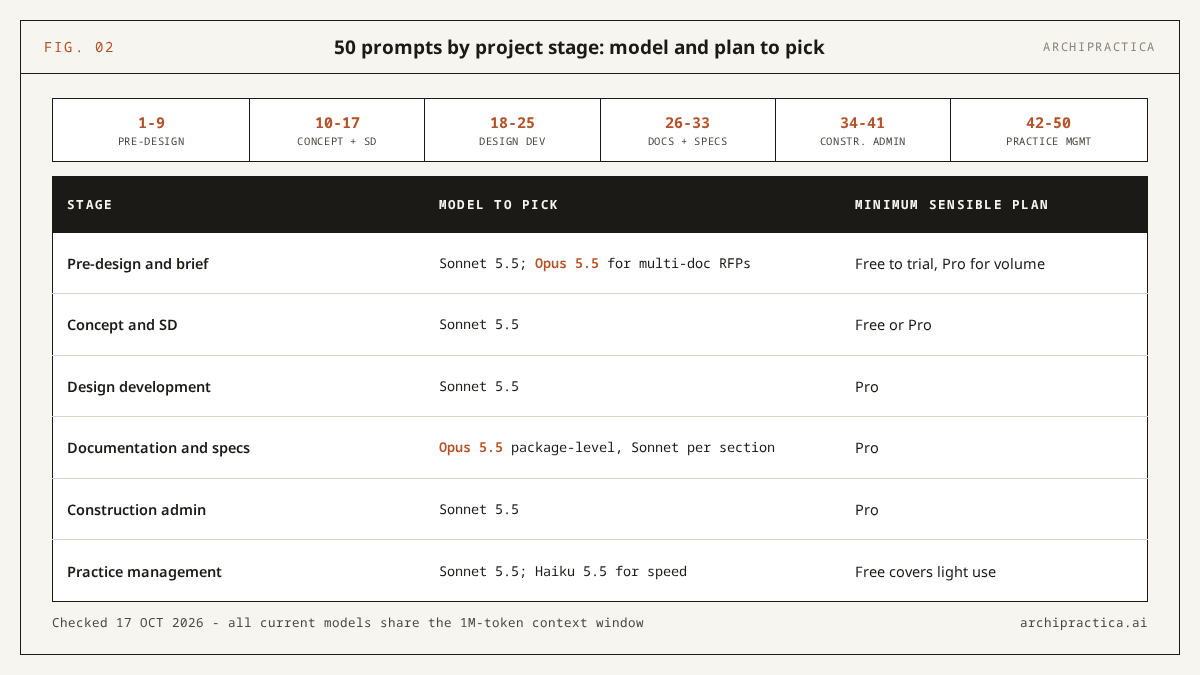
| Stage | Model to pick | Minimum sensible plan | Reasoning |
|---|---|---|---|
| Pre-design and brief (1-9) | Sonnet 5.5; Opus 5.5 for multi-document RFP packages | Free to trial, Pro for real volume | Long documents fit any current model (all have 1M-token context); Opus helps when reconciling several at once |
| Concept and SD (10-17) | Sonnet 5.5 | Free or Pro | Drafting and critique are fast, single-document tasks |
| Design development (18-25) | Sonnet 5.5 | Pro | Frequent mid-size tasks; Free’s usage window interrupts working sessions |
| Documentation and specs (26-33) | Opus 5.5 for package-level work, Sonnet 5.5 for single sections | Pro | Anthropic’s docs point to Opus for heavier knowledge work |
| Construction admin (34-41) | Sonnet 5.5 | Pro | Short documents, fast turnaround; usage adds up during busy CA weeks |
| Practice management (42-50) | Sonnet 5.5; Haiku 5.5 where speed beats polish | Free covers light use | Short outputs you verify by reading |
Checked: 2026-10-17, lineup Fable 5.1 / Opus 5.5 / Sonnet 5.5 / Haiku 5.5. Fable 5.1 is absent from the table deliberately: it is priced and positioned for long-horizon agentic work, and nothing in a chat-prompt library justifies its cost (Pro accesses it only via usage credits, Max at half of weekly limits). Plan prices and the privacy setup that should precede any client document - training opt-out, retention settings - are covered in the Claude guide.
Where does this whole library break?
Claude reads only what you paste, knows the world to June 2026, and writes with equal confidence when right and wrong. Careful input makes output easier to trust than it should be, so those limits belong in one place. Beyond the per-stage caveats, three general limits apply to all 50 prompts.
- It verifies nothing. Codes, zoning, products, standards and contract terms are jurisdiction- and date-specific; AI output on them is a draft for licensed review. The RIBA’s 2026 survey (July 2026) found 74% of UK practices using AI on most projects and 17% reporting improved designs. The measurable gain so far is in document labor, which is where all 50 prompts sit.
- Confidentiality precedes convenience. Turn off training in Privacy settings before pasting client material, and keep NDA-covered documents out entirely (prompt 50 exists for this reason; setup steps are in the guide).
- Generic in, generic out. A prompt run without your project’s material produces text any reader will recognize as filler. Feed every prompt your real documents, constraints and style samples.
FAQ
Do these Claude prompts for architects work in ChatGPT or Gemini?
Mostly, yes. The structure - role, pasted material, explicit output format, gap-marking, demands for quoted references - transfers to any capable chat model. We reviewed the wording against Claude’s current models and Anthropic’s prompting guidance, so the prompts may need minor edits for other tools, which differ in context length, document handling and how literally they follow format instructions. Test on low-stakes material first.
Can Claude check building code compliance with these prompts?
No. Prompts 6, 7 and 25 restrict Claude to code text you paste and force clause-by-clause citations, which makes its reading checkable. The output is a screen that organizes your own review. Every regulatory conclusion still goes to a licensed professional, who checks it against the edition your jurisdiction has actually adopted.
Which Claude model should an architect use for these prompts?
Sonnet 5.5 for nearly everything - these are short, text-heavy chat tasks, and it is the fast model in the capable tier; that default is our recommendation, since Anthropic’s own guidance names Opus 5.5 the general starting model and we have no benchmark. Choose Opus 5.5 when one task spans several long documents. Haiku 5.5 suits quick practice-management drafts. All current models share the 1M-token context window (Anthropic models documentation, checked 17 October 2026).
Is it safe to paste client documents into Claude?
Not until you change the default settings. Consumer plans use chats for model training unless you opt out, and retention depends on that choice (Anthropic consumer terms update, August 2025). The Claude guide walks through the opt-out, retention and anonymization steps; do them before running prompt 1 on a real brief, and keep NDA material out of the chat entirely.
How do I get Claude to write in my own voice?
Include one sample of your past writing in the prompt and instruct it to match tone and rhythm without copying content - prompts 10, 13, 47 and 48 build this in. One good sample does more than adjectives like “professional but warm”. Keep the sample free of confidential details - Claude only needs its tone.
Do I need a paid plan to use these prompts?
No. Every prompt runs on the Free plan, which includes Sonnet 5.5, web search and up to 5 Projects - enough to evaluate the library on one live project. The Free usage window interrupts long document sessions, so expect to upgrade to Pro ($17-20/month, checked 17 October 2026) once these prompts enter your weekly routine.
Sources
- Anthropic - Prompting best practices, Claude Platform Docs (checked 17 October 2026)
- Anthropic - Models overview, Claude Platform Docs (checked 17 October 2026)
- Anthropic - Plans and pricing (checked 17 October 2026)
- AIA - Defining the architect’s basic services (checked 17 October 2026)
- RIBA - AI adoption reaches tipping point across UK architecture (22 July 2026)
- Dezeen - Only six per cent of architects regularly using AI says AIA study (14 March 2025)
- Resolved - We Tested Claude AI on Six Real AEC Tasks (17 March 2026)
- Anthropic - Updates to Consumer Terms and Privacy Policy (28 August 2025)
The best prompts from this page live in the prompt library as individual entries you can filter by stage and task. To get new ones as we test them, the newsletter delivers one working AI practice workflow each week - no hype, sources included. Subscribe.