G–03Guide
How to Write Architectural Specifications with AI: Workflow + Limits
On this page
- Why are specifications the highest-stakes text you produce?
- What can AI draft safely - and what must it never touch unverified?
- The workflow: six steps from outline to issue
- 10 copyable prompts, by MasterFormat logic
- Manual masters, AI assistants, or spec software with AI?
- The liability checklist before you issue
- FAQ
- Sources
AI for spec writing works when you limit it to structure and verification: outlining MasterFormat sections, summarizing product research, checking consistency between drawing notes and spec text, and translating sections into plain language for clients. Product numbers, code citations and performance values stay off-limits until you verify each one at the source, because the specification is a contract document and the liability for every line sits with the licensed professional who issues it.
This guide gives you a six-step workflow for Claude or ChatGPT, 10 copyable prompts organized around CSI MasterFormat logic, a comparison of the three ways practices handle specs today, and a checklist to run before issuing specifications. It covers chat-assistant workflows and the current AI features inside dedicated spec software; it does not cover BIM-linked spec tools or construction administration.
Why are specifications the highest-stakes text you produce?
Because a spec package is part of the contract documents. Renders get redone and design statements get rewritten, but a wrong product number or a superseded standard in Division 08 becomes a pricing error, an RFI, a change order, or a claim with your stamp attached to it. That is why spec writing is the one AI use case where the failure stories arrived before the success stories.
The demand is real and so is the skepticism. In February 2026 a poster asked r/Architects whether anyone trusts AI for spec books; the top answer, from u/Goofyloop3, describes exactly the failure this guide is built to prevent:
“My coworker used AI for a specification in a pinch. Everything seemed fine until the GC tried to find the product number, which was apparently complete nonsense. Even when using spec writing software there are hundreds of decision points during the process of writing a whole set of specs.”
- u/Goofyloop3, r/Architects, February 2026
Institutional research points to the same tension. According to AIA research on specifications (October 2025, published with AIA partner Deltek), only 6% of architects regularly used AI in their workflow at the time of the study - yet the same research singled out specification writing and product research as high-friction tasks where AI shows promise. In the UK, the RIBA AI Report 2026 (July 2026) found the share of practices using AI on most projects rose from 59% to 74% in a year, with 75% reporting productivity gains - while only 17% said AI made their designs better. And the NBS Digital Construction Report 2025 (September 2025), surveying 550+ construction professionals, found two in five using AI tools, over four times the share of five years earlier.
Read those three together: adoption is racing ahead of trust, and specs are where that gap costs the most. The rest of this guide is a workflow built to use the speed without inheriting the risk.
What can AI draft safely - and what must it never touch unverified?
AI handles structure, summary and comparison well, and it fabricates specifics under pressure - what AI vendors call “hallucination”: a fluent, confident answer with no source behind it. Everything in a spec that a contractor could price, order or test belongs on the verify side. Everything that organizes, condenses or cross-checks text you already trust belongs on the safe side.
| Task | Safe to draft with AI? | Why |
|---|---|---|
| Outline of sections by MasterFormat division | Yes | Structure, no facts invented; you confirm the list |
| First-pass product research summary | Yes, with a [VERIFY] list | The summary table is yours to check against manufacturer data |
| Consistency check: drawing notes vs spec sections | Yes | AI compares two texts you supply; you confirm each finding |
| Plain-language client summary of a section | Yes | Output is explanatory, never contractual |
| Editing your office master down to project scope | Yes, with every deletion flagged | Source text is trusted; AI only cuts and flags |
| Product numbers and substitutions | Never unverified | Models invent plausible-looking product codes - the r/Architects failure above |
| Code and standard citations (IBC, ASTM, NFPA…) | Never unverified | Hallucinated or superseded section numbers; wrong jurisdiction defaults |
| Performance values (R-values, fire ratings, STC…) | Never unverified | A wrong number here is a defect claim, and models round, guess and transpose |
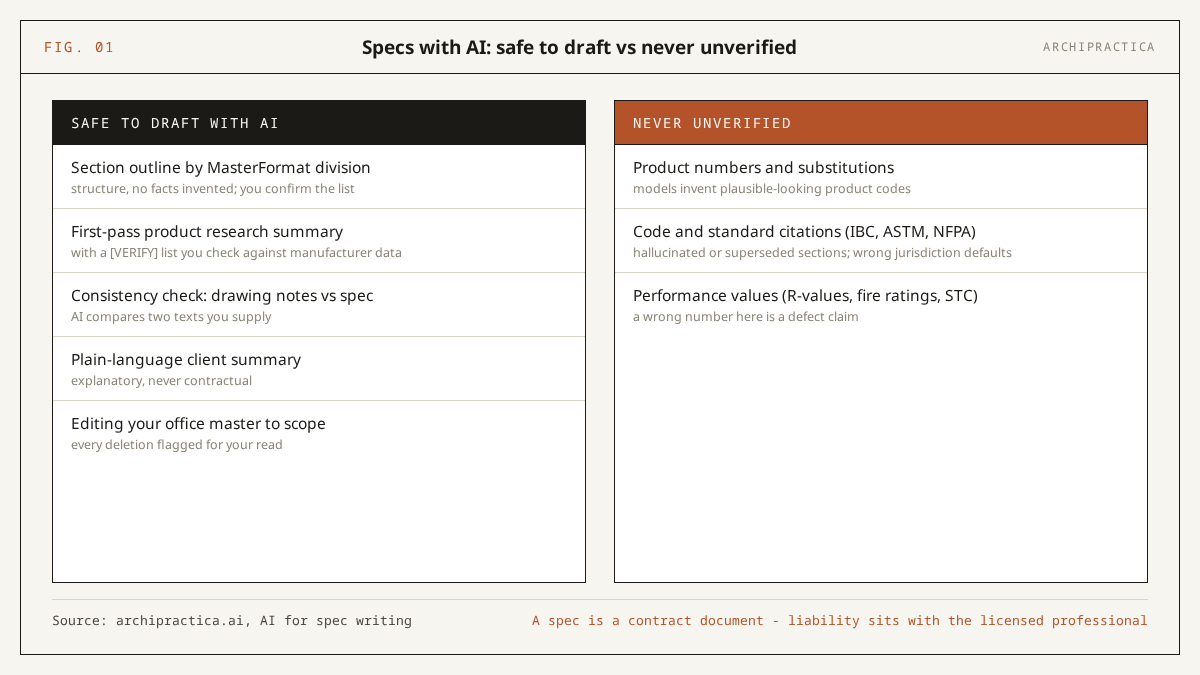
A test result helps explain the table’s never-unverified entries. Brian Potter’s test in Construction Physics (March 2023) had GPT-4 answer 156 of 222 architect-exam practice questions correctly - just over 70%. The wrong answers read as fluently as the right ones, because a model does not flag its own misses; a spec section drafted at that error rate reads fine and prices wrong. Models have improved since - the March 2026 Resolved test cited below shows how far - and the fabrication risk on specifics has shrunk without disappearing, which is why the 10 prompts in this guide forbid the model from supplying any fact your input did not contain.
Liability caveat. Specifications, code references and performance requirements are jurisdiction- and date-specific, and the responsibility for them sits with the licensed professional who seals the documents. Everything AI produces in this workflow is a draft for your review. The specific failure modes to expect: product numbers that do not exist, standard references that were withdrawn or superseded, US-centric defaults applied to other countries, and performance values copied from a different product line. Verify each against current manufacturer and code sources before issue.
The workflow: six steps from outline to issue
The sequence below keeps AI spec writing inside each step’s safe zone and forces verification between steps. The aim on a mid-size project is to remove the blank-page hours while leaving the several hundred decision points with you. Review time should not shrink; the drafting slog is what the workflow targets.
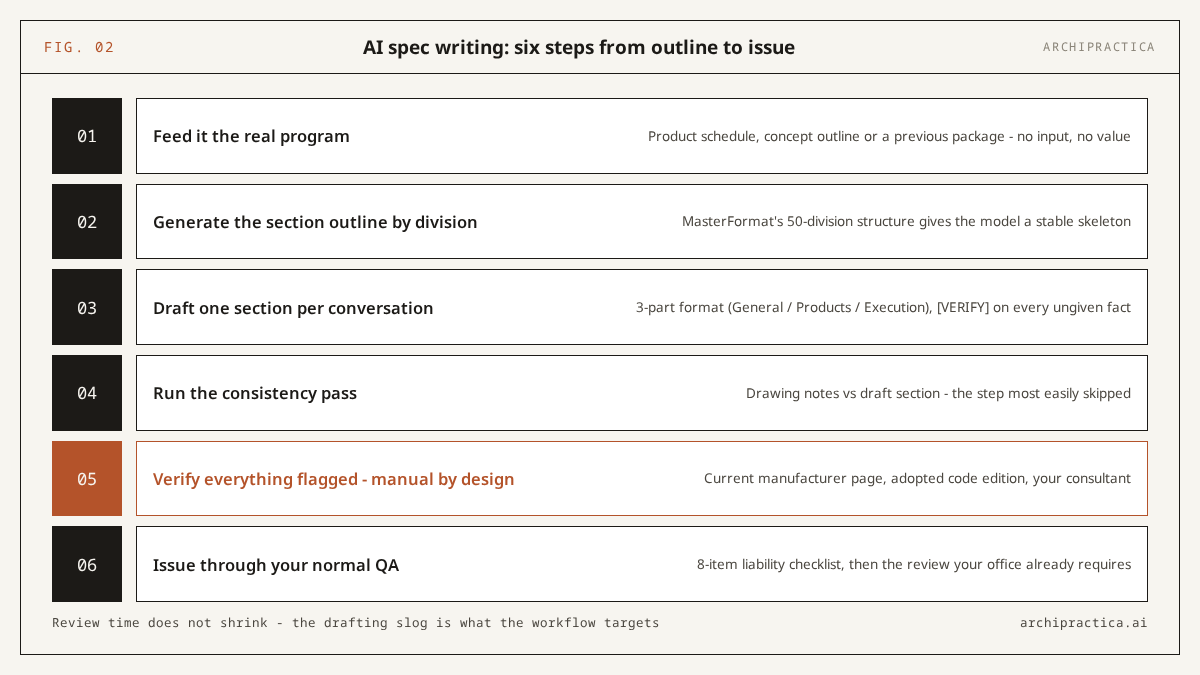
- Feed it the real program. Start from a concrete input: the product and materials schedule, the outline from your brief-to-concept workflow, or a previous project’s package. Without project input the model produces generic filler, and fixing filler takes longer than writing the section yourself.
- Generate the section outline by division. Use prompt 1 below. Review the proposed MasterFormat sections against your scope; the 50-division structure introduced in MasterFormat 2004 and kept in current editions (per the WBDG MasterFormat reference, checked October 2026) gives the model a stable, well-documented skeleton to work from.
- Draft one section per conversation. Working section by section keeps the whole exchange inside the amount of text the model can handle at once (its “context window”) and keeps the text for each review to a manageable length. Ask for the standard 3-part format (General / Products / Execution) with a [VERIFY] flag on every fact it was not given.
- Run the consistency pass. Paste your drawing notes and the draft section; ask for contradictions in terminology, materials and dimensions (prompt 5). This is the step most easily skipped - comparing two supplied texts for mismatches is a task models handle more reliably than writing either text from scratch.
- Verify everything flagged. Every [VERIFY] item gets checked against the current manufacturer page, the adopted code edition for your jurisdiction, or your consultant. This step is manual by design; your seal goes on what it produces.
- Issue through your normal QA. Run the eight-item liability checklist in this guide, then complete whatever review your office already requires. AI does not shorten this step and nothing in this guide suggests it should.
An independent March 2026 test by Resolved, an IT and AI consultancy working with AEC firms, illustrates these limits. Given a full Division 07 92 00 Joint Sealants section to summarize, Claude caught a non-standard 10-year warranty term that, in Resolved’s words, a junior reviewer “may or may not catch” - and the same test’s code-compliance task ended with the verdict “Sound method; needs professional verification”. That is the practical benefit - the review gets sharper and the responsibility does not move.
10 copyable prompts, by MasterFormat logic
These prompts follow one design rule: the model may organize, summarize, compare and flag, and it may never supply a fact that was not in your input. Two of them (1 and 2) come from our prompt library and were tested with Claude Sonnet 5.5 on 16 October 2026; the other eight follow the same pattern and are untested templates to adapt to your project inputs. They are written for use with either Claude or ChatGPT.
1. Outline spec sections from a product schedule
I will paste a product and materials schedule for a project. Draft outline specification sections organized by CSI MasterFormat division. For each section include: section number and title, a short description, the products from my schedule that belong there, and a [VERIFY] list of what must be confirmed with manufacturers or consultants before the section is developed. Do not invent product names, standards or performance values that are not in my schedule.2. Reference spec package gap review
I will paste a specification package from a previous project that we are using as a reference. For a project of this scope - [describe project type and scope in one sentence] - list: 1) which MasterFormat divisions are covered; 2) divisions this project will likely need that are missing; 3) sections whose requirements look unusual or contradictory, with the clause quoted. Review only - do not rewrite anything.3. Draft one section in 3-part format
Draft specification section [number and title, e.g. 08 11 13 Hollow Metal Doors and Frames] in CSI 3-part format (Part 1 General, Part 2 Products, Part 3 Execution) using ONLY the project information I paste below. Where standard practice requires a reference standard, a product, or a performance value that my input does not contain, write [VERIFY: what is needed] instead of a value. Do not cite any code section or ASTM/ANSI standard number unless it appears in my input.4. Edit an office master down to project scope
I will paste a section from our office master specification, then a one-paragraph description of this project's scope. Edit the master down to what this project needs. List every paragraph you deleted and why, every paragraph you modified with before/after text, and anything in the master that looks outdated and should be checked. Do not add new requirements, products or standards.5. Consistency check: drawing notes vs spec section
Below are (A) the general and keyed notes from our drawings and (B) a draft specification section for the same scope. List every inconsistency between them: terminology that differs for the same item, materials mentioned in one but not the other, dimensions or performance requirements that conflict, and notes that reference spec sections that do not exist in the package list I provide. Format as a table: item / what A says / what B says / suggested resolution. Do not rewrite either document.6. First-pass product research summary
I will paste excerpts from manufacturer datasheets for [product type, e.g. mineral wool insulation boards] from several manufacturers. Build a comparison table: manufacturer, product line, the performance values stated in each excerpt (with the exact wording), and gaps where an excerpt does not state a value. Add a [VERIFY] row listing what must be confirmed on current manufacturer documentation before any of this enters a specification. Use only the pasted excerpts - no outside knowledge of these products.7. Submittal register first pass
From the specification sections I paste below, extract every submittal requirement into a register: section number, submittal item, type (product data / shop drawings / samples / test reports / closeout), and the exact clause text that requires it. Flag any section that has requirements in Part 2 or Part 3 but no corresponding submittal article, and any duplicate requirements across sections. Extraction only - do not add requirements.8. Terminology and units sweep
Check the specification sections below for internal consistency: the same product or assembly called different names in different sections, mixed unit systems or formats (imperial vs metric, psi vs MPa), inconsistent defined terms (e.g. "Architect" vs "Designer"), and cross-references to section numbers that are not in the package list I provide. Return a findings table with section, line quote, and the inconsistency. Do not fix anything - findings only.9. Plain-language client summary
Translate the specification section below into a plain-language summary for a client who is not a construction professional. Explain what is being specified, the quality level chosen and what it means in practice, and which decisions are still open. Maximum 300 words. Add one line at the end stating that the specification document itself, not this summary, is the binding text.10. Pre-issue red-flag pass
Review the specification section below as a skeptical senior spec writer. Flag: any product name or model number (each needs manufacturer verification), any code or standard citation (each needs edition and jurisdiction verification), any performance value (each needs a source), warranty terms that differ from standard practice, and any clause that assigns design responsibility to the contractor. Return a numbered list with the quoted text and why it needs attention. You are a reviewer - change nothing.If a prompt asks for something your input does not contain, the correct output is a [VERIFY] flag. Treat a confident, specific answer in its place with suspicion. That one behavior separates this workflow from the fabricated-product-number failure reported on r/Architects in February 2026.
Manual masters, AI assistants, or spec software with AI?
For most small and mid-size practices the workable answer in October 2026 is a hybrid: keep your office master as the source of truth, use a general AI assistant for the summarize-compare-flag work, and watch the dedicated AI spec tools as they mature. The table is a feature comparison from vendor documentation and cited community reports, dated 17 October 2026; we have not benchmarked these platforms ourselves.
| Criterion | Manual + office master | General AI assistant (Claude / ChatGPT) | Spec software with AI |
|---|---|---|---|
| Content source | Your masters, MasterSpec, ARCAT and similar libraries | Whatever you paste in - nothing project-specific by default | Maintained commercial libraries (AIA MasterSpec in Deltek Specpoint; CSI-structured content in RIB SpecLink) |
| What the AI layer does | Nothing | Outline, summarize, cross-check, flag - the 10 prompts in this guide | Ask Dela (Specpoint, announced June 2024) answers questions from MasterSpec content; SpecLink.AI (beta from late 2024 into 2025) adds a co-pilot layer with quality checks and recommendations inside SpecLink Cloud, per vendor pages |
| Hallucination exposure | None from tooling | Highest - mitigated only by your prompts and verification | Lower by design; the AI retrieves from maintained libraries rather than generating from open training data (vendor claim - verify in your own trial) |
| Cost | Staff time; master upkeep | Consumer AI subscription per seat (check current vendor pricing) | Commercial subscription, quoted per firm; expect it to cost more than a consumer seat |
| Learning curve | Lowest, already in place | Low to start, discipline to use safely | Highest - new platform, migration of masters |
| Best for | Repeat typologies with a maintained master | The verification and summary layer around any master | Firms producing many packages per year that already live in these platforms |
Two things the table cannot capture. First, there is a free option: ARCAT’s SpecWizard generates 3-part CSI product spec sections at no cost; like any product-spec generator, its output needs a proprietary-language review before a public-bid package. In the same r/Architects thread, u/qabalist reported exactly that pattern: “i have used arcat’s spec wizard but i still go through and review thoroughly”. Second, no option removes the review. As u/ArchWizard15608 put it in the same thread, for an experienced hand with a good master it can be “much faster to just use a master than read all the drivel it spits out”. If your master is strong and your typology repeats, use the AI layer for checking, summarizing and client communication, and leave the drafting to the master.
For code research, which sits next to specs and carries higher risk, purpose-built tools like UpCodes Copilot retrieve from a maintained library of local code adoptions, which addresses the superseded-edition failure that general chat models carry. Coverage depends on whether your jurisdiction’s adoptions are in its library, and the verification duty stays the same.
The liability checklist before you issue
Run this checklist on every AI-assisted specification section before it enters the issued set. It is short enough to run per section, and it targets the documented AI failure modes: invented product numbers, superseded standards, unsourced performance values and silently dropped clauses. Print it, or run the red-flag pass (prompt 10) first and this list second.
- Every product name and model number confirmed on the manufacturer’s current page - today, by a human. This is the fabrication in the r/Architects story that opens this guide, and the one practitioners report most often in community threads.
- Every code, standard and test reference (IBC, ASTM, NFPA, ANSI, local amendments) checked for the correct edition adopted in your project’s jurisdiction. Models default to US references and to whatever edition dominated their training data.
- Every performance value - R-values, fire-resistance ratings, STC, wind loads, warranties - traced to a datasheet, a consultant’s confirmation, or your master. A value with no source behind it does not go in.
- Substitution language reviewed by you. AI must never decide what counts as an “approved equal”; that judgment is professional discretion and it carries the risk.
- Cross-references resolve. Every “as specified in Section XX XX XX” points at a section that exists in this package (prompt 8 finds these fast; you confirm).
- Deletions from your master accounted for. If AI edited a master down (prompt 4), read the deletion list - a silently dropped clause is as dangerous as an invented one.
- Confidentiality check. Client names, budgets and unreleased project details in prompts should match your office AI policy and your client agreements; use a plan that excludes training on your data.
- Your office QA still runs. Nothing in this checklist replaces the review your practice already requires on contract documents.
If a section cannot pass items 1-3, it is not ready, whoever or whatever drafted it. The RIBA’s July 2026 report puts the same point plainly: “Design outputs delivered and used without professional oversight creates unacceptable risks for the future.”
FAQ
Is AI reliable enough to write a full spec book?
No. The documented failure mode is confident fabrication of specifics - product numbers, standards, values - and a full book multiplies the surface area beyond what review can reliably catch. AI is dependable for the surrounding work: outlines, summaries, consistency checks, submittal extraction and client-facing summaries. Keep drafting anchored to your master or a maintained library and verify everything flagged.
Can ChatGPT or Claude pick products for my specifications?
They can compare products from datasheets you supply and summarize differences into a table, which does speed up product research. They cannot select or substitute products on their own authority: selection is professional judgment tied to performance requirements, availability and liability, and models routinely invent plausible model numbers when asked to be specific without source material.
Who is liable if an AI-drafted specification fails?
The licensed professional who sealed and issued the documents, same as with any delegated drafting. AI vendors’ terms of service disclaim design liability - check the terms of the one you use - and professional-indemnity cover follows your signature. Treat AI exactly like an unlicensed assistant: useful for drafts and checks, and nothing goes out without your verification.
How is asking Claude different from the AI in Specpoint or SpecLink?
A general assistant generates from whatever it absorbed in training - the open web, not your spec library - plus whatever you paste, so its fluency comes with fabrication risk you manage through prompts. Specpoint’s Ask Dela (June 2024) and SpecLink.AI (beta 2024-2025) retrieve from maintained specification libraries - AIA MasterSpec content in Specpoint’s case - which constrains the risk, per vendor documentation. They cost more and assume you work inside those platforms.
Can AI draft specs from AIA MasterSpec?
Only inside a platform licensed to carry it. AIA MasterSpec is a commercial master-specification library available through Deltek Specpoint, where the Ask Dela assistant (announced June 2024) answers questions from MasterSpec content, per vendor documentation. A general assistant such as Claude or ChatGPT has no MasterSpec access of its own: it works only with the sections you paste in under your own licence, where it can summarize, cross-check and flag - but the drafting should stay anchored to the licensed master.
Can AI check my specs against the building code?
It can find candidate code sections and summarize requirements fast, and purpose-built tools like UpCodes Copilot retrieve from maintained local-adoption libraries. Verification against the current edition adopted in your jurisdiction remains your task: general models hallucinate section numbers and cite superseded editions. Our Claude guide covers the code-research workflow and its limits in detail.
Will AI replace specification writers?
The evidence points the other way for now. AIA research (October 2025) found 6% regular AI use among architects, and the RIBA AI Report 2026 (July 2026) found 77% of respondents agreeing AI can never replace human creativity, even as adoption hit 74% of practices. What is shifting is the job’s center of gravity: less first-draft typing, more verification, coordination and decision-making - the parts that were always most demanding.
A concrete way to start: take one section from the package on your desk, paste its drawing notes and the draft text into prompt 5, and count the mismatches it finds. If it catches one you missed, the workflow has earned its review slot; if it catches none, you have spent ten minutes learning where this tool stands.
Sources
- r/Architects - “Ai for spec writing?” (February 2026)
- AIA - AI in specifications: Research insights (October 7, 2025)
- RIBA - AI adoption reaches tipping point across UK architecture (July 22, 2026)
- NBS - Two-fifths of industry now using AI, Digital Construction Report 2025 (September 18, 2025)
- WBDG - CSI MasterFormat reference (checked October 17, 2026)
- Deltek - Specpoint release: Smart Reports and Ask Dela (June 27, 2024)
- RIB Software - SpecLink.AI (checked October 17, 2026)
- Brian Potter - Could ChatGPT Become an Architect?, Construction Physics (March 29, 2023)
- Resolved - We Tested Claude AI on Six Real AEC Tasks (March 17, 2026)
More workflows in this series are collected under guides.
If this workflow saves you a drafting evening, the newsletter sends one like it every week, with the same sourcing discipline. Subscribe.