B–02Business
Claude Cowork for Architecture Firms: Setup, Uses, Limits
On this page
- What is Claude Cowork and is it still a product?
- What it costs: plans compared for a firm
- Setup for a firm: first session on a bounded project folder
- Which firm tasks does Claude Cowork actually fit?
- Delegation briefs you can copy
- Where the work runs: cloud sessions, local files, and your IT
- How do you govern Claude Cowork on a Team or Enterprise plan?
- Limits and failure modes
- FAQ
- Sources
Claude Cowork is Anthropic’s agentic workspace: Claude with permission to work in folders and tools you choose, planning and running a sequence of steps on its own. For an architecture or engineering firm, it handles multi-step document tasks such as minutes consolidation, submittal-log work and first-pass document review. It is included in every paid Claude plan from Pro at $17 to $20 a month to Team at $20 per seat (read 21 October 2026, USD, subject to change). Two conditions apply: Cowork belongs on the document-heavy, judgment-light side of practice, with licensed review before anything stamped or code-related leaves the office, and since 16 September 2026 Anthropic has been merging Cowork into the main Claude app, so buy the capability, not the name.
We did not run Cowork in a firm deployment. This guide to Claude Cowork for architecture and engineering firms is a documentation review based on Anthropic’s published documentation and release notes, read on 21 October 2026, plus attributed third-party reviews. Where I write “I’d start with”, that is my reading of the docs applied to a practice that signs drawings.
What is Claude Cowork and is it still a product?
Yes, Claude Cowork exists and ships in every paid Claude plan as of 21 October 2026. It is the mode of Claude that can read, edit and create files in folders you connect, then run a multi-step task using those files. Anthropic announced on 16 September 2026 that the separate mode is being folded into Claude itself, with tasks, projects, connectors and skills carrying over, so the folder-access capability continues under the Claude name.
Anthropic’s product-page FAQ states: “In regular chat, Claude responds to your messages but can’t access your files directly. In Cowork, Claude has permission to read, edit, and create files in folders you specify.” (product page, read 21 October 2026). The product has changed shape roughly every two months, so the release history below is part of the purchase decision.
| Date | Milestone | Source |
|---|---|---|
| 12 January 2026 | Research preview, macOS desktop, Max plans, local VM | Release notes, read 21 Oct 2026 |
| 16 January 2026 | Extended to Pro | Release notes |
| 25 February 2026 | Scheduled tasks | Release notes |
| 9 April 2026 | General availability, macOS and Windows | Release notes |
| 7 July 2026 | Web and mobile; cloud sessions in beta | Release notes |
| 16 September 2026 | Merge announced: “Claude Cowork and chat are merging into one Claude” | Cowork is now Claude, 16 Sep 2026 |
| 6 October 2026 | New Pro and Max tasks run in the cloud by default | Web, desktop, and mobile, read 21 Oct 2026 |
On 21 October 2026 the product page still carries the Cowork name under a banner reading “Claude Cowork is now just Claude. Rolling out to Pro and Max, with more plans to follow.” Team organizations, and Enterprise organizations whose admins have not turned on the unified-experience beta, keep the separate modes (Team and Enterprise plans, read 21 October 2026). Evaluate the folder access and the admin controls, and expect the menu labels to keep changing.
What it costs: plans compared for a firm
For a practice of two or more people I’d start with the Team plan at $20 per seat per month (read 21 October 2026, USD, subject to change): it is the cheapest tier with no training on your data by default and an admin console. A sole practitioner can run Cowork on Pro at $17 to $20 a month, accepting the vendor’s warning about usage limits. Enterprise is custom-priced and adds role-based access and observability.
| Criterion | Pro | Max 5x | Max 20x | Team | Enterprise |
|---|---|---|---|---|---|
| Price (read 21 Oct 2026, USD) | $17/month annual ($200 up front); $20 monthly | $100/month | $200/month | $20/seat/month, 2-150 seats | Custom |
| Cowork included | Yes | Yes | Yes | Yes | Yes |
| Usage headroom | Lowest; vendor warns limits go faster than chat | Larger | Largest consumer tier | Per seat | Custom; admin spend limits |
| Admin & governance | Privacy toggle only | Privacy toggle only | Privacy toggle only | Org toggle; cloud toggle on by default; OpenTelemetry | Org toggle; cloud toggle off by default; RBAC; spend limits; OpenTelemetry |
| Who it fits | Sole practitioner testing one folder | Solo heavy user | All-day delegation | Firms of 2-150 | Firms needing role controls and IT sign-off |
Compared: 21 October 2026, from Anthropic’s published documentation (document review; no test run). Prices from the product page, which states they exclude tax and are “subject to change at Anthropic’s discretion”; governance facts from Team and Enterprise plans.
The Pro card itself warns: “Claude Cowork consumes limits faster than Chat. For heavy usage, consider upgrading.” (product page, read 21 October 2026). Anecdotal community reports say the warning understates the effect. Tallyfy’s review: “A single Cowork session doing complex file operations can burn through as much quota as dozens of regular chat messages. On the entry-level Pro plan, you’ll hit your limits fast.” (Tallyfy, updated 1 September 2026, secondary).
Setup for a firm: first session on a bounded project folder
The safe first session takes seven steps, and the two that protect client data are the privacy setting and the folder boundary. On a consumer plan you switch off “Help improve our AI models” before any client file is touched; on Team or Enterprise the commercial terms already exclude training. Then you give Cowork one dedicated working folder for one project and run the first task in Manually approve mode.
- Choose the plan. Pro or Max for a sole practitioner, Team for 2 to 150 seats, Enterprise where IT requires role controls (product page, read 21 October 2026).
- Install the desktop app or open claude.ai. Local folder access needs the Claude Desktop app open (Get started with Cowork, read 21 October 2026).
- Set the privacy toggle. On Pro and Max, training use “follows the Help improve our AI models setting in Settings > Privacy” (Web, desktop, and mobile, read 21 October 2026); switch it off before client work. On Team and Enterprise, conversation data “isn’t used to train Claude” (architecture overview, read 21 October 2026); the pricing page lists training as “None by default” (Claude pricing, read 21 October 2026).
- Create a bounded project folder. Anthropic’s guidance is a dedicated working folder with sensitive files kept out (Use Claude Cowork safely, read 21 October 2026). For a firm, that means a copy of one project’s minutes, logs and specs; keep the server outside that boundary.
- Start the session and select Cowork. Select “Cowork” in the message box, describe the task and review the proposed approach before letting it run (Get started with Cowork); accounts on the unified experience no longer see the selector.
- Set permission mode to Manually approve for anything client-facing. The documented modes are “Manually approve” (Claude pauses and asks), “Automatically approve” (Claude screens each action, using more of your limit) and “Skip all approvals”, of which Anthropic says “Only use this when you completely trust every action” (same Get started page), while the unified experience offers Auto and Manual, with Manual the default.
- Add global and folder instructions. Global instructions apply to every session; folder instructions attach to a connected local folder (same Get started page). The global one states what Cowork must never conclude on its own; the folder one names the project and the document conventions.
If your staff already use Claude in the chat window, the habits in our guide to Claude for architects still apply, and Cowork adds file access. The review step is unchanged.
Which firm tasks does Claude Cowork actually fit?
Claude Cowork for architecture and engineering firms has a narrow but useful role: document sequences where the inputs live in a folder, the output is a draft or a register, and a person checks it before it leaves the office. Minutes consolidation, submittal and RFI log housekeeping, tender summaries and divergence lists fit. Code conclusions, life-safety and structural decisions, quantities and anything sealed stay with a licensed professional.
| Fits (delegate with review) | Does not fit (keep with a licensed professional) |
|---|---|
| Meeting-minute consolidation across a project into one issues register | Code-compliance conclusions of any kind |
| Submittal log and RFI tracker housekeeping | Life-safety and structural decisions: fire strategy, means of escape, structural interfaces |
| First-pass summaries of tender or bid document packs | Quantities, measurement and valuations |
| Drawing register vs specification divergence lists (flags for a person to check) | Anything sealed, stamped or client-signed |
| Fee-letter and report drafting from your templates | Final contract language |
| Folder organization and batch renaming | Client-confidential material outside the bounded folder |
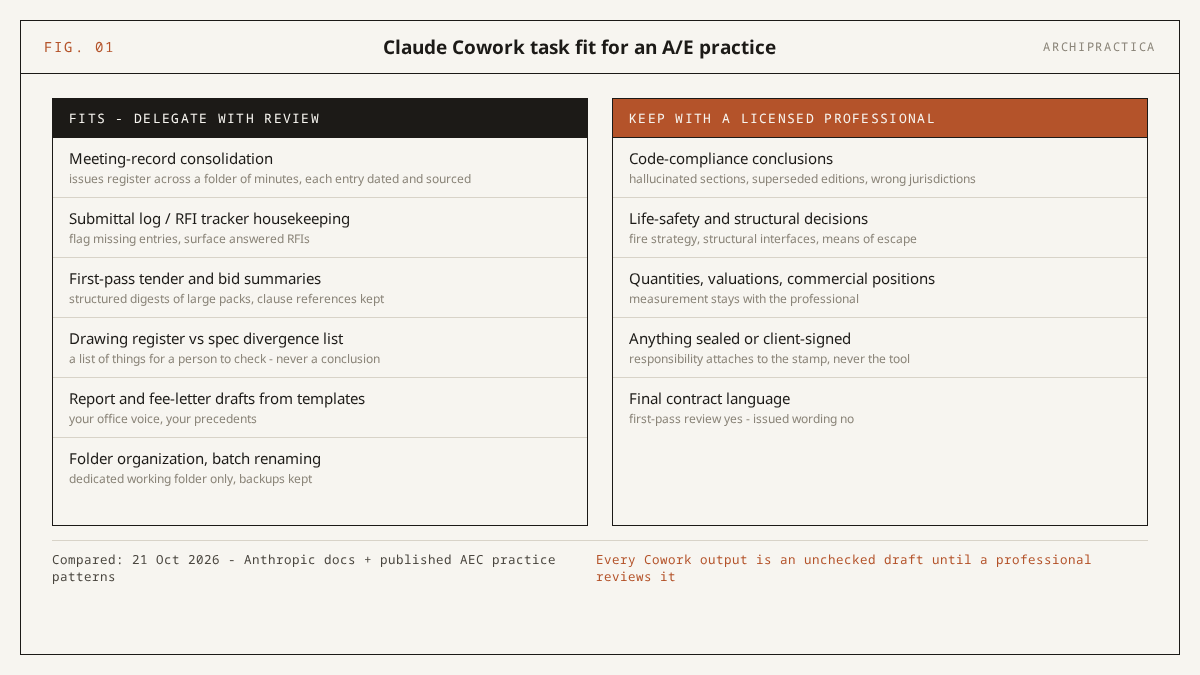
Same basis as the plans table (documentation read 21 October 2026; no test run). The left column draws on Anthropic’s example use cases (folder organization, batch renaming, transcript analysis, first-pass contract review with clause citations) in Get started with Cowork and the product page. The right column is our standing liability rule plus the AI Institute’s list of what stays with a person.
The AEC task patterns come from two consultancies, cited as evidence of practice; we did not verify their results. POLR AI (read 21 October 2026) teaches submittal review, RFI drafting and bid leveling. The AI Institute (read 21 October 2026) describes tender pack summaries, register vs specification reconciliation and meeting consolidation, and lists what stays human, including “Anything touching life safety. Fire strategy, structural interfaces, means of escape.” The AI Institute insists on review before anything is issued, which matches the pattern in how architects actually use AI, our synthesis of seven published surveys.
POLR AI’s rule of thumb: “If the answer is in your head, use Chat. If the answer is the same every time, use a Project. If the answer lives in a folder of files that change every week, use Cowork.” (POLR AI, read 21 October 2026). By that rule a submittal log, which changes every week, sits on the Cowork side, and a fire strategy stays with the engineer.
Delegation briefs you can copy
These two delegation brief templates were written for this article; they have not been run in a Cowork session, so adapt them before use. Both carry a rule I’d put in every firm brief - do not infer a position where a document is silent; mark it as not stated.
Use when: months of minutes sit in one folder and you need a single issues register with traceable sources before a client or contractor meeting.
You are working in the connected folder [PROJECT-NAME]/minutes, which holds the
meeting minutes for [PROJECT-NAME] from [START-DATE] to [END-DATE].

Task: consolidate every open issue, decision and action across all minutes into
ONE issues register saved as [PROJECT-NAME]-issues-register.xlsx in this folder.

Columns: Issue ID (I-001 onward); Topic, in the words of the minutes; Status as
last recorded (Open / Closed / Not stated); Owner as last recorded (or "Not
stated"); Date of first and last mention; Source file and item number for first
and last mention; Verbatim extract of the latest entry (max 40 words).

Rules:
- Use ONLY what is written in the minutes. Do not infer a position where a
  document is silent; write "Not stated".
- Do not close an issue unless a minute explicitly records it as closed.
- Do not edit, rename or delete any existing file in the folder.
- List any file that will not open in a separate sheet named "Problems".
- Finish with a 5-line summary: files read, files skipped, issues found,
  issues marked Not stated, anything you were unsure about.
Spot-check at least five entries against the source minutes, including every entry marked Closed, and confirm no file was skipped. The minutes remain the record of what was agreed; the register only indexes them.
Use when: a drawing register and a specification have been updated separately and you want the apparent mismatches listed for a person to work through before issue.
You are working in the connected folder [PROJECT-NAME]/review, which holds the
current drawing register [DRAWING-REGISTER-FILE].xlsx and the current
specification [SPECIFICATION-FILE].pdf.

Task: produce [PROJECT-NAME]-register-vs-spec.xlsx. This is a list of things
for a person to check rather than a conclusion; keep the title row
"Apparent divergences - for review".

For each apparent divergence record: Ref (D-001 onward); what the register
says (drawing number, title, revision, date) with row reference; what the
specification says, with section, clause and page; Type (revision mismatch /
in register only / in spec only / naming / Other); verbatim extract from each
side (max 30 words each); Confidence (High only where both texts are explicit).

Rules:
- Compare only what is written. Where a document is silent, write "Not stated".
- Do not state whether either document is correct, compliant or complete.
- Do not modify, rename or delete any file in the folder.
- Record every file you could not read in a sheet named "Problems".
- Finish with: files read, number of divergences, number marked Low.
Every row is a question for the person responsible for the register and the spec. Check that clause references point to the specification edition in the folder.
Where the work runs: cloud sessions, local files, and your IT
Since 6 October 2026 a new Cowork task on Pro or Max runs in the cloud, in an isolated per-session sandbox on Anthropic’s infrastructure, with no setting to run it locally. The desktop app still has to be open for Cowork to reach local folders, local MCP servers or the browser. Any local file a cloud session opens is processed on Anthropic’s servers. Team and Enterprise admins choose cloud or local mode per organization.
The cloud change is documented in Use Claude Cowork on web, desktop, and mobile (read 21 October 2026): the “Only on your computer” option was removed and “There’s no setting to choose where a task runs on Pro and Max plans.” Folders stay on your computer; the cloud fetches a copy of just the file a task needs. The same page lists what still needs the desktop app open: local files and folders, local MCP servers (MCP being the connector standard that plugs Claude into other software), browser use and computer use. Anthropic’s Cowork in the cloud article (read 21 October 2026) states it plainly: “If the desktop app is closed, sessions in the cloud keep running but can’t reach your computer.”
Anthropic’s architecture overview (read 21 October 2026) describes the sandbox (an isolated workspace that cannot touch anything outside itself) as: one temporary sandbox per session, destroyed at the end; no reach into private networks; a mandatory egress proxy with allow-listed destinations; short-lived session-scoped tokens only. The same document says the agent’s work, “including any local files it opens through the desktop app, is processed on Anthropic’s servers rather than staying on the device” - I’d put that line in front of any partner who assumes a local folder stays local. The safety page adds: “Isolation limits where Claude’s code runs. It doesn’t limit what Claude reads or does.” (Use Claude Cowork safely, read 21 October 2026).
| Criterion | Cloud session | Local session |
|---|---|---|
| Where code runs | Isolated temporary sandbox on Anthropic-managed infrastructure | On-device agent loop; code in an isolated Linux VM |
| Local file reach | Through an open desktop app; file copies processed on Anthropic’s servers | Connected folders read on the device by the agent loop |
| Admin visibility | Compliance API (30-day window); OpenTelemetry on Team and Enterprise | History on users’ computers; no central management or deletion |
| Who gets it | New Pro and Max tasks since 6 October 2026; Team by default; Enterprise with the cloud toggle on | Pre-6 October tasks on Pro and Max; Enterprise by default; Team with the cloud toggle off |
Same basis as the earlier tables (documentation read 21 October 2026; no test run); facts from the architecture overview and Team and Enterprise plans.
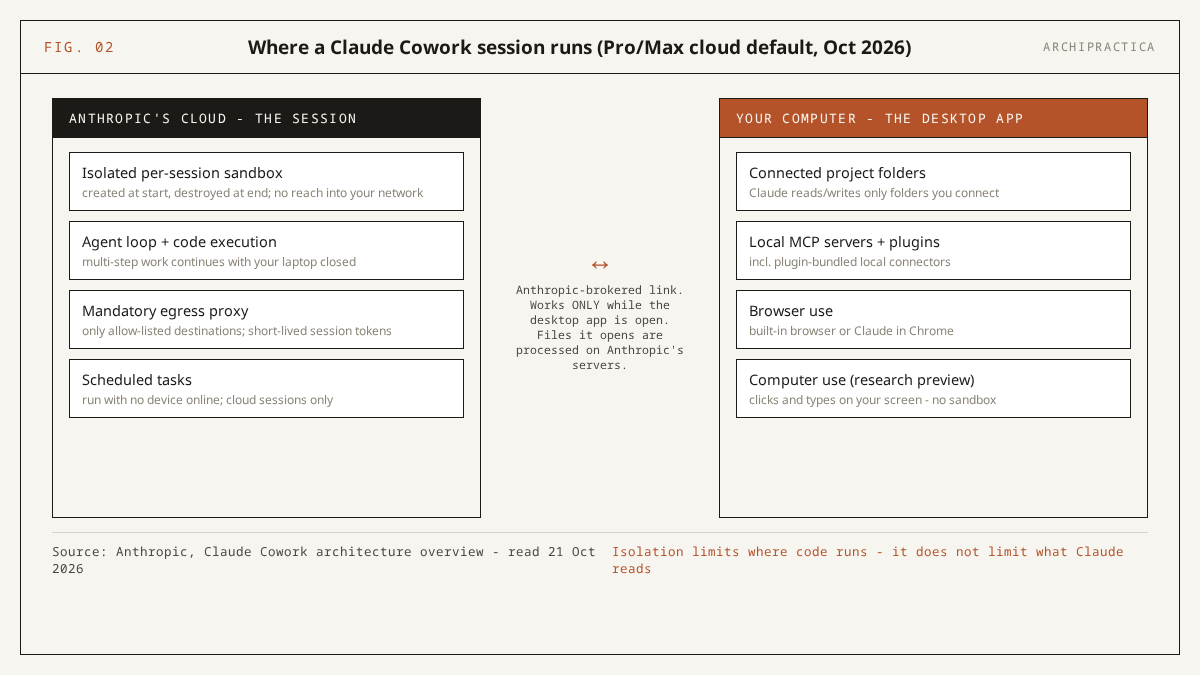
For whoever runs your IT: endpoint security tools see neither mode. In Anthropic’s words, “The VM is isolated from host-based security tools by design, and sessions in the cloud run entirely outside your endpoints, so EDR tools can’t observe them either. If your compliance posture depends on endpoint visibility, account for this before rolling out Cowork.” (architecture overview, read 21 October 2026). The local design most early reviews describe is now the minority path; Simon Willison wrote on 12 January 2026: “As far as I can tell Claude Cowork is regular Claude Code wrapped in a less intimidating default interface and with a filesystem sandbox configured for you without you needing to know what a ‘filesystem sandbox’ is.” A page promising that the work stays on your machine describes that January architecture.
How do you govern Claude Cowork on a Team or Enterprise plan?
You govern Cowork with four admin controls and two team habits. The controls are the org-wide Cowork toggle, the “Run Cowork in the cloud” toggle (on by default for Team, off by default for Enterprise), Enterprise role-based access with spend limits, and OpenTelemetry plus the Compliance API for records. The habits are Manually approve mode for client-facing work and a written rule that no stamped or code-compliance output is delegated.
Anthropic documents the controls in Use Claude Cowork on Team and Enterprise plans (read 21 October 2026). The org-wide toggle is on by default; the cloud toggle is on for Team and off for Enterprise, so an Enterprise firm starts in local mode until an admin decides otherwise. Enterprise adds RBAC via groups and custom roles plus group spend limits (product page), and Team and Enterprise owners can stream tool calls, file access and approval decisions to a SIEM via OpenTelemetry, which the same support page warns “doesn’t replace audit logging for compliance purposes.” Cloud sessions are captured in the Compliance API, which returns sessions from the most recent 30 days; local sessions are stored on users’ computers, admins cannot centrally manage or delete them, and deletion endpoints for local sessions “aren’t available yet”, so verify the current state in your own tenant at purchase.
On the remaining risk, the same page says: “Cowork has unique risks due to its agentic nature and internet access. We’ve implemented safety measures including model training and content classifiers, but the risk of prompt injection attacks is non-zero.” (same page). Prompt injection is an instruction hidden inside a file or web page that the model mistakes for yours; a tender pack from an unknown bidder is exactly such a file. The vendor’s guidance is Manual mode for sensitive files, first-time tools and hard-to-undo actions (Use Claude Cowork safely, read 21 October 2026), and I’d make Manually approve the firm default for anything client-facing.
Three further controls apply. Deletion protection applies in every mode - “Claude requires your explicit permission before permanently deleting any files” (Get started with Cowork, read 21 October 2026). For scheduled tasks, which run in the cloud with no device online, Anthropic advises starting simple, avoiding consequential actions, reviewing outputs and pausing unused schedules; a weekly RFI status summary qualifies and a task that emails clients does not. The vendor’s accountability line belongs in your policy verbatim: “You remain responsible for all actions taken by Claude performed on your behalf.” (Use Claude Cowork safely, read 21 October 2026).
The admin console limits what Cowork can reach. Your policy has to cover the rest: what staff may hand it and who signs the result. So write the rules down - our architecture firm AI policy template covers tool approval, disclosure and data controls.
Limits and failure modes
Cowork has five failure modes for an A/E firm. It burns usage allowance fast; it reads no CAD or BIM formats; cloud sessions have size and persistence limits; it has no idea what your approval chain or jurisdiction requires; and the vendor acknowledges a non-zero prompt-injection risk. The product is also in the middle of a merge, with names and menus still changing.
Quota burn. The product page warns that “Claude Cowork consumes limits faster than Chat” (product page, read 21 October 2026), its FAQ explains that agentic tasks coordinate multiple sub-agents and tool calls, and Automatically approve mode consumes more of the limit than the other modes (Get started with Cowork, read 21 October 2026). Anecdotal reports go further: Tallyfy (updated 1 September 2026) says Pro users “hit your limits fast”, and community threads such as “Am I using claude cowork wrong?” on r/ClaudeAI (2026, anecdotal) report quota burn, slowness and errors on some tasks.
No CAD or BIM formats. Anthropic’s file-type list covers documents (.docx, .pdf, .txt, .md, .html), spreadsheets, presentations, JSON and similar data formats, common images and code (product page, read 21 October 2026). No .dwg, .rvt or .ifc appears on it. Cowork reads a register exported to a spreadsheet or a sheet printed to PDF, and the model file itself stays closed to it. Revit users should read Claude in Revit instead.
Cloud-session limits. Very large files may be slower, and working files Claude does not hand back are not kept after the session (Claude Cowork in the cloud, read 21 October 2026). Scheduled tasks created in the cloud cannot use local folders or local connectors, and past cloud sessions are searchable by title only.
Judgment. Tallyfy’s Amit Kothari, a secondary source: “Cowork doesn’t know your company’s approval hierarchy, your naming conventions, or your compliance requirements. It can process files brilliantly, but it can’t decide whether the output is right for your organization.” (Tallyfy, updated 1 September 2026). Folder instructions close part of that gap, and the approval chain remains with the people currently responsible for it.
Prompt injection. The vendor’s statement that the risk “is non-zero” (Team and Enterprise plans, read 21 October 2026) sits beside its advice to watch for suspicious actions. Simon Willison wrote on 12 January 2026: “I do not think it is fair to tell regular non-programmer users to watch out for ‘suspicious actions that may indicate prompt injection’!” Manually approve mode and a bounded folder are the two controls a non-programmer can operate.
A moving target. Since the 16 September 2026 merge announcement, mode names have changed, the Chat/Cowork selector is disappearing and global instructions have moved. Any internal how-to you write needs a revision date for that reason alone.
Important. Treat every Cowork output - a summarized tender pack, a reconciled register, a drafted report - as an unchecked draft from a new hire: useful, fast, and unsigned. Code interpretations, life-safety decisions, quantities and anything that carries your stamp must be verified by a licensed professional against current documents in your jurisdiction. AI tools hallucinate code sections, cite superseded editions and default to the wrong jurisdiction; Anthropic itself states (read 21 October 2026) that you remain responsible for all actions Claude takes on your behalf.
FAQ
What is the difference between Claude Cowork and Claude Code?
Both use the same agentic approach: Claude plans and executes a sequence of steps on your files. Claude Code is built for software engineering and ships as a terminal tool, desktop app, web interface and mobile app. Anthropic’s FAQ says “Cowork is built for non-coding knowledge work” (product page, read 21 October 2026). For an A/E firm, Cowork is the one that handles minutes, logs and specs.
Is Claude Cowork included in a normal Claude subscription?
Yes, in every paid plan. The free tier does not include it. On 21 October 2026 the product page listed Pro at $17 a month with annual billing or $20 monthly, Max at $100 and $200, Team at $20 per seat for 2 to 150 seats, and Enterprise at custom pricing, all USD before tax and subject to change. Team seats include Cowork in both tiers.
Is Claude Cowork safe for confidential client files?
The controls exist, and you have to check each one. Bound the session to a dedicated project folder. On Team and Enterprise, conversation data is not used for training by default; on Pro and Max, turn off “Help improve our AI models” in Settings > Privacy (Anthropic, read 21 October 2026). Local files a cloud session opens are processed on Anthropic’s servers, so check your client agreements first.
Does Claude Cowork still exist after the September 2026 merge?
Yes. Anthropic announced on 16 September 2026 that Cowork and chat are “merging into one Claude”, rolling out on Pro and Max first, with chats, tasks, projects, connectors and skills carrying over. On 21 October 2026 the product page still carried the Cowork name. Team organizations, and Enterprise organizations whose admins have not turned on the beta, keep the separate mode.
Can Claude Cowork check my drawings against the building code?
No. The vendor’s file-type list covers documents, spreadsheets, images and code, with no .dwg, .rvt or .ifc on it (product page, read 21 October 2026), and code-compliance conclusions stay with a licensed professional in your jurisdiction in any case. Cowork can structure code excerpts you paste or save into the folder, as a reading aid for your own review, with every clause checked by you against the current edition.
A concrete next step: pick one closed project, copy its minutes folder, run the first delegation brief above in Manually approve mode, and compare the register that comes back against your own record of the job. One afternoon on a closed project tells you more about Claude Cowork for architecture and engineering firms than any review, this one included.
Sources
All sources for this review of Claude Cowork for architecture and engineering firms were read on 21 October 2026; each support page backs a distinct claim.
- Claude Cowork product page - Anthropic (read 21 October 2026)
- Get started with Claude Cowork - support.anthropic.com (read 21 October 2026)
- Claude release notes - support.anthropic.com (read 21 October 2026)
- Use Claude Cowork on Team and Enterprise plans - support.claude.com (read 21 October 2026)
- Claude Cowork architecture overview - support.claude.com (read 21 October 2026)
- Use Claude Cowork safely - support.claude.com (read 21 October 2026)
- Use Claude Cowork on web, desktop, and mobile - support.claude.com (read 21 October 2026)
- Claude Cowork in the cloud - support.claude.com (read 21 October 2026)
- Claude Cowork and chat are now one Claude - claude.com blog (16 September 2026)
- Claude pricing - claude.com (read 21 October 2026)
- First impressions of Claude Cowork - Simon Willison (12 January 2026)
- Getting started with Claude Cowork - POLR AI (read 21 October 2026, consultancy, secondary)
- Claude Cowork for AEC teams - AI Institute (read 21 October 2026, consultancy, secondary)
- Claude Cowork review - Tallyfy (updated 1 September 2026, vendor blog, secondary)
Each week we send one AI setup an architect can copy, with the sources and the limits spelled out the way this page does. Subscribe.