D–02Data
Best AI Floor Plan Generators 2026: 8 Tools, One Brief
On this page
There is no single best AI floor plan generator. PlanFinder (EUR 16 a month, about $18, running inside Revit, Rhino and Archicad) fits a small studio producing early-stage apartment layouts. Maket suits quick residential concepts (free tier to try it, DXF export from $20 a month). TestFit or ArkDesign serve developer-scale feasibility at developer prices.
Many of the tools that rank for this query output a picture of a plan with no editable geometry behind it. This comparison is built from each vendor’s public documentation and pricing pages, accessed 20-21 October 2026, and scored against one written brief; we did not run the tools hands-on.
We created no accounts and ran no generator: all eight tools sit behind a signup or a sales demo, so every claim below traces to a dated vendor page, and we say “the vendor states” where a claim is the vendor’s own. Where a pricing page and its documentation disagree, we quote both.
Our yardstick is a brief we wrote ourselves: a 12-unit urban infill apartment building, 4 stories, about 950 m2 (10,200 sq ft) GFA, a mix of 1- and 2-bed units, ground-floor parking, three layout options required within a week. The deliverable the studio needs is editable geometry (DXF, DWG or RVT), not a picture.
The brief we scored the tools against
We scored each tool on four criteria: multifamily scope beyond a single house; editable output (DXF, DWG or a BIM model); several options per run; and an entry price within a small-studio software budget (under EUR 100 or $100 a month). The brief in one line: 12 units, 4 stories, about 950 m2, a 1- and 2-bed mix, ground-floor parking, three layout options within a week, editable geometry as the deliverable.
We wrote the brief for this comparison. A “yes” in the tables means the vendor documents the capability on a page we cite; we did not watch any tool deliver it.
Which AI floor plan generator is best for a small studio?
For a small studio working in Revit, Rhino or Archicad, PlanFinder is the best AI floor plan generator based on the documentation we read: the only one of the eight with a paid tier under EUR 20 a month that runs inside the BIM or CAD host. Maket is the quickest route to a residential concept with DXF export, at $20 a month in a browser.
Rayon fits a studio that wants collaborative 2D CAD with AI assistance at EUR 19 (about $21) a month per seat. Categories in the table are ours; every other cell comes from the vendor page named in each tool’s profile.
| Tool | Category | Price from | Free option | Output formats | Works inside | Best for |
|---|---|---|---|---|---|---|
| Maket | Text-to-plan, consumer-grade | $20/mo (Homeowner); Pro $100/mo | Free: 30 one-time credits, single-floor generation | PDF, DXF and renders from $20/mo; editor on Free | Web browser only | Quick residential concepts |
| PlanFinder | BIM/CAD plugin generator | EUR 16/mo billed annually (Pro) | 30-day trial, all plugins, 8 plans per run | Native geometry in the host application; browser version | Revit, Rhino, Archicad, Grasshopper, browser | Early-stage apartment layouts in a small studio |
| Finch | Firm-rules generative design | EUR 79/mo (Basic); Enterprise from EUR 14,500/yr | Free: editing tools and performance metrics, no generation | Rhino/Grasshopper/Revit geometry; custom BIM export on Enterprise | Rhino 8/7/6, Grasshopper, Revit 2023-2027, Forma; Archicad via Grasshopper | Multifamily unit mix and circulation on firm rules |
| Rayon | CAD with AI assist | EUR 19/mo billed yearly (Pro) | Free: full editor, limited PDF and DWG export | PDF and DWG; vector plan from an image (Beta) | Browser, standalone | Collaborative 2D CAD with AI redraw |
| TestFit | Developer feasibility | $195/mo (Parking Solver); Site Solver from $15,000/yr | None listed on the pricing page | 2D and 3D massing, quantity takeoffs; Revit and SketchUp integration in all plans per the pricing FAQ, file formats not listed | Own platform; MCP for Claude or ChatGPT | Site feasibility at developer scale |
| ArkDesign | Developer feasibility, US | $180/mo (Pro) | Lite: 3 projects, 3 PDF reports | PDF reports; Revit export only on Premium $1,800/mo | Web; Revit export on Premium | US multifamily schematic design with US code presets |
| Autodesk Forma | Site planning | Numeric price not shown on the buy page; sold standalone and in the AEC Collection | Via Autodesk trial | Site and massing models | Autodesk cloud, Revit ecosystem | Site and massing studies, no unit plans |
| mnml.ai | Plan-image rendering | $29/mo (Lite) | 100 signup credits, no card | PNG and DXF | Web; plugins for SketchUp 2026, Revit 2024-2027, Rhino 8, Grasshopper; MCP server | Styling and rendering an existing plan image |
Feature comparison from vendor documentation and pricing pages, accessed 20-21 October 2026. Not a hands-on test: we did not run these tools. ArkDesign data cache-verified 17 October 2026 (its site blocks automated access).
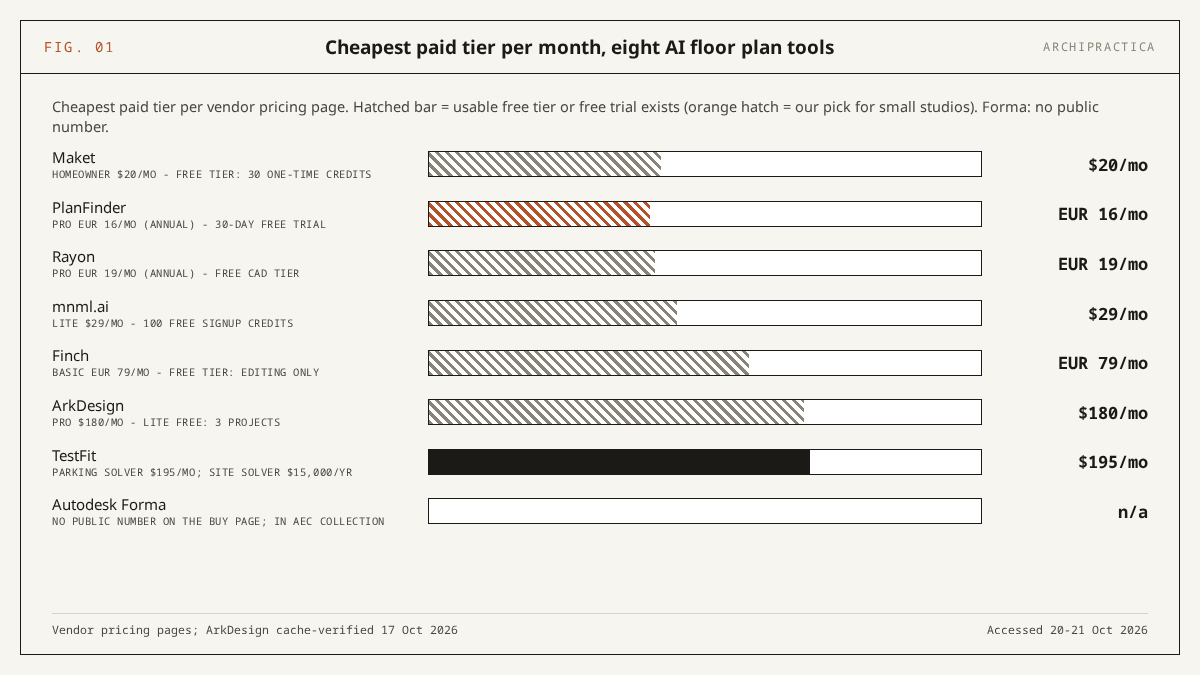
EUR prices are listed as published by the vendors; USD figures in parentheses use the European Central Bank reference rate of 21 October 2026 (1 EUR = 1.1234 USD), rounded.
What each tool produces
Four of the eight produce editable geometry a studio can develop: PlanFinder (apartment layouts inside the BIM or CAD host), Finch (unit mix and circulation in Rhino or Revit, with restricted access to full AI plan generation), Maket (a DXF from a browser tool built for houses) and Rayon (DWG from a plan you already have). TestFit and ArkDesign produce feasibility massing at developer prices. Forma creates site massing, and mnml.ai renders plan images.
Maket
According to Maket’s pricing page (accessed 21 October 2026), the Free plan gives 30 one-time AI credits, single-floor plan generation, a floor plan editor and renders, with no card required. Homeowner at $20 a month adds 300 credits a month, multi-floor generation, AI floor plan editing and PDF, DXF and render exports; Pro at $100 a month gives 3,000 credits and plan upload with human validation. Each generated or uploaded floor costs 20 credits, each optimization 5 and each render 10. The Homeowner plan name signals its target market.
PlanFinder
PlanFinder (accessed 21 October 2026) generates, fits and furnishes “orthogonal apartment layouts for early-stage studies”, in the vendor’s words, through plugins for Revit, Rhino, Archicad and Grasshopper plus a browser version. The Free Trial lasts 30 days, includes all plugins and up to 8 plans per run, and requires no card; Pro costs EUR 16 a month billed annually as a device-locked named seat with up to 24 plans per run.
Finch
According to Finch’s get-started page (accessed 21 October 2026), the Free tier covers a single user with all editing tools and real-time building performance metrics; Basic at EUR 79 a month (about $89) adds optimized unit-mix and circulation generation after a 14-day trial. Enterprise starts at EUR 14,500 a year (about $16,300) for three seats minimum. That tier lists “AI-powered floor plan generation”, a “Code and compliance check” that names no code, custom BIM export, and claims “Schematic design with LOD 300-level precision”.
The Finch FAQ states that “AI Unit plan generation is currently only available for our strategic AI customers.” The same FAQ lists Rhino 8, 7.24+ and 6 SR35+, Grasshopper, Revit 2023-2027 and Forma as compatible, and Archicad via Grasshopper.
Rayon
Rayon’s pricing page (accessed 21 October 2026) lists a Free plan with the full editing experience, unlimited public models and limited PDF and DWG export; Pro at EUR 19 a month billed yearly brings full PDF and DWG export and 100 AI credits a week; Team costs EUR 35 (about $39) per editor. The Work with AI documentation labels the whole AI feature set as Beta and describes a “Generate floor plan” tool that produces a vector plan with walls, openings and zones from an image or drawing of a plan.
TestFit
According to TestFit’s pricing page (accessed 21 October 2026), Parking Solver costs $195 a month billed monthly and covers parking automation, 2D and 3D massing and a yield estimator, with add-ons for Site Intelligence (+$150, zoning and environmental data), Pro Forma (+$170) and an MCP Connection (+$100). Generative design, building presets and custom unit types are available with Site Solver from $15,000 a year billed annually. The vendor’s press release of 28 July 2026 says the platform is “used to evaluate more than 3,200 deals per week”, a self-reported figure we have not verified; its own pricing page, captured the same day as the rest of our data, puts the count at “650+ Deals Evaluated per Week”.
ArkDesign
ArkDesign offers a free Lite tier with 3 projects and 3 PDF reports, a Pro tier at $180 a month, and Revit export only on Premium at $1,800 a month; its product is schematic design and feasibility for US multifamily housing with US building-code presets, which do not apply outside the US. These figures come from our cache-verified capture of the ArkDesign pricing page dated 17 October 2026; the live site blocked our automated fetches on 21 October 2026, so we do not link it.
Autodesk Forma
According to Autodesk’s Forma overview (accessed 21 October 2026), the product, now named Forma Site Design, is “AI-powered cloud software for site planning and analysis” that creates site and massing models “in minutes with design automations”. It is sold as its own subscription and included in the AEC Collection; its buy page showed price placeholders and no numeric figure on 21 October 2026. Revit 2027’s Autodesk Assistant (a tech preview announced in April 2026) answers questions about the model and does not generate layouts.
mnml.ai
mnml.ai’s pricing page (accessed 21 October 2026) lists Lite at $29 a month for 1,000 credits (around 100 fast renders), Plus at $49, Studio at $119, and 100 free signup credits with no card. Exports are PNG and DXF, with plugins for SketchUp 2026, Revit 2024-2027, Rhino 8 and Grasshopper. Its Floor Plans tools render or texture a plan you upload. The pricing page describes no room-layout feature, which is why it scores “no” on the brief.
How the eight tools scored on our brief
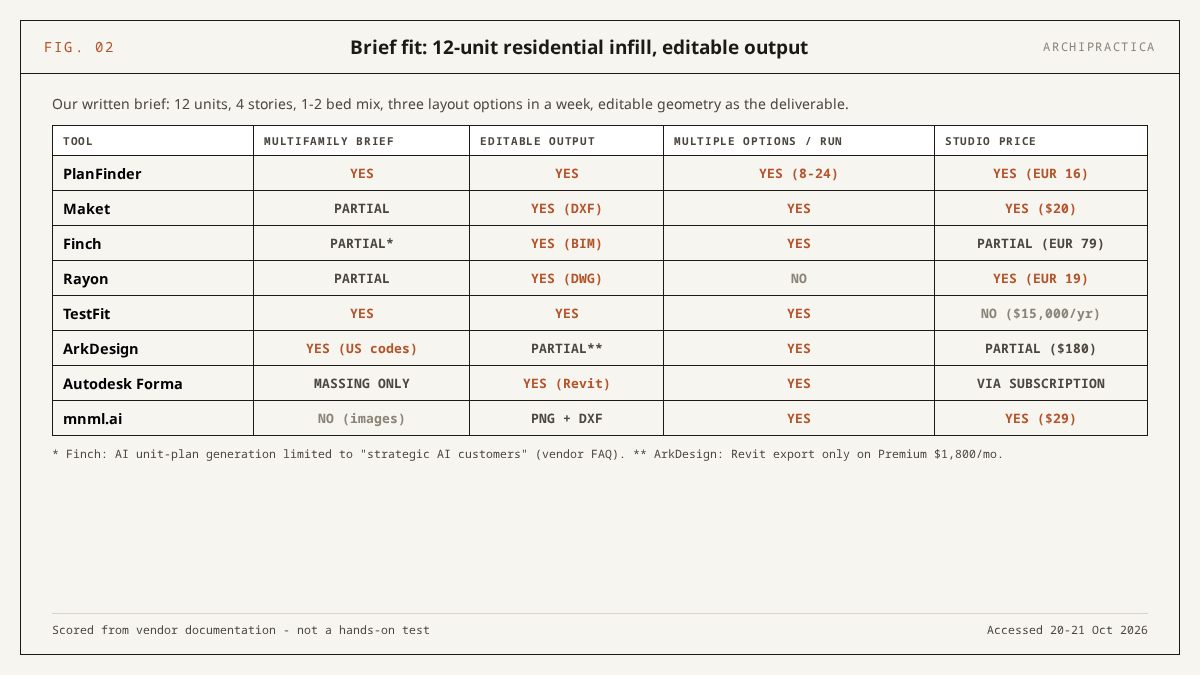
PlanFinder is the only tool that meets all four criteria for our 12-unit brief based on the documentation we read: multifamily scope, geometry in the host application, 8 to 24 plans per run, EUR 16 a month. TestFit and ArkDesign meet the multifamily criterion and fail on price or on US-only code presets. Finch fails on restricted AI generation, Maket on scale, Rayon and Forma on scope, and mnml.ai on all four.
| Tool | Handles a 12-unit multifamily brief | Editable output (DXF/DWG/BIM) | Multiple options per run | Price within a small-studio budget | Note |
|---|---|---|---|---|---|
| Maket | partial | yes | partial | yes | Single-floor only on Free; multi-floor and DXF from $20/mo; web-only, built for houses |
| PlanFinder | yes | yes | yes | yes | Orthogonal apartment layouts for early-stage studies; 8 plans per run on trial, 24 on Pro |
| Finch | partial | yes | partial | partial | Basic generates unit mix and circulation; AI unit-plan generation only for “strategic AI customers” (FAQ) |
| Rayon | partial | yes | partial | yes | Generates a vector plan from an existing image or drawing; AI tools labeled Beta |
| TestFit | yes | partial | yes | no | Revit and SketchUp integration in all plans per the pricing FAQ; file formats not listed; generative design from $15,000/yr |
| ArkDesign | yes | partial | partial | partial | US code presets; PDF reports on Lite and Pro, Revit export only on Premium $1,800/mo |
| Autodesk Forma | no | partial | partial | partial | Site and massing, no unit plans; no numeric price on the buy page |
| mnml.ai | no | partial | no | no | $29/mo buys plan rendering; there is no layout engine to price |
Scored from vendor documentation and pricing pages accessed 20-21 October 2026, against our own written brief.
Can any of them check building codes?
No. We found no AI floor plan generator that documents compliance checking against named building codes outside US presets, as of 21 October 2026. ArkDesign documents US building-code presets, TestFit’s Site Intelligence add-on supplies US-focused zoning data, and Finch’s Enterprise page lists a “Code and compliance check” without naming a code or edition. We found no published independent benchmark comparing these eight tools on a common brief either.
According to Maket’s own blog (published 10 March 2026, captured 20 October 2026), AI-generated floor plans “are not construction documents. A licensed architect or structural engineer needs to review any layout before permitting or building.” The same post states: “Local building codes, structural loads, and zoning requirements are outside what current AI tools handle.”
Treat every generated layout as a starting point. A licensed professional must verify it against the current code edition in the applicable jurisdiction, because the generators do not know your local egress widths and travel distances, your accessibility standard, or the fire-separation ratings between units and the parking below them. Our guide to AI building code checks records where the chat assistants fail on exactly these questions.
What can you do for free?
Every tool except TestFit offers a free tier or trial, and the free options offer different capabilities. PlanFinder’s 30-day trial is the only one that lets you run the generator at full capability inside your own Revit or Rhino model. Maket’s 30 credits buy one floor and a couple of tweaks, Finch Free edits and measures without generating, and Rayon Free is a working CAD editor with export limits.
| Tool | Free tier | Real limit | Enough for |
|---|---|---|---|
| Maket | Free plan, no card | 30 one-time credits; 20 per floor, 5 per optimization | One single-floor plan plus two optimizations, or one floor plus one render |
| PlanFinder | Free Trial, no card | 30 days; all plugins; up to 8 plans per run | Testing apartment layouts on a live project inside Revit, Rhino or Archicad |
| Finch | Free tier, single user | Editing tools and performance metrics; no generation | Evaluating the modeling environment and its metrics |
| Rayon | Free plan | Full editor, unlimited public models, limited PDF and DWG export | Drawing and collaborating; full DWG export needs Pro |
| mnml.ai | 100 signup credits, no card | Credits spent on renders of plan images | A handful of styled plan images |
| ArkDesign | Lite | 3 projects, 3 PDF reports | A first look at US multifamily feasibility, PDF only |
| Autodesk Forma | Via Autodesk trial | Numeric price not public on the buy page; included in the AEC Collection | Site and massing studies if you already hold an Autodesk subscription |
| TestFit | None listed on the pricing page (21 October 2026) | Entry is Parking Solver at $195/mo | Nothing without a paid plan or a sales conversation |
Free tiers from vendor pricing pages accessed 20-21 October 2026. Vendors change free allowances without notice.
When is a chat assistant the better tool?
When the task is text-based. Claude and ChatGPT can critique a layout you describe, estimate program areas from a unit mix and a site area, and draft the brief you hand to a generator, all without drawing a usable plan. They are ruled out as unverified code checkers.
In the 12-task test behind our published comparison of Claude and ChatGPT for architects, both assistants returned correct egress values but Claude cited the corridor-width rule under a superseded section number, and our Claude guide lists invented citations as a known failure mode in regulatory work.
TestFit uses this division of tasks in its feasibility product. Its MCP announcement of 28 July 2026 describes connecting Claude or ChatGPT so that the user directs a feasibility study in natural language while, in the vendor’s wording, “TestFit’s engine still generates the layouts and the real quantity takeoffs, no hallucinating”. The claim holds in the narrow sense that a parametric engine produces the geometry and the language model only steers; the sentence is still marketing copy, and we have not seen the engine run.
Text-to-plan from a language model alone is still research. The arXiv paper Text-to-Layout: A Generative Workflow for Drafting Architectural Floor Plans Using LLMs (Duggempudi et al., submitted 30 August 2025) describes an LLM-driven workflow for schematic plan drafting as an experimental pipeline, and no shipping product among our eight works that way.
Limits and failure modes
Four limits apply across the category, each documented in a dated source. The tools focus on residential work, their site data focuses on the US, most of what ranks for this query produces images, and the profession that has adopted AI most widely reports little gain in design quality from it.
Maket’s blog (10 March 2026) states that “Most AI floor plan generators are optimized for residential layouts” and calls the commercial options “extremely limited”; units above a retail ground floor mean drawing the shop yourself.
Site data stops at the border. The same post states: “Features like automated lot lookup and zoning data typically only work in the US.” TestFit’s Site Intelligence and ArkDesign’s code presets fit the same pattern, so a European or Latin American studio buys the layout engine without the context layer.
Most of what ranks for this query outputs an image. Of the top-10 results in our own search on 21 October 2026, 9 were tool landing pages and 1 a vendor listicle, and most of those tools output PNG images that resemble plans. A picture cannot be opened in Revit, dimensioned or checked against a code; check which file format a tool exports first.
According to the RIBA AI Report 2026 news release (22 July 2026), practices using AI on at least some projects rose from 59% in 2025 to 74% in 2026, while fewer than one in six respondents (17%) agree their designs are better because of AI. Our comparison of seven adoption surveys shows how many of the practices in that 74% are still experimenting.
FAQ
Is there a completely free AI floor plan generator?
Partly: Maket’s Free plan gives 30 one-time credits, enough for one single-floor plan and two optimizations. PlanFinder’s 30-day trial runs all plugins with up to 8 plans per run, and then ends. Finch Free and Rayon Free are editors: Finch Free has no generation, and Rayon Free has export limits. No tool in the set generates multifamily layouts on a free tier that does not expire.
Can AI floor plan generators produce construction documents?
No, and the vendors say so themselves. Maket’s blog (10 March 2026) states that AI-generated plans “are not construction documents. A licensed architect or structural engineer needs to review any layout before permitting or building.” The outputs are early-stage layouts, massing or rendered images. Dimensioning, detailing, structure, services and code compliance remain the licensed professional’s work in every jurisdiction we know of.
Which AI floor plan generator works inside Revit?
PlanFinder ships a Revit plugin alongside Rhino, Archicad and Grasshopper, at EUR 16 a month after a 30-day trial. Finch lists compatibility with Revit 2023-2027 and Rhino, with AI unit-plan generation restricted to “strategic AI customers” per its FAQ. mnml.ai has a Revit 2024-2027 plugin for rendering plan images, and ArkDesign exports to Revit only on its $1,800-a-month Premium tier.
How accurate are AI-generated floor plans?
We found no independent benchmark measuring accuracy across these tools. Vendors make their own claims: Finch describes “LOD 300-level precision” on Enterprise, TestFit says its engine produces “real quantity takeoffs”, Maket’s Pro tier offers human-validated plan uploads. Maket’s own blog places building codes, structural loads and zoning outside what current tools handle. Treat accuracy as unverified until you run your own trial on your site.
Did Archipractica test these tools hands-on?
No. We created no accounts and ran no generator. All eight tools sit behind a signup or a sales demo, so we compared them from their public pricing and documentation pages, accessed 20-21 October 2026 (ArkDesign cache-verified 17 October 2026), and scored them against one written brief of our own.
Sources
- Maket - Pricing (accessed 21 October 2026)
- Maket - AI in Building Design: Where It Helps and Falls Short (blog) (published 10 March 2026, captured 20 October 2026)
- PlanFinder - Home and pricing (accessed 21 October 2026)
- Finch - Get started and pricing (accessed 21 October 2026)
- Finch - FAQ (documentation) (accessed 21 October 2026)
- Rayon - Pricing (accessed 21 October 2026)
- Rayon - Work with AI (documentation) (accessed 21 October 2026)
- TestFit - Pricing (accessed 21 October 2026)
- TestFit - News: MCP support announcement (published 28 July 2026, accessed 21 October 2026)
- Autodesk - Forma overview (accessed 21 October 2026)
- mnml.ai - Pricing (accessed 21 October 2026)
- RIBA - AI adoption reaches tipping point across UK architecture (news release) (22 July 2026)
- arXiv - Text-to-Layout: A Generative Workflow for Drafting Architectural Floor Plans Using LLMs (submitted 30 August 2025)
- European Central Bank - Euro foreign exchange reference rates (21 October 2026)
ArkDesign pricing cache-verified 17 October 2026; its site blocked our automated access on 21 October 2026, so we do not link it here.
The weekly letter flags the next price change or restricted feature among these tools before you start a trial, with the vendor page and date attached. Subscribe.