D–03Data
Best AI Tools for Architects 2026: One Brief, 11 Tools
On this page
- How did we test, and what did we not test?
- Which AI text assistant is best for architects?
- Which AI rendering tool should an architect pick?
- What about AI floor plan and feasibility tools?
- Do BIM assistants and document tools earn a place yet?
- What can you do for free?
- How do you choose without wasting a month?
- FAQ
- Sources
The best AI tools for architects in 2026 are one short list per task category, because no single tool wins: Claude, ChatGPT or Gemini for text work; Veras or mnml.ai for renders inside your modeler; PlanFinder for floor plans in a small studio. Text work is the one category we ran ourselves, on a brief with three planted conflicts, and all three assistants found every conflict. The render and floor-plan picks rest on what each vendor’s documentation says, read on 22 October 2026.
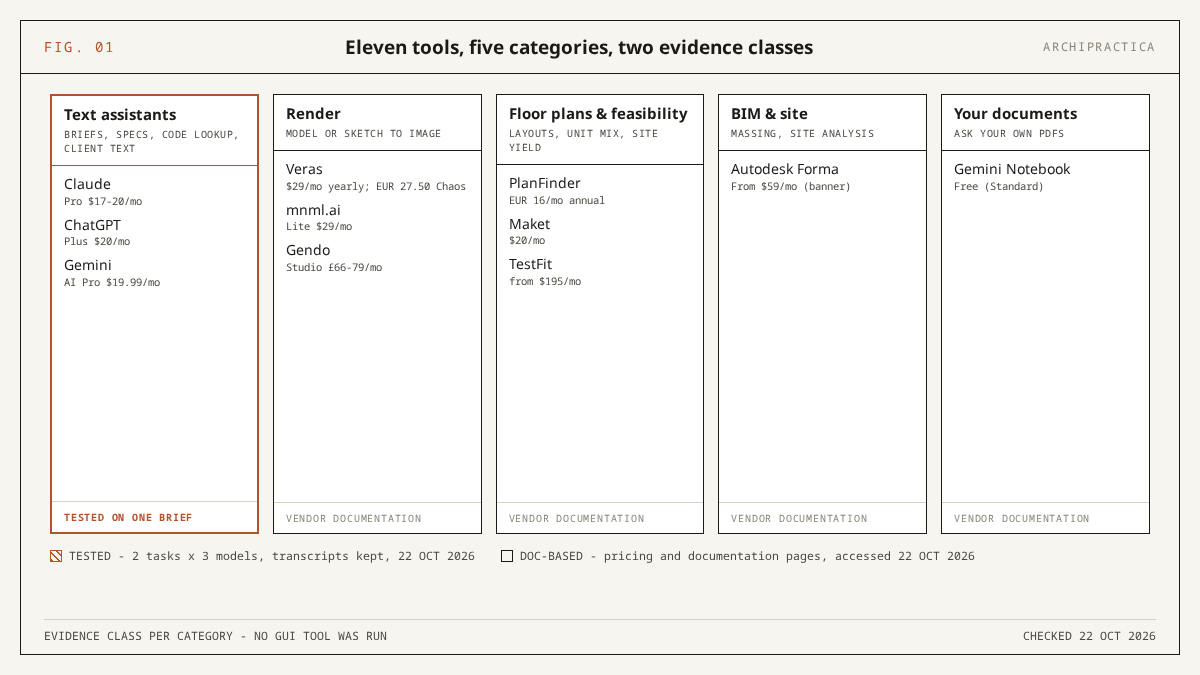
On 22 October 2026 we ran the three text assistants through two tasks on one project brief we wrote ourselves, each model run programmatically from a command-line client, one run per task per model, with every transcript kept. The other eight tools we priced and scored from their vendor documentation and pricing pages on the same day. We created no accounts and ran none of the GUI tools, so every render or floor-plan statement below is a reading of a vendor page, labeled as such.
How did we test, and what did we not test?
We tested one category and read the rest. Claude, ChatGPT and Gemini each received the same two tasks on a brief we wrote with three planted conflicts, and the six transcripts are our evidence. Veras, mnml.ai, Gendo, PlanFinder, Maket, TestFit, Autodesk Forma and Gemini Notebook are GUI products behind a signup or a sales demo, so their rows come from vendor documentation and pricing pages fetched on 22 October 2026.
The brief describes a fictional four-storey infill apartment building we called Elm Yard, and we planted three conflicts a careful architect would catch on first read. The unit schedule (8 x 45 m2 plus 4 x 70 m2) sums to 640 m2 against a stated 700 m2 net target. Four floors at 3.2 m plus a 1.2 m parapet give 14.0 m against a 13.0 m zoning cap. The ground floor holds 9 parking spaces where the municipality requires 12.
Task 1 asked each model to list every internal conflict with the arithmetic shown, then list the missing information, and to invent nothing. Task 2 asked for a concept note under 150 words plus three client questions, marking any unknown with the tag [NEEDS INPUT]. With one run per task per model, the results are a dated observation of six transcripts; we claim no statistical benchmark.
Two limits on scope: we ran the model families from a command-line client, so the claude.ai, chatgpt.com and gemini.google.com apps with their file-upload, canvas and image features went untested. We also found no published independent benchmark that tests text, render and floor-plan AI tools for architects on one common brief, as of 22 October 2026. When we searched “best AI tools for architects” on 22 October 2026, three of the top ten results were tool vendors ranking their own product first. So we split the list by category and dated every table.
Which AI text assistant is best for architects?
On our brief, in one run per task, none of the three beat the others on accuracy: Claude (Sonnet 5), ChatGPT (GPT-6 Astra) and Gemini (4 Argon) each found all three planted conflicts with the arithmetic shown correctly. They differed on instruction discipline and output hygiene.
Gemini wrote the longest analysis and found one conflict we had not planted; it also broke the 150-word cap at 169 words and left LaTeX markup behind. ChatGPT wrote the shortest concept note, though its conflict list ran to 1,196 words against Claude’s 867. Claude stayed within every cap and stated it had inferred nothing.
| Criterion | Claude (Sonnet 5) | ChatGPT (GPT-6 Astra) | Gemini (4 Argon) |
|---|---|---|---|
| Found all 3 planted conflicts | Yes (640 m2, 14.0 m, 9 vs 12) | Yes (640 m2, 14.0 m, 9 vs 12) | Yes (640 m2, 14.0 m, 9 vs 12) |
| Arithmetic shown correct | Yes | Yes | Yes |
| 150-word cap respected (task 2) | Yes, 141 words | Yes, 133 words | No, 169 words (heading excluded) - Gemini broke the cap |
| [NEEDS INPUT] discipline | Honored, 1 use | Honored, 2 uses | Honored, 4 uses |
| Output hygiene | Clean verbatim quoting; closed by stating it had inferred no values beyond the quoted figures | Clean; separated established conflicts from conditional ones | LaTeX markup ($$…$$, \text) that pastes as noise outside renderers |
| Monthly price of the plan family | Claude Pro $17 billed annually or $20 billed monthly | ChatGPT Plus $20 | Google AI Pro $19.99 / 21.99 EUR |
Tested: 22 October 2026, versions: claude-sonnet-5, gpt-6-astra, gemini-4-argon-medium, each run programmatically from a command-line client, one run per task per model.
Gemini also found a conflict we had not planted. It showed that 950 m2 of GFA cannot hold 700 m2 of net residential area on three upper floors plus a 9-car ground floor, and it wrote out the 712.5 m2 and 98.2% efficiency math. ChatGPT separated “established” conflicts from “conditional” ones, noting that the height breach depends on the street datum. Claude flagged a secondary net-to-gross tension and ended with an explicit no-inference statement.
Prices for the plan families, per Claude’s pricing page (22 October 2026): a free plan, Pro at $17 a month billed annually or $20 billed monthly, Max from $100 a month. Per OpenAI’s help articles on ChatGPT Plus and ChatGPT Pro (22 October 2026): a free plan, Plus at $20 a month, Pro tiers at $100, $200 and $500 a month. A ChatGPT Go tier at $8 a month was on openai.com’s pricing page on 20 October 2026; that page was login-walled to us on 22 October 2026.
Per the Gemini subscriptions page (22 October 2026, served to us in German with EUR prices): a free tier, AI Pro at 21.99 EUR a month, AI Ultra from 99.99 EUR (5x the AI Pro limits) to 219.99 EUR (20x). The USD figures of $19.99, $99.99 and $199.99 come from our rendered capture of Google’s AI plans page on 20 October 2026. The plan prices are not the prices of the models we ran: per our 20 October test, GPT-6 Astra is the Pro-plan reasoning option and the $20 Plus chat runs GPT-6 Sol, while Gemini 4 Argon is available on AI Pro.
The pattern repeats across our longer runs. In our 12-task test of 18 October 2026, Claude against ChatGPT for architects, Claude (Sonnet family) reviewed briefs and RFPs most thoroughly but broke one word cap and mis-cited an IBC section by edition, while GPT-6 Astra followed instructions most closely. In our 20 October 2026 test of ChatGPT against Gemini, Gemini 4 Argon wrote the most thorough brief, RFP and spec reviews while GPT-6 Astra caught a calendar error Gemini missed, and 7 of 12 tasks tied. Our Claude guide for architects and the prompt library show the brief-audit workflow, and the prompts transfer across all three assistants.
The task 1 prompt, generalized so you can paste your own brief under it:
You are assisting a practicing architect. Below is a project brief received from a client. Read it carefully and do the following, in this order:

1. List every internal conflict or inconsistency you can find in the brief (where one stated fact contradicts another, including any arithmetic you need to do to show it). For each conflict, quote the exact figures involved and show the calculation.
2. List missing information an architect would need before starting schematic design.
3. Do NOT invent any facts that are not in the brief. If something cannot be determined from the brief, say so.

BRIEF:

[paste the full text of your brief here]
Run it on a brief you have already audited by hand and compare its list with yours.
Which AI rendering tool should an architect pick?
By documentation: Veras if you want AI rendering inside the modeler you already use; mnml.ai if you want a $29 monthly tier with free plugins and DXF export; Gendo if you want unlimited watermarked trials before paying in pounds. The table reads each vendor’s pages as of 22 October 2026, and Veras was priced in two currencies through two shops that same day.
| Criterion | Veras | mnml.ai | Gendo |
|---|---|---|---|
| Cheapest paid tier | evolvelab.io: $29/mo named license billed yearly ($348/yr), $59 billed monthly; Chaos shop: EUR 27.50/mo billed annually (EUR 330/yr) | Lite $29/mo (1,000 credits/mo, about 100 Fast renders); Plus $49/mo; Studio $119/mo | Studio £79/mo, or £66/mo billed annually |
| Runs inside | SketchUp 2021-2025, Revit 2021-2026, Rhino 7/8, Archicad 28, Vectorworks 2024/2025, Autodesk Forma, plus a web app | Plugins for SketchUp, Revit, Rhino and Grasshopper, free to install | Not covered on the pricing page we read |
| Free option | 30 renders and a 15-day trial | 100 signup credits, no card | Free plan: unlimited generations with watermark, 1k export, 1 active canvas |
| Output / export | Renders from the host model | PNG and DXF exports | 1k export on the free plan |
| Where it is sold | evolvelab.io (USD) and the Chaos shop (EUR); EvolveLAB is part of the Chaos ecosystem | mnml.ai | gendo.ai |
Feature comparison from vendor documentation and pricing pages, accessed 22 October 2026. We did not run these tools.
Per the Chaos EvolveLAB shop (22 October 2026), a Veras named license costs EUR 27.50 a month billed annually, EUR 330 a year, and a floating license EUR 41.50 a month, EUR 498 a year. EvolveLAB’s own Veras page, read the same day, still showed USD prices: a named license at $59 a month billed monthly or $29 a month billed yearly ($348), and a floating license at $51 a month ($612 a year), with its Buy button leading to the Chaos shop. Check which shop serves your country before you compare.
EvolveLAB’s Veras page lists SketchUp 2021-2025, Revit 2021-2026, Rhino 7/8, Archicad 28, Vectorworks 2024/2025 and Autodesk Forma, with a web app besides, and offers 30 renders and a 15-day trial free. mnml.ai’s pricing page puts Lite at $29 a month for 1,000 credits, which the same page equates to about 100 Fast renders; signup gives 100 free credits with no card. Its plugins for SketchUp, Revit, Rhino and Grasshopper are free to install, and exports are PNG and DXF.
Gendo’s pricing page, in GBP, promises on the Free plan at £0 unlimited generations with a Gendo watermark, 1k export, one active project canvas, 50 assets per canvas and history limited to 10 image sets. Studio is £79 a month or £66 billed annually. We cannot tell you which produces the better image, since we generated none.
What about AI floor plan and feasibility tools?
Reading the vendor pages only: PlanFinder for a small studio that wants plan generation inside Revit, Rhino, Archicad or Grasshopper at EUR 16 a month; Maket for quick credit-based layouts with PDF and DXF export at $20 a month; TestFit for developer-scale parking and site feasibility from $195 a month. Every plan these tools generate is a sketch for a licensed professional to check, and Maket says so on its own blog.
| Criterion | PlanFinder | Maket | TestFit |
|---|---|---|---|
| Cheapest paid tier | Pro EUR 16/mo billed annually | Homeowner $20/mo (300 credits); Pro $100/mo (3,000 credits) | Parking Solver $195/mo billed monthly; Site Solver from $15,000/yr |
| Runs inside | Revit, Rhino, Archicad, Grasshopper, and a browser | Not checked by us | Not checked by us |
| Free option | 30-day free trial with all plugins | 30 one-time credits | None listed on the pricing page (it offers a demo) |
| Output and cost per plan | Plans inside the host app | 20 credits per floor generated; PDF, DXF and render exports | Parking and site feasibility studies |
| Who the pricing targets | Small studios already in Revit, Rhino or Archicad | Homeowners and quick concept studies | Developers and feasibility teams |
Feature comparison from vendor documentation and pricing pages, accessed 22 October 2026. We did not run these tools.
Per PlanFinder’s site (22 October 2026), Pro costs EUR 16 a month billed annually, with a 30-day free trial of all plugins, inside Revit, Rhino, Archicad and Grasshopper or in a browser. The same site describes the generator as fitting orthogonal apartment layouts for early-stage studies, so expect rectilinear options for a first study. Maket’s pricing page gives 30 one-time free credits; Homeowner costs $20 a month with 300 credits and PDF, DXF and render exports, Pro $100 a month with 3,000 credits, and each generated floor costs 20 credits. TestFit’s pricing page lists the Parking Solver at $195 a month billed monthly and the Site Solver from $15,000 a year, a developer’s budget line.
Maket’s own blog wrote on 10 March 2026: “AI-generated floor plans are excellent for exploration and planning conversations, but they are not construction documents. A licensed architect or structural engineer needs to review any layout before permitting or building.” The same rule covers code compliance in every tool on this page, text assistants included. AI output is a starting point that a licensed professional must verify against the current code edition in the applicable jurisdiction. These tools cite superseded sections and default to the wrong jurisdiction unless told otherwise; our guide to AI building code checks shows the failure modes we recorded.
Do BIM assistants and document tools earn a place yet?
Two of the eleven tools sit outside the three main categories, and each earns a place with a condition attached. Autodesk Forma belongs on the list for site planning if your practice already buys from Autodesk, since it also ships inside the AEC Collection. Gemini Notebook (formerly NotebookLM) belongs on the shortlist of any practice with a Google account: its Standard tier is free and its answers are grounded in the documents you upload.
Per Autodesk’s Forma overview (22 October 2026), Forma Site Design is AI-powered cloud software for site planning and analysis covering sun, wind and noise, sold standalone and inside the AEC Collection. The page banner reads “Starting at $59 / month”, while the page’s own FAQ prices a Forma Site Design subscription at $85 monthly, $700 annually or $2,100 for 3 years, and the AEC Collection at $460 monthly or $3,675 annually. Ask Autodesk which of the two figures applies to you before you budget.
Google’s Gemini Notebook plans article (22 October 2026) says the Standard tier is free with a Google account and higher limits come with paid Google AI plans. Its product overview (28 October 2026) describes answers as “grounded information based on your sources with clear in-line citations”. For an architect, that means asking questions across a planning policy PDF, a client brief and your standard specification, with answers pointing back to your own pages. Google’s overview also says Gemini Notebook “can make mistakes”, so the code-check caveat above applies to any clause it quotes.
What can you do for free?
Enough to trial every category on one real project, as long as nothing leaves the office. Claude, ChatGPT and Gemini all have free tiers that run the brief-audit prompt above. Veras gives 30 renders over 15 days, mnml.ai 100 signup credits, Gendo unlimited watermarked generations at 1k, PlanFinder 30 days with all plugins, Maket 30 one-time credits, and Gemini Notebook’s Standard tier costs nothing. None of them is enough to deliver client work from.
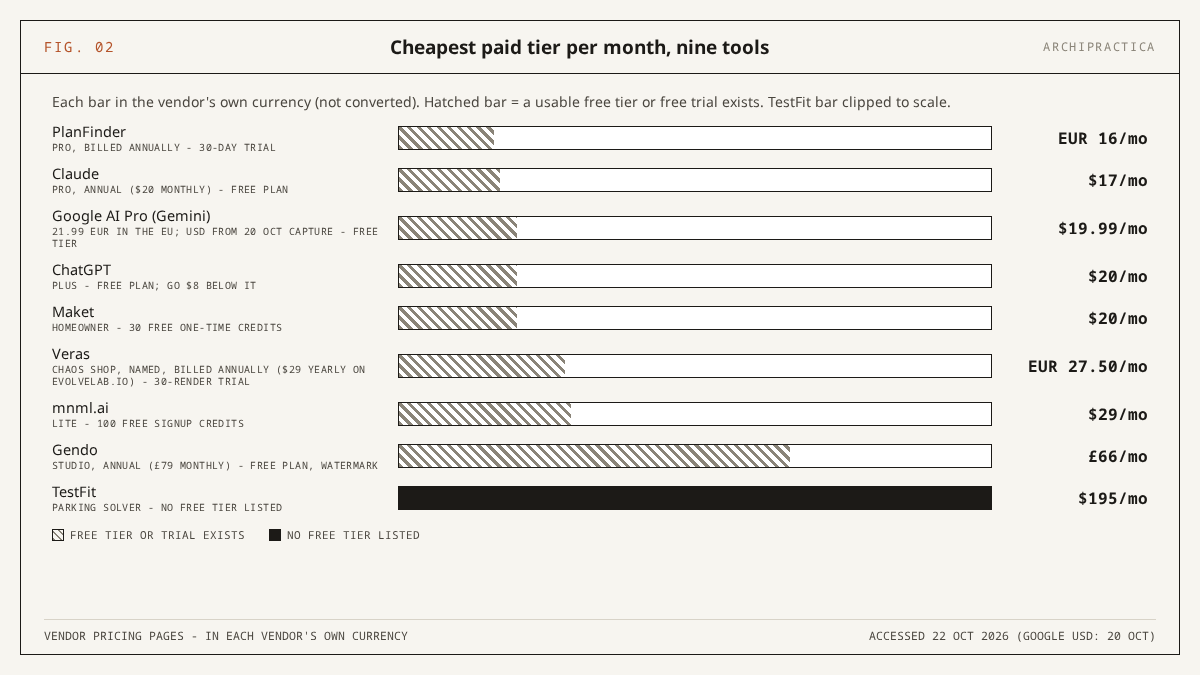
| Tool | Free tier or trial | Enough for |
|---|---|---|
| Claude | Free plan | The task 1 prompt on a real brief; minutes and bid text drafts |
| ChatGPT | Free plan | The same brief audit; ChatGPT Go at $8/mo sits between free and Plus (openai.com, 20 October 2026) |
| Gemini | Free tier | The same brief audit; Gemini 4 Argon is headlined for paid AI Pro and AI Ultra |
| Veras | 30 renders, 15-day trial | One concept-stage project rendered from your own model |
| mnml.ai | 100 signup credits, no card | A first look at the plugin on your own model |
| Gendo | Free plan: watermark, 1k export, 1 active canvas, 50 assets per canvas, history of 10 image sets | Internal mood images; the watermark rules out client boards |
| PlanFinder | 30-day trial with all plugins | One plan study inside Revit, Rhino, Archicad or Grasshopper |
| Maket | 30 one-time credits, 20 per floor | One generated floor to judge the output format |
| Gemini Notebook | Standard tier free with a Google account | Questioning your own policy PDFs and briefs |
Free tiers from vendor pricing pages and documentation, 22 October 2026. We did not run the GUI tools; the “enough for” column is our reading of the stated limits.
Start with the free tiers of the three text assistants, because that is the category where one run per task on our brief found accuracy tied and the choice comes down to discipline and price. For Gendo, the watermark and single canvas make the free plan a sketchbook. For Maket, 20 credits per floor against 30 free credits means one floor before you decide. On a zero budget, start with the assistant already open in your browser, pointed at a brief you have audited by hand.
How do you choose without wasting a month?
Pick one bottleneck task, trial the free tiers on it, and pay only after a free run has logged an hour saved. That sequence costs nothing and produces a dated note you can defend to a partner. The RIBA survey context below says most UK practices already use AI somewhere, most report productivity gains and few report better designs, so the bar for buying is time saved on a named task.
- Pick your bottleneck task. Name the one task that eats the most unbilled hours this month: brief audits, bid text, concept images, massing studies or policy lookups. One task, one category, one tool at a time. If the task is code compliance, the tool gives a first pass and the licensed professional still signs.
- Trial free tiers first. Every tool in the free table above has a no-cost route, and the three text assistants each have a free plan. Run the free tier on a real, already-finished piece of work so you can compare the output with what you delivered.
- For text work, use our transcript findings. Accuracy tied on our 22 October 2026 brief, in a single run per task per model; the differences were discipline and output hygiene, as the table above shows. Pick on discipline and price.
- For render and plans, shortlist by what runs inside your modeler. Veras lists SketchUp, Revit, Rhino, Archicad, Vectorworks and Forma; mnml.ai lists SketchUp, Revit, Rhino and Grasshopper; PlanFinder lists Revit, Rhino, Archicad and Grasshopper.
- Book the paid tier only after the free run logs an hour saved. Log the minutes on the trial task against your hand-done version. If the saving is under an hour on the first real use, the subscription waits; prices and sales channels shift, as the two Veras price lists show, so re-read the pricing page on the day you pay.
Per the RIBA AI Report 2026 (published 22 July 2026; survey March-April 2026, over 1,100 respondents, practices as the unit, “at least some projects” as the threshold), 74% of UK practices use AI on at least some projects in 2026, up from 59% in 2025. Among AI users, 73% report improved productivity (RIBA’s news release gives 75%; we use the report’s figure), while only 17% agree their designs are better because of AI. Our comparison of seven surveys on how architects use AI reads those figures against six other surveys. The surveys measured time saved, so measure time saved in your own trial.
FAQ
What is the best AI tool for architects overall?
There is no overall winner, and any page that names one without a dated test has not shown you its evidence. The best AI tools for architects split by task: on our 22 October 2026 brief test Claude, ChatGPT and Gemini tied on accuracy and differed on discipline; for renders, Veras and mnml.ai run inside common modelers per their documentation; for floor plans in a small studio, PlanFinder is the lowest-priced option we found.
Can AI tools check building codes?
Only as a first pass. The tools cite superseded sections and default to the wrong jurisdiction unless told which one applies, so a licensed professional checks every clause against the code edition in force where the project sits. In our 18 October 2026 test, Claude mis-cited an IBC section by edition. Our guide to AI building code checks lists the failure modes.
How much do the best AI tools for architects cost?
For the text assistants, per the vendors’ pricing pages on 22 October 2026: Claude Pro $17 a month billed annually or $20 monthly, ChatGPT Plus $20, Google AI Pro 21.99 EUR ($19.99 per our 20 October 2026 capture). Render tools start at EUR 27.50 (Veras, Chaos shop), $29 (mnml.ai Lite) and £66 (Gendo Studio, annual); plan tools at EUR 16 (PlanFinder), $20 (Maket) and $195 (TestFit Parking Solver); Autodesk Forma from $59.
Did you test every tool yourself?
No. Of the best AI tools for architects on this page, we tested only the three text assistants, on 22 October 2026: two tasks on one brief we wrote, run programmatically from a command-line client, one run per task per model. Veras, mnml.ai, Gendo, PlanFinder, Maket, TestFit, Autodesk Forma and Gemini Notebook we read from vendor documentation and pricing pages on the same day; we created no accounts and ran none of them.
Which survey says how many architects use AI?
The RIBA AI Report 2026 (published 22 July 2026): 74% of UK practices use AI on at least some projects in 2026, up from 59% in 2025, from a March-April 2026 survey of over 1,100 respondents with practices as the unit. Among AI users, 73% report improved productivity, and 17% of respondents agree their designs are better because of AI.
Sources
- Anthropic - Claude pricing (accessed 22 October 2026)
- OpenAI Help Center - What is ChatGPT Plus? (accessed 22 October 2026)
- OpenAI Help Center - What is ChatGPT Pro? (accessed 22 October 2026)
- Google One - Google AI plans (USD prices from our capture of 20 October 2026)
- Google Gemini - Subscriptions (accessed 22 October 2026, served in German with EUR prices)
- Chaos - EvolveLAB shop (Veras licenses) (accessed 22 October 2026)
- EvolveLAB - Veras (accessed 22 October 2026)
- mnml.ai - Pricing (accessed 22 October 2026)
- Gendo - Pricing (accessed 22 October 2026)
- PlanFinder - Home and pricing (accessed 22 October 2026)
- Maket - Pricing (accessed 22 October 2026)
- Maket - How AI helps in building design (blog) (published 10 March 2026)
- TestFit - Pricing (accessed 22 October 2026)
- Autodesk - Forma overview (accessed 22 October 2026)
- Google Support - Gemini Notebook (NotebookLM) plans and limits (accessed 22 October 2026)
- Google Support - Learn about Gemini Notebook (accessed 28 October 2026)
- RIBA - Artificial Intelligence Report 2026 (PDF) (published 22 July 2026, survey March-April 2026)
- RIBA - AI adoption reaches tipping point across UK architecture (news release) (22 July 2026)
When one of these prices moves, the newsletter carries the re-check along with one workflow we have run ourselves that week. Subscribe.