P–02Prompts
30 ChatGPT Prompts for Architects, Tested by Use Case
On this page
- How we tested these 30 prompts
- How do you make these prompts work on your project?
- Pre-design and proposal prompts (1-5)
- Concept and schematic design prompts (6-10)
- Design development and coordination prompts (11-15)
- Documentation and specification prompts (16-20)
- Construction administration prompts (21-25)
- Practice management prompts (26-30)
- Which ChatGPT plan do these prompts need?
- What can you do on the free plan?
- Where does this library break?
- FAQ
- What to run first
- Sources
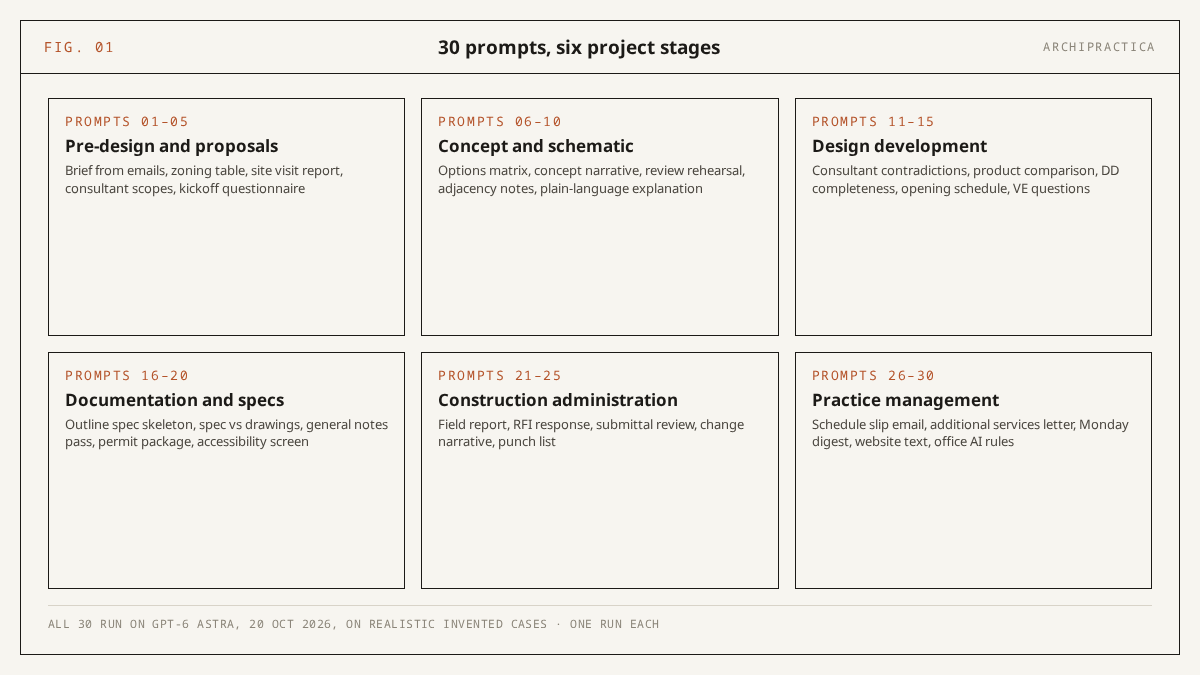
Here are 30 ChatGPT prompts for architects, organized by six project stages from pre-design to practice management. We ran every one on GPT-6 Astra on 20 October 2026 before including it in this library. Copy the prompt for the task on your desk, swap the [bracketed] placeholders for your project’s facts, and treat anything touching codes, products or contract language as a draft that a licensed professional verifies.
Most lists of ChatGPT prompts for architects give no sign that their prompts have been tested - no model named, no date, no output described. Each prompt below has a transcript behind it, produced on a fictional project with facts we controlled, and several of those projects contained errors we planted so we could see whether the model caught them or papered over them. The note under each prompt reports what came back, including the points where a human still had to finish the job.
How we tested these 30 prompts
We ran all 30 prompts on GPT-6 Astra on 20 October 2026, programmatically from a command-line client, once each, on invented cases built to look like real jobs: fictional projects and documents, several with errors we planted in advance. Astra sits behind ChatGPT’s Pro reasoning option, so results in the chat app on other plans can differ. Single runs on invented material provide a practical test rather than a benchmark.
A brief with a bedroom count that changes between two emails, a structural report that disagrees with the architect’s notes on slab thickness, an accessibility description with a grab bar that is too short: each planted error let us check a specific behavior rather than admire fluent prose. Where a prompt asks the model to find contradictions, we knew how many there were before we read the output.
We chose Astra because it is the tier we already had a baseline for. In our 12-task Claude vs ChatGPT test on 18 October 2026, Astra followed instruction limits precisely and produced citations we could verify, which made it the natural model for a library built on “quote verbatim” and “mark gaps” instructions.
According to OpenAI’s Help Center (GPT-6 models page, retrieved 20 October 2026), Astra powers the GPT-6 Pro option on the Pro, Business and Enterprise plans; Plus accounts get it only inside ChatGPT Work and Codex. If you run these prompts on Free, Go or Plus, the chat model is GPT-6 Luna or GPT-6 Sol. The notes below describe Astra’s behavior; yours may differ.
What a pass meant: the output did what the prompt said, followed its constraints (quotes verbatim, gaps marked, no invented numbers), and caught the planted errors where there were any. We read every transcript in full. A prompt that produced a beautiful document while missing a planted contradiction would have been rewritten or dropped; none had to be - all 30 cleared that bar on their only run, and no prompt here is a rewrite of an earlier failed version. If that reads as suspiciously clean, the fair caveat is that our planted errors may have been catchable ones; one behavior worth knowing about anyway is described under prompt 13.
How do you make these prompts work on your project?
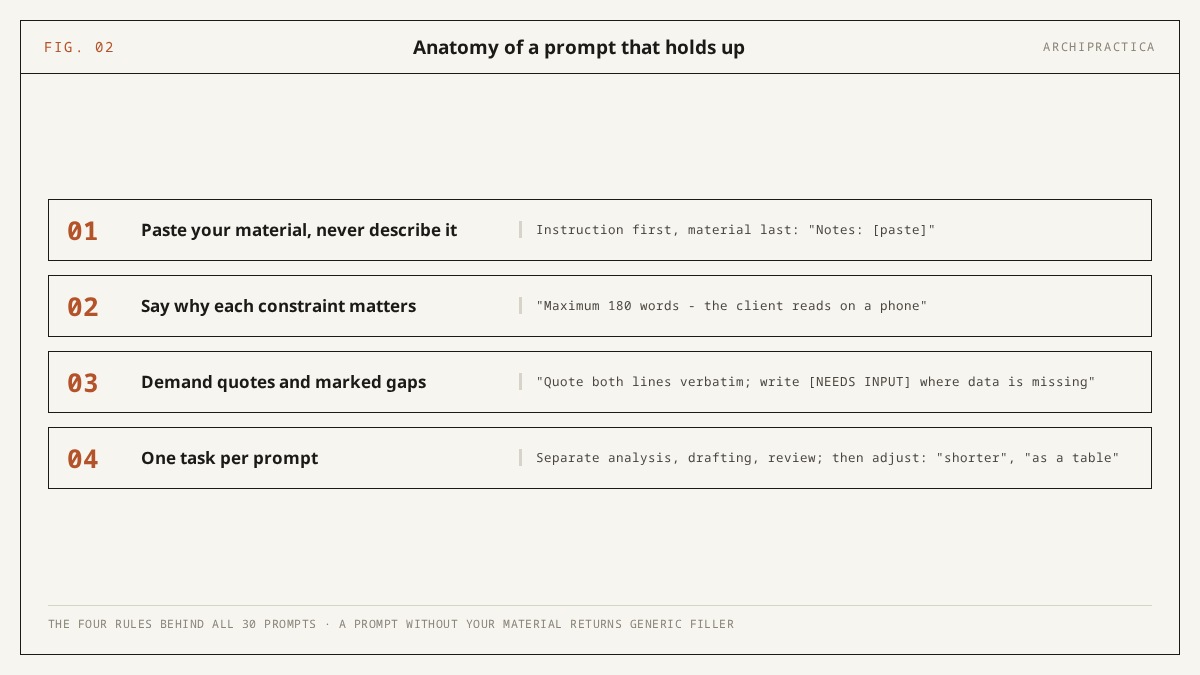
Paste your material instead of describing it, say why each constraint matters, demand verbatim quotes and marked gaps, and keep one task per prompt. Those four rules are built into all 30 prompts below. Strip them out and the same prompt returns the generic filler that comes back whenever the model has nothing of yours to work with.
The rules, ranked by how often skipping them caused problems when testing these ChatGPT prompts for architects:
- Paste, do not describe. “My client wants a bigger kitchen” produces a paragraph anyone could have written. The three client emails that mention the kitchen, pasted whole, produce a brief that quotes the client’s own words and catches the email where the kitchen grew by two meters. OpenAI’s own prompt engineering guide (retrieved 20 October 2026) recommends including relevant context in the prompt to constrain the model to the resources you supply.
- Say why each constraint matters. “Maximum 250 words” is a rule; “maximum 250 words because the client reads this on a phone between site visits” is a rule the model can apply with judgment when it has to cut. The prompts below explain their constraints where doing so changes the output.
- Demand verbatim quotes and marked gaps. Every prompt that checks one document against another says “quote both sides verbatim”, and every prompt that fills a template says “[NEEDS INPUT] rather than assuming”. The quotes let you verify the output in seconds; the marked gaps keep the model from filling them with typical conditions for your region, which is how an invented setback ends up in a drawing.
- One task per prompt. The adjacency prompt does adjacencies; the plain-language prompt does translation. In our 18 October comparison runs, asking for both in one prompt produced a weaker version of each. OpenAI’s guide likewise recommends decomposing a complex request into sub-tasks.
This does not work for tasks whose material you cannot paste. If the information lives in a model file, a set of PDFs you cannot share, or a conversation you did not write down, the prompt has nothing to quote and will revert to generalities. Dictate the facts first, then run the prompt on the dictation. And where the material is confidential, read the ground-rules memo in prompt 30 before pasting anything.
Pre-design and proposal prompts (1-5)
These five prompts cover the paperwork that starts a job: the brief assembled from scattered emails, a first look at zoning parameters against pasted ordinance text, site notes turned into a report, consultant scope questions and a client kickoff questionnaire. In the test runs, the two prompts with planted contradictions (1 and 2) caught every one. The zoning prompt organizes your review; the review is still yours.
1. Pre-design brief from scattered emails. Fed a fictional set of client emails with two planted contradictions (three bedrooms in one message, four in another, and a “skylight we discussed” that no email had discussed), the run caught both, quoted both lines each time, and ranked the bedroom count and the budget ambiguity as the first two open questions.
I am an architect starting [project type] for [client type]. Below are my raw
notes and excerpts from client emails, separated by ---. Build a structured
pre-design brief under these headings: Project goals / Spaces and requirements /
Budget and schedule signals / Site facts stated / Constraints stated /
Contradictions between sources, quoting both lines / Decisions the client
assumes are made but never confirmed / Open questions, ranked by rework risk.
Use only what appears in my material; where something is implied but not
stated, put it under Open questions. Write [NEEDS INPUT] where a heading has
nothing. Material: ---[paste]---
2. Zoning parameter table from pasted ordinance text. The run quoted each ordinance section verbatim with its number, marked a proposed 38 ft height against a 35 ft limit as “appears not to comply”, and for the rear setback, which the pasted text did not settle, wrote “cannot tell from the pasted text” instead of guessing a figure.
Below I paste sections of the zoning ordinance for my site, copied from the
adopted text, then my proposal's parameters. Build a table: requirement, the
ordinance line quoted verbatim with its section number, required value,
proposed value, and one of "appears to comply", "appears not to comply",
"cannot tell from the pasted text". Use only the pasted text - do not add
requirements from memory. This organizes my own review; it is not a code
check. Ordinance: [paste] Proposal: [paste]
3. Site visit notes into an observation report. Dictated notes with deliberately loose measurements came back with every number as spoken, and the loose ones (a curb cut “about 12 ft”, an unmeasured crack width, the cause of a wet patch) moved to the verify-with-survey list rather than being tidied into false precision.
Turn my phone-dictated site visit notes into a site observation report under:
Access and approach / Topography and drainage / Existing structures and
condition / Utilities observed / Neighboring context / Vegetation / Items to
verify with a survey or authority. Keep every measurement exactly as I
dictated it; where my notes are ambiguous, list the item under Items to
verify instead of resolving it. Do not infer typical conditions for this
region. Notes: [paste]
4. Consultant scope question list. This one produced the longest output of the 30: four tables, one per discipline, each pairing a question with why it matters, and it named the exclusion traps that hurt later, “meetings as needed” among them. No fee estimates appeared, as instructed.
I am assembling the consultant team for [project type, size]. For each
discipline I list below, produce the questions their fee proposal must
answer: scope boundaries, deliverables by phase, meetings and site visits
included, exclusions that usually hurt later, and information they will need
from me by [phase]. Format: one table per discipline, question / why it
matters. Do not estimate fees. Disciplines: [list]
5. Kickoff questionnaire for a specific client. The output contained twenty questions in the six requested groups, each phrased for someone who has never heard the word “soffit”, followed by the three to ask in person (with one line of reasoning each). The profile you put in the brackets does most of the work here; a vague profile yields a generic list.
Prepare a kickoff questionnaire for a [project type] client who is [client
profile]. 20 questions maximum, grouped: how they will use the spaces /
budget and its flexibility / schedule drivers / decision-making and approvals
/ taste and references / fears. Phrase every question for someone with no
construction vocabulary, one line each. End with the three questions I should
ask in person rather than in writing, with one line on why.
Professional liability. Prompt 2 organizes a review of ordinance text you pasted. It is a draft that a licensed professional verifies against the adopted code edition in the applicable jurisdiction. The failure modes are specific: if you leave the “use only the pasted text” line out, the model will supply setbacks and height limits from memory, sometimes with section numbers that do not exist in your ordinance, sometimes from a superseded edition, sometimes from a different jurisdiction’s default. The “cannot tell from the pasted text” result is the honest one. Treat it as an instruction to go read the section.
Concept and schematic design prompts (6-10)
Most prompt lists drift into mood-board language at concept stage. These five focus on written tasks: an options matrix built from your own descriptions, a concept narrative that keeps your reasoning, a rehearsal for a hostile review, adjacency notes from a space program, and a plain-language version of the scheme for the client. In the test runs, none of them added a design idea you did not give.
6. Design options comparison matrix. Given three fictional options with uneven detail, the run built the table from stated facts only, wrote “not stated” where an option’s description was silent on structure or cost, and closed with the client decisions as numbered questions. Padding one option with advantages the description did not contain would have been the easy failure; it did not happen.
I will present [N] design options for the same program. From my descriptions
below, build a comparison table: how each option answers the program, site
response, structural implications I stated, relative cost drivers I stated,
and risks or unknowns. Use only what I wrote - no invented advantages. After
the table, list the decisions the client must make to choose, as numbered
questions. Options: [paste]
7. Concept narrative from design moves. Four moves with four reasons went in; about 350 words came back with all four reasons intact and in their original cause-and-effect order, and with no sustainability or community claim that the moves had not made. For the longer workflow around this prompt, see brief to concept narrative.
Turn my design moves into a concept narrative of about [350] words for
[audience]. I list each move with its reason. Keep my reasoning exactly - do
not add sustainability, wellbeing or community claims I did not make, and do
not reorder cause and effect. Plain professional prose, no marketing
adjectives. Moves: 1. [move] because [reason] 2. ...
8. Skeptical review rehearsal. The scheme summary we supplied had two planted weaknesses: no soil report and an unresolved unit mix. The eight questions came back ordered from most to least damaging, and those two gaps were questions one and two, each clearly naming the material needed to resolve it.
Act as a skeptical design jury reviewing my scheme the day before the real
review. From my summary below, write the eight hardest questions I will
face, ordered from most to least damaging, each with one line naming the
weakness behind it. Then pick the two questions I currently cannot answer
from my own summary and say what material would close each. Do not soften
the questions. Scheme: [paste]
9. Adjacency notes from a space program. The adjacency-strength table quoted the program line supporting every pairing. On the third task, conflicts that cannot all hold on one floor, the run reported that the program text did not prove any, which was correct for our fictional program; a model eager to please would have invented one. On a real program, a “no conflicts found” result tells you what the text proves; you still need to review the plan itself for subtler conflicts.
From the space program below, produce: 1) a table of required adjacencies -
space pair, strength (must touch / near / no relation / keep apart), and the
reason from the program text; 2) spaces whose placement the program leaves
undecided, as questions for the client; 3) conflicts where the program's
stated adjacencies cannot all hold on one floor, if any, quoting the
conflicting lines. Use only the program text. Program: [paste]
10. Plain-language scheme explanation for the client. Every dimension survived the translation unchanged - the 24 ft public bar, the 10 ft glazed spine and the 28 ft clear span among them - and each jargon term appeared once in parentheses after its plain equivalent. The open items came with the point in the schedule when each gets decided, and the 300-word cap held at 278 words.
Rewrite my technical scheme description for the client, who has no
construction background. Keep every number and dimension unchanged. Replace
jargon with plain equivalents, keeping the technical term in parentheses at
first use. Order: what they will see arriving, how the main spaces work day
to day, what is decided, what is still open and when each open item gets
decided. Maximum [300] words. Description: [paste]
Where these do not work. Prompts 6 to 10 operate on your descriptions, so the matrix, narrative and adjacency table inherit every omission in them. In the prompt 6 run, an option whose description was silent on structure got “not stated” in the table; a reader who skims sees a blank where a risk sits. The adjacency prompt found no conflicts in our program because the text held none, and it will also find none in a program whose conflicts live in the drawings rather than the text. The plain-language rewrite keeps numbers but not emphasis, so a dimension the client should worry about reads the same as one they should not.
Design development and coordination prompts (11-15)
Design development is coordination, and coordination is finding where two documents disagree. Three of these five prompts are contradiction finders (notes against a structural report, two product data sheets, a DD sheet list against expectations), one builds a schedule skeleton from markups, and one turns a contractor’s value-engineering list into questions. The planted errors here were the hardest to catch: a slab depth differing by two inches, a beam designation by one size number.
11. Architectural notes vs consultant report contradictions. The run on our pair of documents with planted errors caught all three contradictions: the 6 vs 8 in. slab, the W10 vs W12x26 beams, the hung stair that the report had on posts. The canopy, which the two documents described differently but compatibly, was correctly left alone. The whole output was under a thousand characters. A contradiction list should be that short.
Below are my architectural notes and the structural engineer's report for
the same project, separated by ===. List only the contradictions between
them: element, what my notes say, what the report says, and severity (stops
coordination / needs a call / minor). Quote both sides verbatim. Do not
propose engineering solutions, and do not flag items that merely appear in
one document and not the other unless they conflict. My notes: [paste] ===
Report: [paste]
12. Product data sheet comparison scaffold. Two fictional sheets, one reporting under ASTM methods and one under EN, produced a table with every standards mismatch flagged on its own row, no attempt to convert between them, and “not stated” where one sheet omitted the warranty. The prompt is only as good as the criteria list you fill in; leave it empty and the model picks its own.
I paste two product data sheets for [product type], separated by ===. Build
a comparison table using only values that appear on the sheets: criterion,
product A, product B, and "not stated" where a sheet is silent. Criteria:
[list]. Flag any criterion where the two sheets report values under
different test standards, and do not convert between standards. Sheet A:
[paste] === Sheet B: [paste]
13. DD issue completeness screen. The run found the missing sheets we had removed (two of four elevations, the level 2 reflected ceiling plan), flagged hardware sets and handrail fabrication details as construction-document scope arriving early, and marked every item “confirm against contract”. It also added a web citation to aia.org that we had not asked for. Astra added unprompted citations in four of the 30 runs (prompts 4, 13, 15 and 30); verify them like everything else, and do not assume a cited page says what the model implies.
Here is the sheet list of my design development issue for a [project type].
Against the deliverables an architect would normally include at DD for this
building type, list: sheets or content that seem missing, sheets that look
like construction-document scope arriving too early, and the consultant
drawings I should confirm are coming. Format as three lists, one line each
with the reason. My office standard and the contract govern - mark every
item "confirm against contract". Sheet list: [paste]
14. Opening schedule skeleton from markups. The table consistently used [NEEDS INPUT], with no fire rating or hardware group invented for cells the markups did not support. Below the table it listed the openings the notes implied without describing: a break room with no door, restroom doors, and a question about whether office 103 has a window.
Build a door and window schedule skeleton from my markup notes below.
Columns: mark, location, nominal size, type, material, fire or acoustic
rating, hardware group, remarks. Fill only cells my notes support; write
[NEEDS INPUT] in every other cell rather than assuming. After the table,
list openings my notes imply but never describe (a room with no door listed,
a habitable room with no window). Notes: [paste]
15. Value-engineering impact questions. Five fictional VE items each turned into a block of review questions: the U-factor after a glazing swap, the roof warranty after a membrane change, thermal bridging at a revised parapet, the code items to re-verify. No item was accepted or rejected and no savings figure appeared. The output is long by design: it is a checklist for your review.
The contractor proposed the value-engineering items below. For each, list
what it would change beyond cost: performance, durability, appearance,
code-sensitive aspects to re-verify, and knock-on effects on other trades -
each phrased as a question for my review, not a verdict. Do not accept or
reject any item and do not invent savings figures. Items: [paste]
Where these do not work. Prompts 11, 12 and 17 find contradictions between the two things you pasted and nothing else. A slab depth that appears on the structural drawings but not in the report you pasted is invisible to prompt 11; the run caught 6 vs 8 in. because both numbers were in the paste. The sheet-list screen in prompt 13 compares against what an architect would normally include, which is the model’s generalization and not your contract - that is why every item carries “confirm against contract”. And the VE prompt returns questions rather than answers; on a long VE list expect several pages, all of which are yours to read.
Documentation and specification prompts (16-20)
An invented standard number does its worst damage in documentation, so four of these five refuse to supply references from memory and the fifth (the permit letter) makes no compliance claim at all. The set covers an outline spec skeleton, spec-versus-drawing contradictions, a general-notes cleanup, a permit cover letter with transmittal, and an accessibility screen against pasted standard text.
16. Outline spec section skeleton with VERIFY slots. Run on Section 07 42 13, metal wall panels for a one-story clinic, it returned the three-part structure as questions under each heading with nine [VERIFY] slots where a standard, test value or code reference belongs, and no ASTM or EN number anywhere in Parts 2 or 3. For how this fits a full specification workflow, see how to write specifications with AI.
Draft an outline specification skeleton for [section]. Structure only:
Part 1 General (submittals, quality assurance, warranties), Part 2 Products
(materials, components, finishes), Part 3 Execution (preparation,
installation, tolerances, protection) - as headings with the questions I
must answer under each. Write [VERIFY] wherever a standard, test value or
code reference belongs; do not supply the reference from memory. One page
maximum.
17. Spec section vs drawing notes contradictions. We planted four contradictions (window material and color, door material, hardware finish, a Level 5 finish called out at G1 in one document and not the other); the run caught all four and quoted both sides. A shim-space note that matched between the two documents was correctly not flagged.
Below are excerpts from my specification section and the notes on my
drawings for the same scope, separated by ===. Find only direct
contradictions: element, what the spec says, what the drawing note says,
quoted verbatim. Classify each: blocks pricing / causes an RFI / cosmetic.
Ignore wording differences that do not change the requirement. Do not
propose which side is right. Spec: [paste] === Drawing notes: [paste]
18. General notes duplicate and conflict pass. Two duplicate pairs (notes 1 and 4, notes 3 and 10) were merged using suggested wording; two contradictions (a stud-versus-finish datum, the scope of Type X board) were quoted and left for decision; a third list named the notes that belong in the specification. Every finding was numbered, so the output works as a markup list.
Here are the general notes collected from my drawing set. Find: duplicate
notes saying the same thing in different words (quote both), notes that
contradict each other (quote both), and notes that belong in the
specification rather than on drawings. Suggest a merged wording only for
exact duplicates; leave contradictions for my decision. Number every
finding. Notes: [paste]
19. Permit cover letter and transmittal. The letter stayed factual and short, the transmittal listed each document with date and sheet count, and the two checklist items we had left out (an asbestos survey and structural calculations) were flagged “to follow” and “not applicable” respectively, matching the facts we gave. The letter made no compliance claim beyond “submitted for review”.
Draft a permit submission cover letter and document transmittal from the
facts below: project, address, scope summary, the authority's checklist
items I paste, and which documents I am including. The letter is factual and
brief - no persuasion, no compliance claims beyond "submitted for review".
The transmittal lists each document with title, date and sheet count, and
flags checklist items I have not included as "to follow". Facts: [paste]
Authority checklist: [paste] My documents: [paste]
20. Accessibility screen from pasted standard text. The run caught both planted shortfalls: a 14 in. latch-side maneuvering clearance against a quoted 18 in., and a 36 in. grab bar against a quoted 42 in. It added a caveat that clear width depends on the measurement method. Door hardware came back “not covered by the pasted text” because we had not pasted that section, which is the result the prompt is built to give.
I paste sections of the accessibility standard adopted in my jurisdiction,
then describe my design. Produce a screening list: requirement with its
section number quoted, what my description says, and "appears to meet",
"appears short", or "not covered by the pasted text". Use only the pasted
sections - no requirements from memory. This prepares my own verification;
the governing check happens on the adopted edition with my code consultant.
Standard: [paste] Design: [paste]
Professional liability. Prompts 16 and 20 produce drafts that a licensed professional verifies against the adopted code edition in the applicable jurisdiction. In specifications, the characteristic failure is a plausible standard designation with the wrong year or the wrong part number, which reads as correct to anyone who has not opened the standard that week; the [VERIFY] slots exist so that nobody has to spot it by eye. In accessibility screening, the failure is a requirement imported from a different standard than the one your jurisdiction adopted, or from an edition it has since replaced. “Not covered by the pasted text” means you have not pasted it yet, nothing more.
Construction administration prompts (21-25)
In construction administration a contractor can rely on a document you issue, so these five prompts keep the architect’s wording, cite pasted sources for every statement and end with what you must verify before issuing. They cover field reports, RFI responses, submittal review notes, change narratives for the client and punch lists. The planted date errors in prompt 21 were the ones we most expected the model to fix silently; it flagged them instead.
21. Field report from dictated notes. The notes said “visit today Monday October 19” on a run made on Tuesday 20 October, and called an email “last Friday the 17th” when 17 October 2026 was a Saturday; the run flagged both under inconsistencies rather than correcting either, and put the visit date itself at [NEEDS INPUT] pending confirmation. Directives arrived as imperative sentences a contractor can act on.
Turn my dictated notes from today's site visit into a field report: project,
date, weather, work observed by trade, deficiencies observed, directives
given (imperative sentences a contractor can act on), information requested,
next visit. Keep my wording for deficiencies, cleaned only for clarity. Mark
gaps [NEEDS INPUT] instead of inventing. Flag any internal inconsistency in
my notes - dates, counts, names - rather than resolving it silently. Notes:
[paste]
22. RFI response draft from pasted documents. A fictional RFI about a flashing detail went in with three project documents, one of which had a blank gauge field. The run answered from the pasted documents only, named the document and sheet for each statement, identified the blank gauge field as missing information instead of filling it, and closed with the items to verify before issuing.
Draft a response to the RFI below using only the project documents I paste
with it. Structure: restate the question in one line; answer it citing each
document by name, sheet or section for every statement; if the pasted
documents do not fully answer it, say exactly what is missing instead of
filling the gap. Neutral wording, no fault assignment. I will review and
sign - note at the end what I must verify before issuing. RFI: [paste]
Documents: [paste]
23. Submittal review notes vs spec section. Against a resilient flooring spec, the run caught a wear layer of 0.5 mm where the spec required 0.7 mm and a flash cove base the submittal excluded, listed the omissions (slip resistance data, the F2170 moisture test) as clarification questions, and left the stamp decision explicitly to you.
Compare the submittal below against the specification section I paste.
Return: items that match the spec (reference both), deviations (quote both
sides, classify: substitution request / error / clarification needed), and
items the submittal omits that the spec requires. Phrase every deviation as
a question for my review action - the review stamp decision is mine.
Submittal: [paste] Spec section: [paste]
24. Change narrative for the client. The output opened with the change and its effect in two sentences, kept every figure as given ($18,400, 9 days, CO-03) and held a neutral tone with none of the minimizing words the prompt bans. It was brief, as a client reading about a change order would want.
Write a change narrative for my client from the facts below: what changed,
why, cost and schedule effect as I state them, and what happens next. Open
with the change and its effect in two sentences, then the background.
Neutral tone - no blame, no apology spiral, no minimizing words like "just"
or "small". Keep every figure exactly as I give it. Maximum [250] words.
Facts: [paste]
25. Punch list organizer from walkthrough notes. The list grouped numbered items by room and then by trade, keeping the deficiency wording as dictated. One vague note about “nosings” was marked [CLARIFY] for re-walking, and the count by trade closed the list. Fast walkthrough dictation is the natural input; the prompt tolerates fragments.
Organize my walkthrough notes into a punch list: items grouped by room, then
by trade within each room; each item gets a number, location, deficiency in
one line, and a reference to spec section or drawing if my notes include
one. Keep my deficiency wording. Mark entries too vague to assign [CLARIFY]
- I will re-walk those. End with a count by trade. Notes: [paste]
Professional liability. Field reports, RFI responses and submittal review notes carry contractual weight once issued; the drafts from prompts 21 to 23 are reviewed and signed by the licensed professional of record, and the review stamp decision in prompt 23 is never delegated. The failure modes here are quieter than invented code sections: a directive the model sharpened into a stronger instruction than you dictated, a “matches the spec” line based on a paragraph you did not paste, or an RFI answer that reads as complete because the gap was in a document you forgot to include. Read the “verify before issuing” list at the end of each output as part of the output.
Practice management prompts (26-30)
Many architects first use ChatGPT in practice management, usually for an email they are dreading. These five cover the schedule-slip email, the additional services letter, a Monday digest of last week’s notes, a website project description in your studio’s voice, and the ground-rules memo for using chat assistants in the office. Every run kept the figures, dates and clause text exactly as given.
26. Schedule slip email to the client. On the test run the email opened with the revised plan and the new date, explained the cause in two plain sentences without blaming the consultant we had made responsible, and closed with the next step and its date in under 180 words. The prompt leaves personalization to you, and the email needs it; the test output was correct but slightly impersonal.
Write an email to my client about a schedule slip. Facts: [what slipped, how
long, why, what continues in parallel, new date]. Open with the revised plan
and new date - not with the problem. Explain the cause in two plain
sentences without blaming anyone. Close with the next concrete step and its
date. Professional, warm, no filler apologies, maximum [180] words. I will
personalize before sending.
27. Additional services letter. Fed an original scope summary, three dated change requests (June, August, October) and a fictional Clause 7.2 on additional services, the run quoted the clause exactly once, mapped each change against the original scope, and ended with a request for written authorization before work proceeds. It stayed collaborative without softening the request.
Draft a letter to my client about additional services. I paste: the original
scope summary, the change requests to date with dates, and the agreement
clause on additional services, quoted verbatim. Structure: what the
agreement covers, what has changed, why the new work falls outside, and the
proposed path - written authorization before work proceeds. Collaborative
but firm; cite the clause exactly once. Maximum [350] words. Facts: [paste]
28. Monday portfolio status digest. Scattered notes across four fictional projects came back ordered by how much attention each needed, with decisions waiting and who was waiting for them. Three notes we had deliberately written without enough context to assign to a project (a mention of Kemp’s lawyer, “the schedule thing from Tom”, a set of dates for Priya) were placed under “review by hand” instead of being assigned to a project by guesswork.
Turn my scattered notes from last week into a Monday project digest. For
each project: status in one line, decisions waiting on me (and who is
waiting), deadlines in the next two weeks, and anything that reads urgent.
Order projects by how much attention they need today. Put notes you cannot
place under "review by hand" instead of guessing. Notes: [paste]
29. Website project description in the studio voice. The description copied the sample’s observable traits - short declarative openings (“An office in a former machine shop”), materials named plainly, no first person for the client - and landed at 164 words inside the 150 to 220 band, with no client name and no superlative the facts did not support. The voice sample does the heavy lifting; without one, the output drifts toward the house style of every architecture website.
Write a project description for my studio's website from the facts I paste:
type, size, location in general terms, design approach, key decisions,
materials. Match the voice of the sample description I include. 150 to 220
words. No superlatives the facts do not support, no client name unless I
marked it approved. Facts: [paste] Voice sample: [paste]
30. Office chat-assistant ground rules memo. The memo fit on one page, named the “Improve the model for everyone” toggle as the setting to change before first use, and remained a draft pending review by the insurer and counsel. For the policy that sits behind a memo like this, see architecture firm AI policy.
Draft a one-page memo of ground rules for using chat assistants in an
architecture office of [size]. Cover: material that never gets pasted
(client identifying data, anything under NDA, unpublished financials);
account settings to change before first use, naming the model-training
toggle; the rule that anything touching codes, products or contract language
is a draft a licensed professional verifies; and who in the office answers
questions. Plain language. I will align it with our insurer and counsel
before issuing.
Where these do not work. The letters in 26 and 27 come out correct and impersonal on the first run; the schedule-slip email in particular read like a well-run office’s template and needs the sentence only you can write. The additional services letter quotes your clause but does not know whether the clause is enforceable, and it will draft a confident letter on the wrong clause if you paste the wrong one. The digest in 28 can only sort notes you wrote down. And the ground-rules memo names the consumer-plan toggle; on a Business or Enterprise account the setting is managed elsewhere, and the memo’s own last line keeps it a draft until insurer and counsel have read it.
Which ChatGPT plan do these prompts need?
Any plan runs all 30 ChatGPT prompts for architects as text tasks; what changes with the plan is the model answering, how much you can upload, and whether you see ads. We tested on GPT-6 Astra, which powers the GPT-6 Pro option in the chat app on Pro, Business and Enterprise. Plus answers with GPT-6 Sol, Free and Go with GPT-6 Luna, so the behavior reported above is the top tier’s.
| Criterion | Free | Go | Plus | Pro |
|---|---|---|---|---|
| Price | $0 | $8 USD/month (US price, localized in some markets) | $20 USD/month | From $100/month; tiers at $100, $200 and $500 |
| Chat model | GPT-6 Luna | GPT-6 Luna | GPT-6 Sol (Astra only inside ChatGPT Work and Codex) | GPT-6 Sol, plus GPT-6 Pro powered by Astra; Pro 500 adds Astra Ultrafast in ChatGPT Work and Codex |
| Long documents | File uploads limited | 10x Free’s uploads and messages | No numeric upload limit stated in the sources we checked | No numeric upload limit stated in the sources we checked |
| Ads | Yes, in markets where ads have rolled out | Yes, in markets where ads have rolled out | Ad-free | Ad-free |
| Best for | Trying the 30 prompts as text tasks | Daily use with more uploads on a small budget | Daily document work on GPT-6 Sol | Running the library on the model we tested |
Tested: 20 October 2026, versions: GPT-6 Astra on all 30 prompts (run programmatically from a command-line client). The plan table is a feature comparison from OpenAI’s documentation, 20 October 2026, not our own plan-by-plan test.
Two dates matter if you are comparing this library with older ones. GPT-6 began rolling out in ChatGPT on 7 October 2026 for Plus, Pro, Business and Enterprise and reached Free and Go from 8 October per OpenAI’s release notes, and the Help Center’s GPT-6 models page says it may not be available for every account yet. GPT-5.5 was retired from ChatGPT, ChatGPT Work and Codex on 14 October 2026, so any prompt list that reports GPT-5.5 results describes a model you can no longer select in the app.
The table says nothing about whether Luna or Sol would have caught the planted errors that Astra caught. We have not run this library on those models. If you are on Plus and a contradiction-finding prompt returns fewer findings than you expected, the model is one plausible cause, and running the same paste a second time is the cheapest check.
What can you do on the free plan?
All 30 prompts are text tasks, and the Free plan runs every one of them on GPT-6 Luna, a lighter model than Sol and Astra on paid plans. OpenAI’s release notes describe Free as unlimited text chats with the Think button, subject to abuse guardrails, with limits still applying to file uploads, images and other tools. For this library that means pasting text works without a ceiling you will hit in normal use.
Free gives up uploads, which matter if your material lives in PDFs you would rather attach than paste. Go, at $8 USD per month in the US, offers 10x Free’s messages, uploads and image creation per OpenAI’s Go announcement of 16 January 2026. Ads also appear on Free and Go: OpenAI announced a US test on 9 February 2026, extended it to Australia, New Zealand and Canada on 16 April 2026, to the UK in June 2026, and to 31 European markets in August 2026. Plus, Pro, Business, Enterprise and Education are ad-free.
Before you paste anything about a client on any consumer plan, open Settings, go to Data controls and turn off “Improve the model for everyone”. OpenAI’s data controls page (retrieved 20 October 2026) says that with the toggle off, new conversations are not used to train its models. Business plans handle this differently, so if your office is on one, check with whoever administers it. Prompt 30 writes the memo that tells the rest of the office the same thing.
The Free plan’s limit that no setting fixes is the model itself. We cannot tell you from our runs how Luna handles a contradiction pass with three planted errors, because our transcripts are Astra’s. Run prompt 11 on a pair of documents where you already know the contradictions, and you will have your own answer in five minutes.
Where does this library break?
Three things break it: missing material, skipped verification, and a single test run mistaken for a guarantee. Each prompt ran once, on an invented case, on one model tier, on one day; a different paste on a different plan can behave differently. Fluent output is the easiest thing for these models to produce, and a tired reader rarely doubts it.
The first failure mode is the empty paste. A prompt that says “use only the pasted text” with nothing substantial pasted returns the model’s general knowledge dressed in your headings, and the “quote verbatim” instruction gives it nothing to quote. In our experience the output then looks confident and reads like a template, which is the signal to stop and gather the material.
The second is unprompted additions. In the prompt 13 run, Astra added a web citation to aia.org that we had not asked for, and it did the same in three other runs (prompts 4, 15 and 30). A citation is a claim about what a page says, and it needs the same verification as a dimension. OpenAI’s release notes also say GPT-6 can begin answering while it continues to think or use tools, so an answer that starts before a lookup finishes is normal behavior for this model, and a reason to read to the end before copying anything.
The third is adoption running ahead of verification habits. RIBA’s 2026 AI report (2026) says the share of UK practices using AI for most projects rose from 59% in 2025 to 74% in 2026, with 75% reporting a productivity improvement and 17% agreeing their designs are better because of AI. Those are self-reported UK figures and they say nothing about error rates. They do say that most practices now run work through these tools, so the “[VERIFY]” and “[NEEDS INPUT]” discipline in these prompts is now a working professional habit.
The fourth is the single run. Thirty prompts, thirty transcripts, one each. That is enough to show that these ChatGPT prompts for architects produce the intended behavior on Astra once, and not enough to say they always will. If a prompt matters to a deliverable, run it twice on the same paste and compare; disagreement between the two runs is information, and the second run costs a few minutes. Our Claude prompt library carries the same single-run caveat for the ten of its fifty prompts that were run on Claude Sonnet 5.5.
FAQ
Five common questions about prompt libraries, each answered so you can read it without the rest of the article. Where the answer depends on a date or a plan, it says so, and where we have not tested something, it says that too.
Do these ChatGPT prompts for architects work in Claude or Gemini?
The wording transfers, because ChatGPT prompts for architects of this kind rely on pasted material and plain instructions rather than on any ChatGPT feature. We have not run these 30 in Claude or Gemini, so the test notes above apply to GPT-6 Astra only. For Claude, use our Claude prompt library, which was built separately for Claude, with ten of its fifty prompts run on Claude Sonnet 5.5; for Gemini, run a prompt on material where you already know the answer before trusting it.
Do they work on the free plan?
Yes, as text tasks. The Free plan runs unlimited text chats on GPT-6 Luna with limits on uploads, images and other tools, and every one of these ChatGPT prompts for architects is a paste-and-read task. The model is the difference: our transcripts come from GPT-6 Astra on the Pro tier, and we have not tested Luna on the planted-error cases. Turn off “Improve the model for everyone” in Data controls before pasting client material on any consumer plan.
Can ChatGPT check code compliance with these prompts?
No. Prompts 2 and 20 organize your own review of ordinance or standard text you paste, quoting the section you gave and comparing it with the parameters you gave; they add no requirements from memory and they say “cannot tell from the pasted text” when the paste is silent. The compliance check happens on the adopted edition, in the applicable jurisdiction, by a licensed professional. AI for building code checks explains the pasted-text discipline.
Is client data safe to paste?
On consumer plans, turn off “Improve the model for everyone” under Settings, then Data controls; OpenAI’s data controls page says new conversations are then not used to train its models. That setting does not make a paste appropriate under an NDA or a client confidentiality clause, so strip identifying details, or use the memo from prompt 30 to decide what never gets pasted. Business plans have their own data terms; ask your administrator.
Why GPT-6 Astra, and will results differ on my plan?
We used Astra because it is the tier for which we had already established a baseline in our 12-task comparison. GPT-6 rolled out in ChatGPT from 7 October 2026; Plus answers with GPT-6 Sol, Free and Go with GPT-6 Luna, and only Pro, Business and Enterprise get Astra in chat (Plus gets it in ChatGPT Work and Codex). Results on other tiers can differ; we did not test them.
What to run first
Take prompt 11 or 17 and a pair of documents you coordinated by hand last month, where you already know the contradictions. Paste them, count the findings against your own list, and read the quotes. Ten minutes, your own material, no trust required. If the count is short, you have learned something about your plan’s model. Then pick the prompt for the task on your desk today.
Sources
The primary sources behind every date, price and model name in this article, each with the date it was retrieved or published. The test transcripts are our own records from 20 October 2026; they are described in the testing section rather than linked here.
- OpenAI Help Center, GPT-6 and other models in ChatGPT, retrieved 20 October 2026.
- OpenAI Help Center, ChatGPT release notes, 7 October 2026 entry.
- OpenAI Help Center, Model release notes - GPT-5.5 retirement, 14 October 2026.
- OpenAI, Introducing ChatGPT Go, 16 January 2026.
- OpenAI, ChatGPT Ads expands across Europe, 18 August 2026.
- OpenAI, Prompt engineering guide, retrieved 20 October 2026.
- OpenAI Help Center, Data controls in ChatGPT, retrieved 20 October 2026.
- RIBA, AI adoption reaches tipping point across UK architecture, 2026, retrieved 20 October 2026.
When the models behind these 30 prompts change again, the re-test appears in the newsletter first - get the dated results by email.